PAM Explained: Vault • Discover • Approve • Record

Matt Miller
December 08, 2025
Lean IT teams don’t need a maze of security tooling; they need guardrails that deploy fast and are hard to bypass. Devolutions PAM delivers the four essentials—Vault, Discover, Approve, Record—and Remote Desktop Manager (RDM) plus Devolutions Gateway make them usable day-to-day. The result is Just-in-Time (JIT) elevation aligned with the Principle of Least Privilege (PoLP) and a clear path toward Zero Standing Privilege (ZSP).
Vault & rotate: Centralize passwords, change them after use
Put your privileged accounts in the PAM vault and launch sessions from RDM with credential injection, so admins can use the account without ever seeing the password. When the session ends, PAM can automatically rotate the password—either when credentials are checked in or on a set schedule. PAM also updates every place the account is referenced (services, scheduled tasks, connection entries) so nothing breaks.
Why it matters: No passwords to leak, a tiny reuse window, and because elevation is short-lived by design, you realign with PoLP after each session.
Discovery: Inventory and govern privileged accounts
Run discovery in the places elevated access actually lives—directories, servers, endpoints, databases, and cloud roles—and classify what you find by risk level. Pull high-risk accounts straight into the PAM vault, attach a rotation policy, and require time-boxed approvals and session recording. Run discovery at regular intervals so new accounts get flagged and enrolled instead of drifting.
For segmented networks and MSP scenarios, run discovery through Devolutions Gateway; one authenticated gateway endpoint with policy-controlled access.
Why it matters: You eliminate blind spots, enroll high-risk accounts fast, and stop new ones from drifting unmanaged. This supports ZSP by ensuring elevation exists only when it’s needed, and only for as long as necessary.
Approve: Make elevation intentional (and fast)
Use approvals that match how work really happens. In RDM (including RDM mobile), a requester provides a reason or ticket, and policy routes the request to approvers. They grant a time-boxed window—predefined (e.g., 5/15/60 minutes) or custom—and access auto-expires at the end. Approvers can respond right in RDM (including RDM mobile) or via Devolutions Workspace; you can set multiple approvers to be notified during working hours for fast approval. This is JIT elevation by default, with no open-ended rights.
Each approved session can be recorded, and credentials rotate on check-in or on schedule to close the loop. Activity reports can include ticket numbers alongside the request, approver, and timestamps for clean, audit-ready trail.
Why it matters: Elevation becomes deliberate, traceable, and fast enough to use every time.
Record: Turn trust into evidence
If you can’t reconstruct what happened, you’re relying on memory. Session recording for RDP/SSH ties actions to the request, approval, and rotation event. Export a complete evidence pack—request, approval, session metadata/recording, and rotation—in minutes. This operationalizes Zero Standing Privilege: rights exist only during approved sessions.
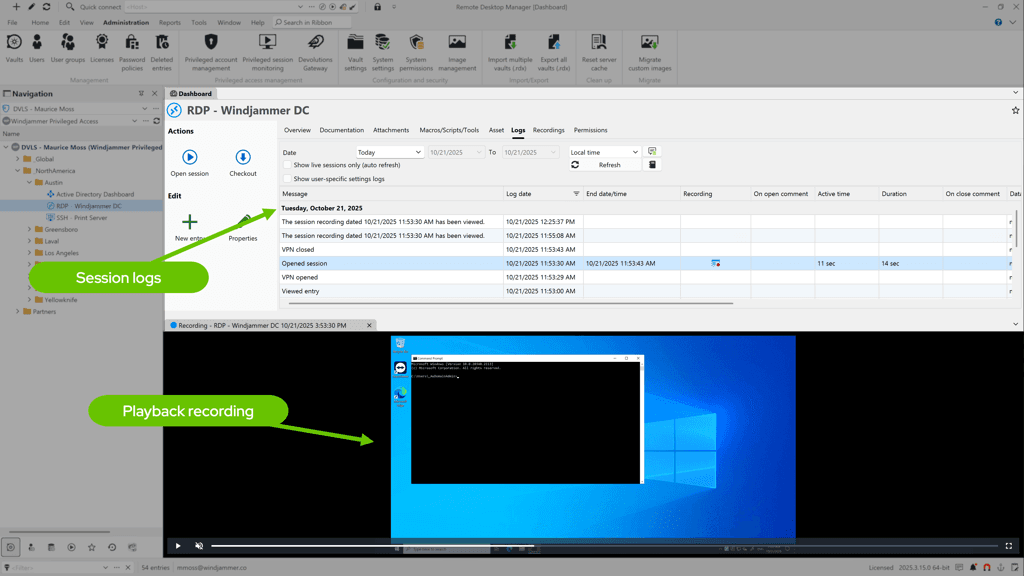
Why it matters: Quickly produce a single chain of evidence for audits and incidents.
From request to evidence: Governed elevation at a glance
- Requests are routed to approvers.
- Approve access for a time-boxed window (e.g., 5/15/60 minutes or custom); access auto-expires.
- Launch RDP/SSH via Devolutions Gateway with credential injection. No password viewing rights required.
- Record the session; all activity is linked to the original request and approval.
- Rotate on check-in (or on schedule); updates propagate to services, tasks, and connection entries.
What “done” looks like: Password rotation enforced; approvals auto-expire; privileged sessions are recorded; all privileged accounts are under policy. It’s PoLP in action, with ZSP as your default posture.
Why it’s lighter—and how we differ
Many enterprise PAM suites optimize for breadth—and often bring operational lift with it. Our approach gives lean teams governed elevation and an exportable audit trail in hours, with a clear path to advanced controls when you need them.
Devolutions PAM stands out on the four essentials:
- RDM-native workflow: Request → approve → launch → rotate—no context switching.
- Gateway reach: Brokered RDP/SSH across segmented networks—no jump-host farm to maintain.
- Time-to-value: From install to first rotation policy in a single working session; expand weekly with discovery.
- Evidence by design: Every session yields a request → approval → recording → rotation narrative you can export in minutes.
Try Devolutions PAM in an on-demand lab
Test-drive our PAM solution in a free, browser-based lab session. With a preconfigured environment, no installation required, and no changes to your infrastructure, it's an ideal, low-commitment proof of concept. All you need to get started is a Devolutions account.
