Version 2025.2
- New features
- HP iLO web session
- SQL Server management console
- Improvements
- Performance – significant improvements
- New permissions for VPN/SSH/Gateway and session recording sections
Thank you for updating Remote Desktop Manager Linux (RDM Linux) to version 2025.2!
For the full list of changes, check out the release notes.
Here’s a quick look at the most exciting updates:
New features
SQL Server management console
Similar to Dataflare, you can now manage SQL databases directly in RDM without having to install SQL Server Management Studio (SSMS)!
The following actions are supported:
- Running SQL queries
- Listing databases
- Create/Delete database
- Listing Tables, viewing contents & editing
- Start/Stop/Restart SQL Server service
- Manage Logins, Create, Edit, Delete, Reset passwords
- Manage roles
- View logs
- Manage Agent, Jobs
HP iLO web session
Support for HP iLO web session is now available in RDM Linux, bringing parity with Windows and macOS!
Improvements
Performance – significant improvements
We've delivered major performance enhancements for RDM on Linux. Switching between tabs like "Account Information" and vault views no longer triggers unnecessary refreshes. We've also reduced the overhead from excessive ConnectionControlStates creation during UI updates. Additionally, in an upcoming minor update, slow GTK-based getters used to retrieve connection information have been optimized—eliminating delays when navigating large tree views or switching data sources.
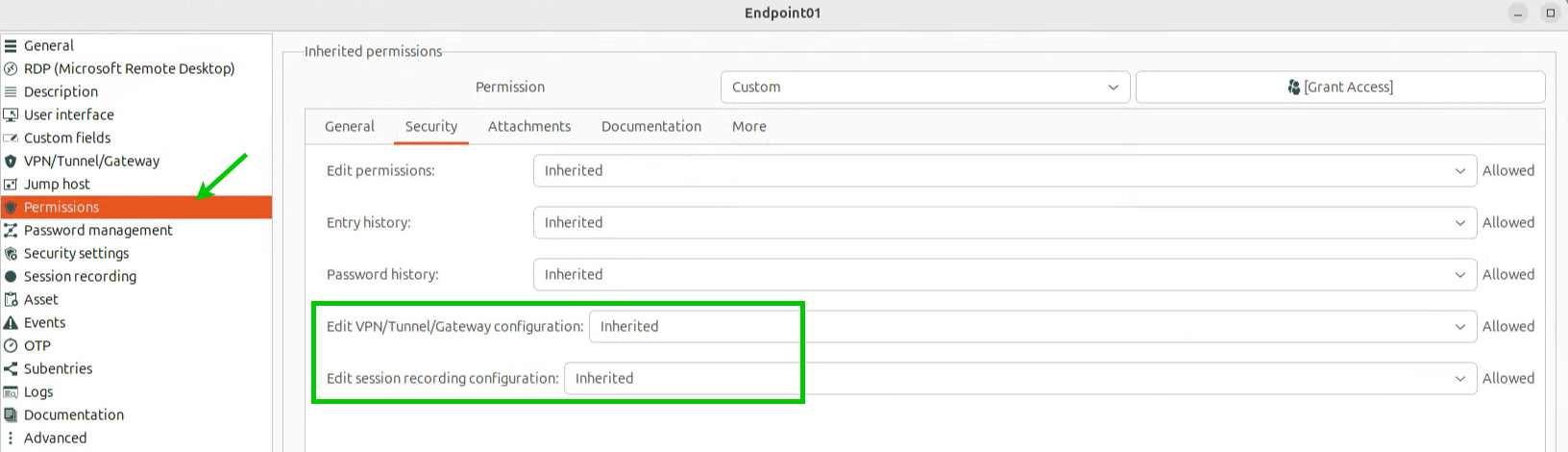
New permissions for VPN/SSH/Gateway and session recording sections
Administrators can now enforce stricter control by assigning specific permissions for editing the VPN/SSH/Gateway and Session Recording sections within entries. This allows users to retain general editing rights (if granted) while preventing changes to critical connection settings.