- 2025.3.29.0
- 2025.3.28.0
- 2025.3.27.0
- 2025.3.26.0
- 2025.3.25.0
- 2025.3.23.0
- 2025.3.22.0
- 2025.3.21.0
- 2025.3.20.0
- 2025.3.17.0
- 2025.3.16.0
- 2025.3.15.0
- 2025.2.30.0
- 2025.2.29.0
- 2025.2.28.0
- 2025.2.27.0
- 2025.2.26.0
- 2025.2.25.0
- 2025.2.23.0
- 2025.2.22.0
- 2025.2.21.0
- 2025.2.20.0
- 2025.2.17.0
- 2025.2.16.0
- 2025.2.14.0
- 2025.2.13.1
- 2025.1.41.0
- 2025.1.40.0
- 2025.1.39.0
- 2025.1.38.0
- 2025.1.37.0
- 2025.1.34.0
- 2025.1.33.0
- 2025.1.31.0
- 2025.1.30.0
- 2025.1.29.0
- 2025.1.27.0
- 2025.1.26.0
- 2025.1.25.0
- 2025.1.24.0
- 2024.3.31.0
- 2024.3.29.0
- 2024.3.28.0
- 2024.3.27.0
- 2024.3.26.0
- 2024.3.25.0
- 2024.3.22.0
- 2024.3.21.0
- 2024.3.20.0
- 2024.3.19.0
- 2024.3.18.0
- 2024.3.17.0
- 2024.3.16.0
- 2024.3.15.0
- 2024.3.14.0
- 2024.3.13.0
- 2024.3.12.0
- 2024.3.10.0
- 2024.2.21.0
- 2024.2.20.0
- 2024.2.19.0
- 2024.2.18.0
- 2024.2.17.0
- 2024.2.16.0
- 2024.2.15.0
- 2024.2.14.0
- 2024.2.13.0
- 2024.2.12.0
- 2024.2.11.0
- 2024.2.10.0
- 2024.2.8.0
- 2024.1.32.0
- 2024.1.31.0
- 2024.1.30.0
- 2024.1.29.0
- 2024.1.28.0
- 2024.1.27.0
- 2024.1.25.0
- 2024.1.23.0
- 2024.1.21.0
- 2024.1.20.0
- 2024.1.19.0
- 2024.1.18.0
- 2024.1.17.0
- 2024.1.15.0
- 2024.1.12.0
View all releases
Spotlight on: RDM linked external vault mode for selecting credentials

Marc Beausejour
December 09, 2025
Credential sprawl slows admins down and exposes them to risk, adding unnecessary friction to everyday tasks. The linked external vault mode in Remote Desktop Manager (RDM) changes that by delivering the right credentials exactly when you need them—making complex environments faster to manage, safer to secure, and far less manual. Let’s dive in and explore why this enhancement significantly simplifies credential management.
What is the linked external vault mode?
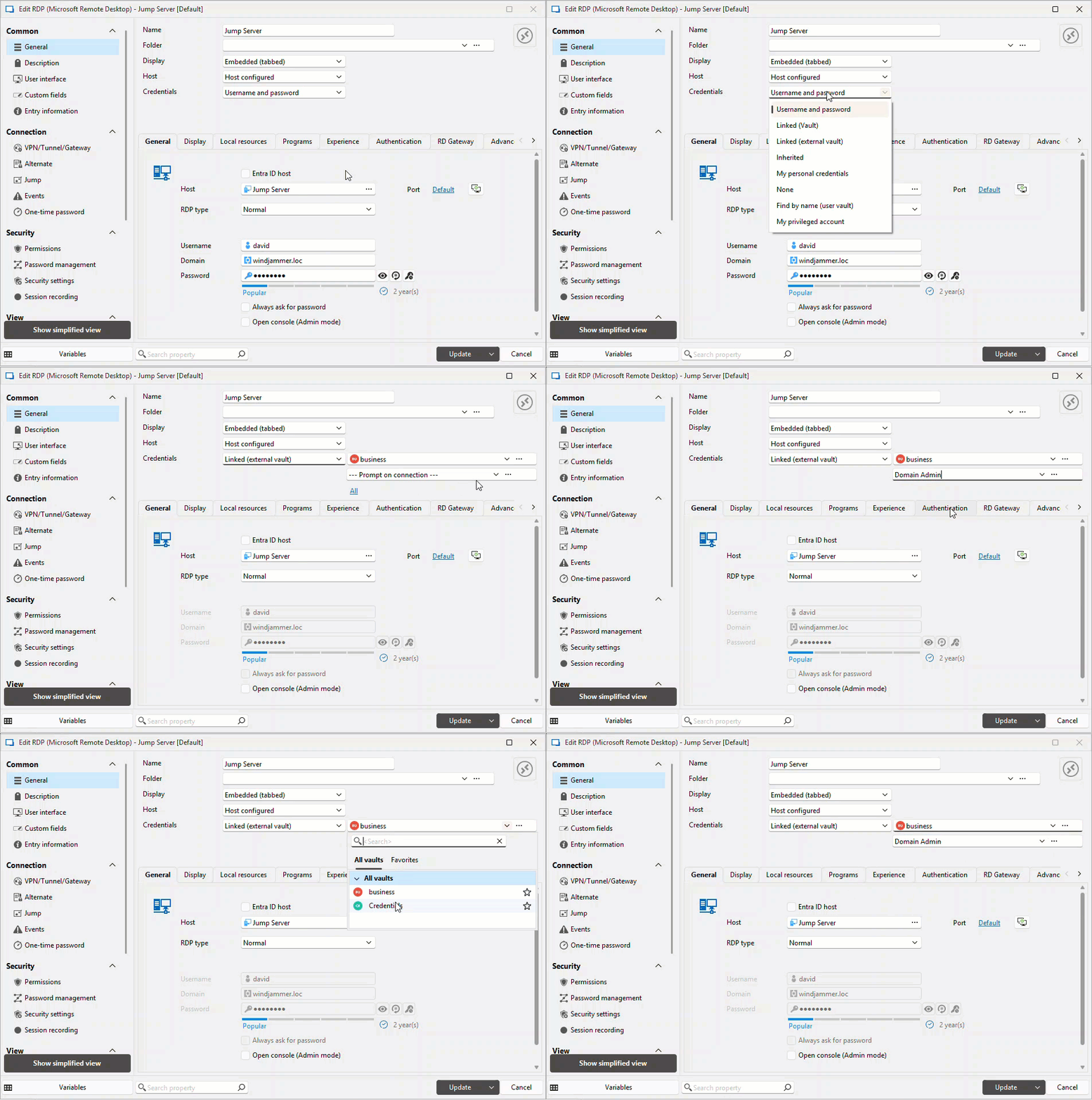
The linked external vault mode enables you to effortlessly select and utilize credentials that are stored in other vaults within your shared database like Devolutions Hub and Devolutions Server, directly within RDM entries. Previously, you could only link credentials from within the current vault. Now, you can link directly to credentials stored in other vaults, streamlining your credential management process.
Key benefits
Enhanced security
Credentials remain secured within their original vaults, significantly reducing risk exposure.
Improved efficiency
Improves credential management workflows by enabling credentials to be clearly and securely separated into different vaults, simplifying organization and reducing complexity.
Containerized management
Enables seamless integration with containerized environments, enhancing agility and scalability in credential management.
Experience the power of Remote Desktop Manager Team edition with a free 30-day trial
Use cases
This feature is ideal for environments where:
- Credentials must be securely stored and managed in separate vaults, with seamless linking capabilities across these vaults.
- Secure, centralized credential management is essential.
- Teams use credentials from multiple vaults, including those managed within Devolutions Hub and Devolutions Server.
Getting started
Enable linked external vault mode by configuring your RDM entries. Simply select credentials directly from your linked vault, and RDM handles the rest seamlessly.
Get ahead: Streamline your credential management now!
The linked external vault mode isn’t just about faster logins—it’s about bringing order to the chaos. By centralizing and streamlining how you access credentials, Remote Desktop Manager helps you better organize both your connections and the credentials tied to them. The result? Cleaner workflows, fewer errors, and a credential management process that finally feels efficient, secure, and scalable.
Upgrade RDM to the latest version today to simplify and secure your credential management process.