Spotlight on: Remote Desktop Manager vault dashboard

Marc Beausejour
December 03, 2025
In the world of IT management, organizing and securing remote connections, access, credentials, and sensitive data is critical. Devolutions’ Remote Desktop Manager (RDM) offers a comprehensive vault dashboard that leverages advanced organizational and tracking tools to display information about all your assets securely and efficiently in a single pane of glass. We will explore the vault dashboard, its features, and how it can streamline your work.
What is the RDM vault dashboard?
The RDM vault dashboard is a customizable interface within Remote Desktop Manager designed to provide a centralized overview of vault data, enhancing visibility and control over various elements such as sessions, credentials, and other stored assets. Vaults serve as secure containers where sensitive data is stored. The vault dashboard acts as a command center for managing and interacting with these vaults.
Key features
Customizable widgets:
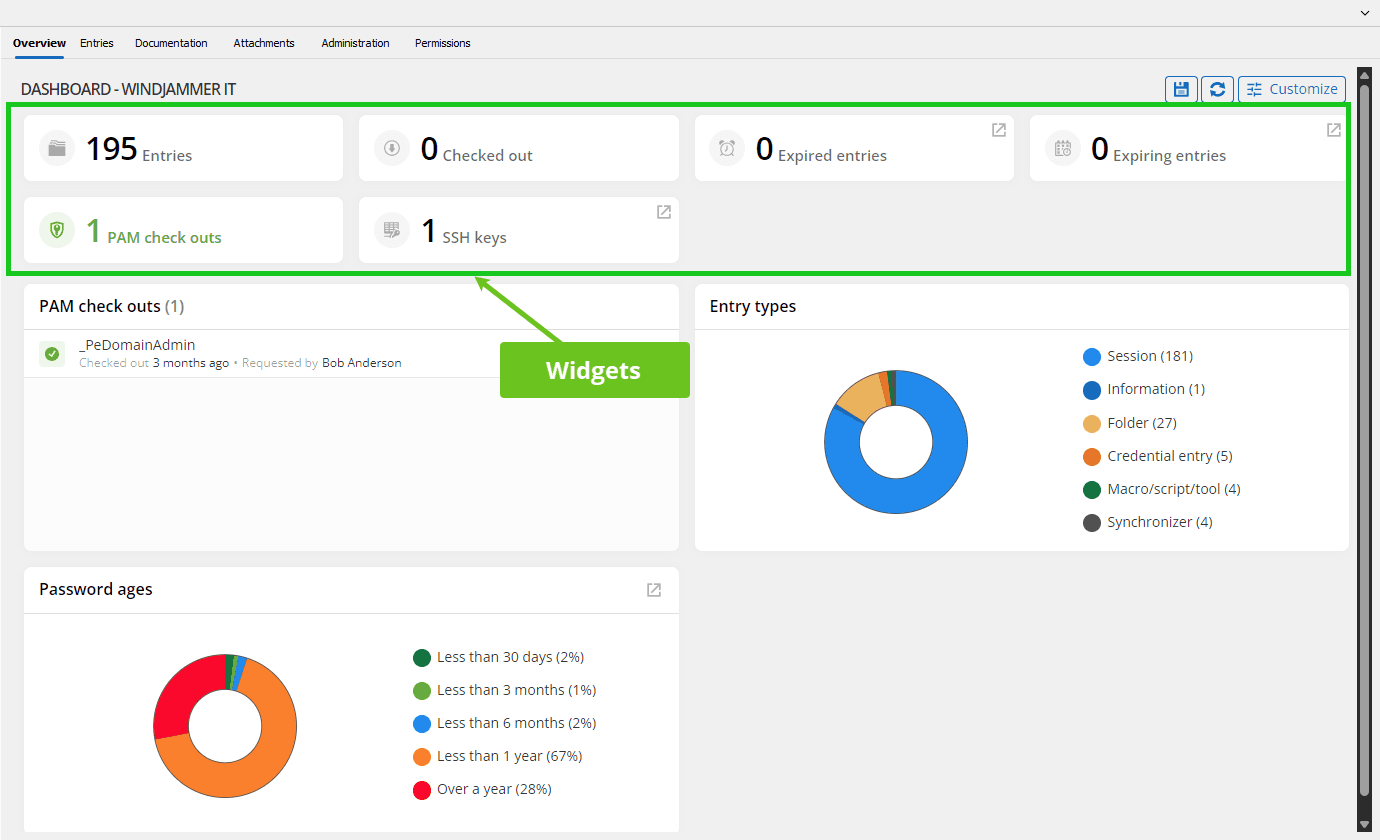
The vault dashboard is powered by widgets, which provide live insights into different aspects of your vaults. Widgets can be customized based on user preferences, offering information at a glance. Key widget categories include SSH keys, expired/expiring entries, certificates, tasks, and more!
Centralized management:
The vault dashboard consolidates multiple assets into a single user interface. You can quickly view resources within a vault and view specific ones. This feature is essential for teams managing multiple environments or client accounts.
Detailed insights and reporting:
The dashboard provides high-level insights into vault activities, allowing you to generate reports on what has been accessed, by whom, and when. This supports compliance requirements and helps troubleshoot issues more effectively.
Want to get started right away? Click here to start your free trial of Remote Desktop Manager!
Advantages
Increased efficiency:
By centralizing all vault activities and data, the vault dashboard eliminates the need for switching between multiple tools or interfaces, reducing the time and effort needed to manage remote connections, credentials, and sensitive data.
Improved collaboration:
For teams, the vault dashboard allows for easy viewing and management of data across team members. By integrating RDM with Devolutions Server or Devolutions Hub, users can view key items in vaults securely while maintaining resources and tasks up to date.
Better security and oversight:
With the ability to display the status of key assets such as certificates, SSH keys, and password age, the vault dashboard aids in maintaining high security standards and staying compliant with industry regulations.
Customizable features:
The customizable nature of the dashboard means that it adapts to different roles and responsibilities. Users can tailor it to suit their specific needs, whether it's for viewing tasks, certificates, assets, or more.
How to
- Access the vault dashboard:
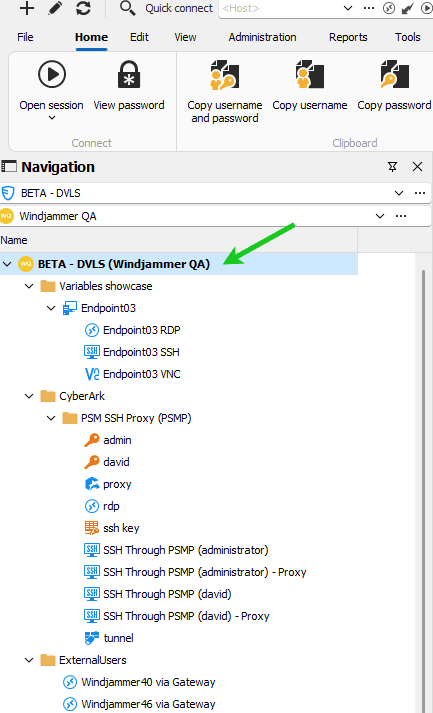
To access the vault dashboard, select your data source’s root folder in the navigation pane, which is the topmost item displayed on the left. The selection changes to the vault dashboard on the right side in RDM.
- Customize your dashboard:
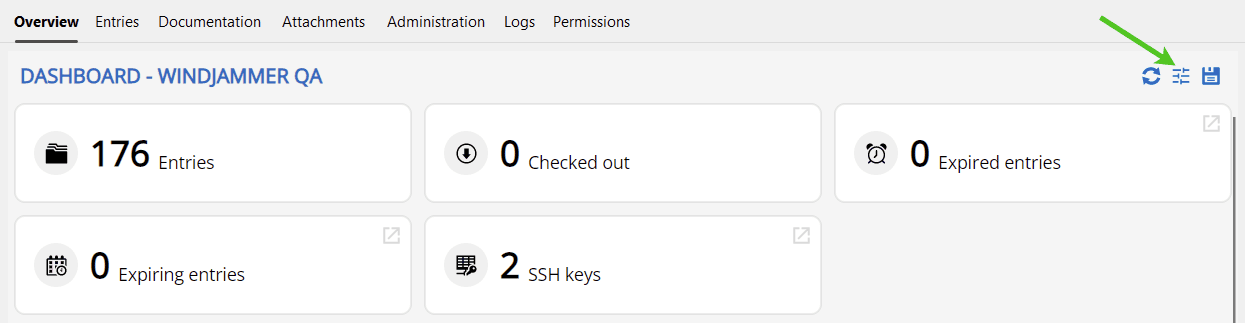
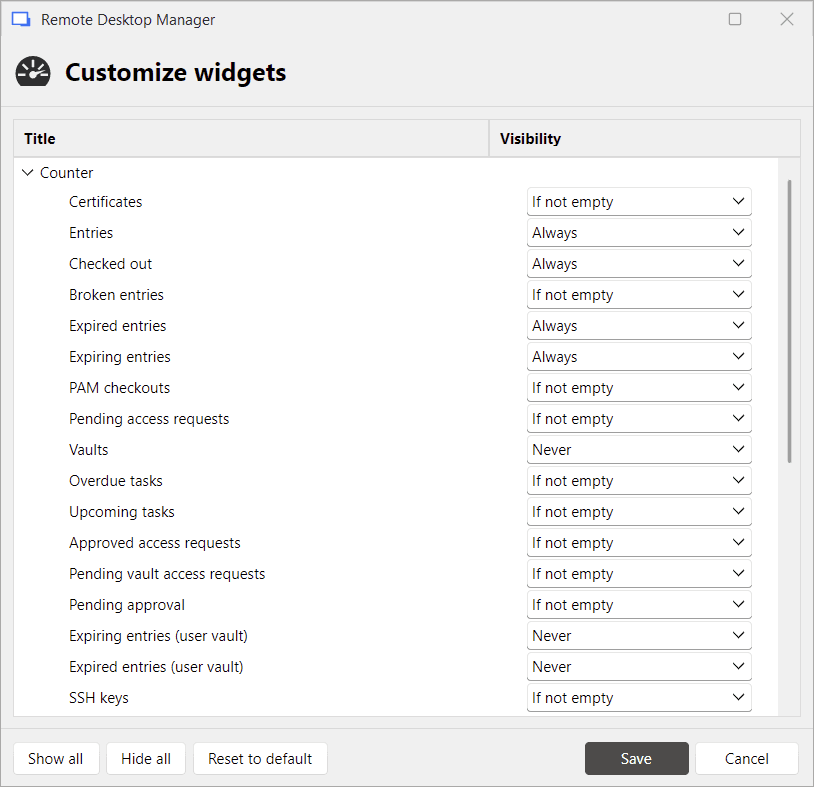
Once you’re in the vault dashboard, you can begin customizing it by adding or removing widgets. This can be done via the Customize button at the top right of the dashboard. You can select from a range of widgets, such as Certificates, SSH keys, or Expired/Expiring entries.
Improve your workflow
The vault dashboard in Remote Desktop Manager is an invaluable tool for IT administrators and teams tasked with managing credentials, assets, and sensitive data. Its customizable, centralized interface, coupled with powerful widgets, offers an efficient way to view, track, and manage vault data across different projects or environments. Whether you’re a solo IT professional or part of a large team, the vault dashboard can significantly improve your workflow by providing real-time insights and comprehensive management tools in one place.
Are you ready to take control of your vaults with enhanced security and ease? Try out the vault dashboard in Remote Desktop Manager to see how it can transform the way you work.
Please let us know about enhancements you’d like to see in the dashboard in the future. You can comment below, post in the Devolutions Forum, or contact our support team!