<style> /* Reveal x-cloak content so sidebar branch lists and closed-state chips render — EXCEPT the mobile slide-in backdrop, which would otherwise cover the whole viewport in black/40 with no way to dismiss (the dismiss handler is x-on:click="mobileHeader = false" and can't fire without Alpine). */ [x-cloak]:not([x-show="mobileHeader"]) { display: revert !important; } /* (1) Force every version card OPEN so all release-notes content is visible. Overrides the default `.rn-ver-body { grid-template-rows: 0fr }` from release-notes.css, which is normally lifted to `1fr` via Alpine's `:class="{ 'rn-ver-body--open': open }"`. */ .rn-ver-body { grid-template-rows: 1fr !important; } /* (1b) Strip `hidden="until-found"` from collapsed card bodies. WEB-3164 added that attribute on cards 2..N (the first card omits it, see the `{% unless forloop.first %}` in release-notes-cards.eleventy.liquid) so Chrome/Edge browser find-in-page can reveal text inside collapsed bodies and fire a `beforematch` event Alpine catches to pop the card open. Alpine's `x-effect` directive normally removes the attribute when `open` flips true — but without JS that directive never runs, so cards 2..N stay hidden via either `content-visibility: hidden` (Chrome/Edge/Safari 17+ resolve `hidden="until-found"` to that) or `display: none` (older Safari / unknown browsers treat it as a plain boolean `hidden`). Rule (1) above lifts the SCSS-based grid-rows collapse but does NOT override `[hidden]` — the attribute applies a higher-priority `display: none` / `content- visibility: hidden` that wins over grid-template-rows. This rule covers both browser-engine paths: `display: revert` restores the element's normal display (the `grid` utility on the wrapper), `content-visibility: visible` overrides the modern-browser path. */ .rn-ver-body[hidden] { display: revert !important; content-visibility: visible !important; } /* (2) Hide controls that can't do anything without JS so the UI doesn't lie about being interactive: the expand/collapse chevron, the closed-state category chips (Security 3 / Features 5 / …), the section-level expand-all toggle if reintroduced, and the cursor-pointer hint on the header. */ .rn-ver-chevron, .rn-ver-chips, .rn-toggle-all { display: none !important; } .rn-ver-header { cursor: default !important; } /* (3) Hide status pills (Current / Beta / Extended maintenance) and the matching sidebar dots. Pills are rendered server-side from productInfo.json at build time and are accurate at publish — but a stale cached page in Sparkle could surface them on a version that is no longer "Current" by the time the user opens RDM, so hiding them entirely under no-JS removes the whole class of misleading-stale-pill failure modes. */ .rn-ver-tag-line, .rn-status-pill, .rn-status-dot { display: none !important; } /* (4) Sidebar branch chevrons stay frozen in the "closed" rotation without Alpine to flip them — drop them since the branch lists below are already revealed by the x-cloak rule above. */ .rn-toc-branch-head > span:first-child { display: none !important; } /* (5) Hide mobile-only chrome whose Alpine click handlers can't fire: the top mobile menu-open bar and the sidebar's mobile close bar. Both gate `mobileHeader`, which never toggles without JS. */ .rn-main-header, .rn-sidebar > div:first-child { display: none !important; } </style>

Release notes

Release notes

MFA at PAM checkout: Confirming identity the moment it matters

Steven Lafortune · July 9, 2026

Table of contents

Privileged accounts don’t get compromised at the login screen. They get compromised after login: when a session is hijacked, a device is left unlocked, or credentials get shared a little too casually. That’s the gap MFA at PAM checkout is built to close: instead of trusting whoever’s already inside the perimeter, Devolutions now verifies identity again, right at the moment someone requests access to a privileged account.

The problem MFA at checkout solves

Standard login MFA proves who authenticated at the start of the day. It doesn’t prove who’s sitting at the keyboard an hour later when a privileged checkout request comes in. For sensitive accounts — domain admins, service accounts, anything with elevated rights — that gap matters. Requiring a fresh MFA challenge at the exact moment of checkout closes it: verification now follows the access request itself, not just the initial sign-in.

Enabling MFA for checkout

In Devolutions Server:

  1. Make sure users have an MFA method configured, either per user (Administration – Users – Multifactor) or enforced globally through Administration – Configuration – Server Settings – Security – Conditional Access Policies (set the MFA target to Required, Optional per user, or Skipped).
  2. Open the PAM provider or entry’s properties and go to the Checkout policy tab.
  3. Enable the option to require MFA on checkout.
  4. Save. The requirement applies the next time that entry is checked out.

In Devolutions Cloud: the same logic applies through Administration – Configuration – Security – Authentication, where MFA verification can be enabled for launching sensitive entries. Supported methods include email and TOTP, with more identity providers covered through the platform’s broader MFA options (Yubikey, Duo, Radius, and others depending on your setup).

What happens when a user checks out an account

The checkout flow itself doesn’t change on the surface: a user picks the entry, selects a duration, and submits a reason or ticket number if that’s required. What’s new happens right there, before the request even goes anywhere. If MFA is required for that entry, the user has to verify — a TOTP code, an emailed code, or SMS — as part of submitting the request. Without a valid MFA, the request never reaches the approver in the first place: identity is confirmed at the source, not bolted on after the fact.

What the approver sees

Approvers aren’t left guessing whether identity was confirmed. By the time a checkout request reaches them for review, MFA verification has already happened — the requester couldn’t have submitted the request otherwise. The approval screen reflects that, giving the approver one less unknown in the decision, and one more data point in the audit trail if that checkout is ever reviewed later.
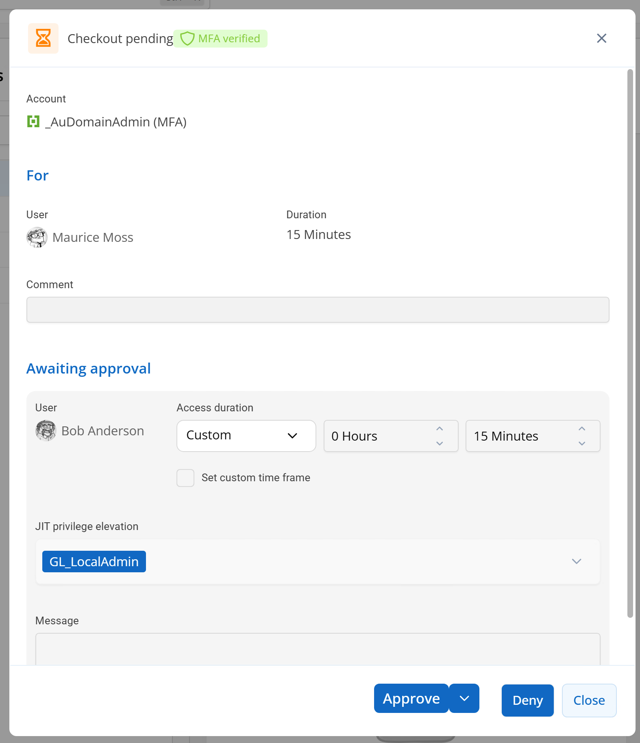
Devolutions Server PAM checkout approval screen showing that MFA was verified

Why this matters

MFA at checkout doesn’t replace approvals, session recording, or your existing checkout policies, it sits alongside them as one more checkpoint, placed exactly where the risk is highest: the moment someone gains access to a privileged account. For teams already using Devolutions PAM, it’s a policy toggle, not a new system to deploy.

If you’re running Devolutions PAM, this is worth turning on. Check the documentation below for the full setup, and let us know how it works for your team.

Resources: