













Cloud-gehostete Datenquelle für Devolutions RDM
Eine sichere Cloud-Datenquelle für Devolutions RDM mit integrierter Passwortverwaltung und einem Weg zu Cloud-basierter Verwaltung privilegierter Zugriffe.
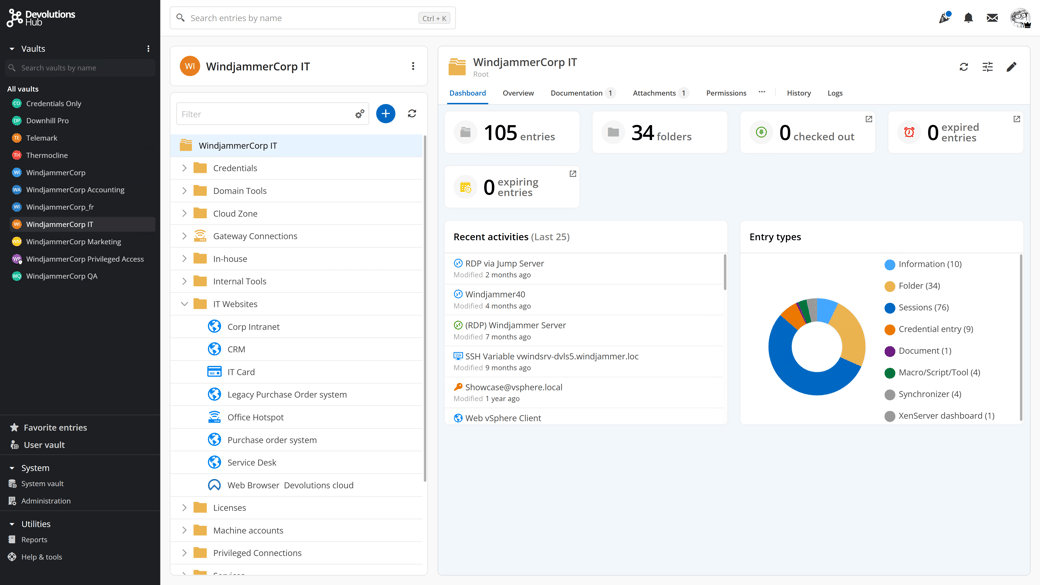
RDM-Verbindungen und Anmeldeinformationen in Hub Business speichern
Hub Business fungiert als cloudgehostete Datenquelle für Devolutions Remote Desktop Manager und ergänzt die vertraute RDM-Erfahrung der Techniker um Identitäts- und Zugriffskontrolle.
RDM liest direkt aus Hub Business, sodass Teams in RDM arbeiten können, während Hub Business Sicherheitsrichtlinien und Datenspeicherung im Hintergrund verwaltet.
Speichern Sie Ihre RDM-Daten in einem vollständig gehosteten Cloud-Service, der von Devolutions gewartet wird – keine Server, Infrastruktur oder Updates zu verwalten.
Aktivieren Sie Single Sign-On für RDM, indem Sie Hub als Datenquelle verwenden, unterstützt von Identitätsanbietern wie Microsoft Entra ID und Okta.
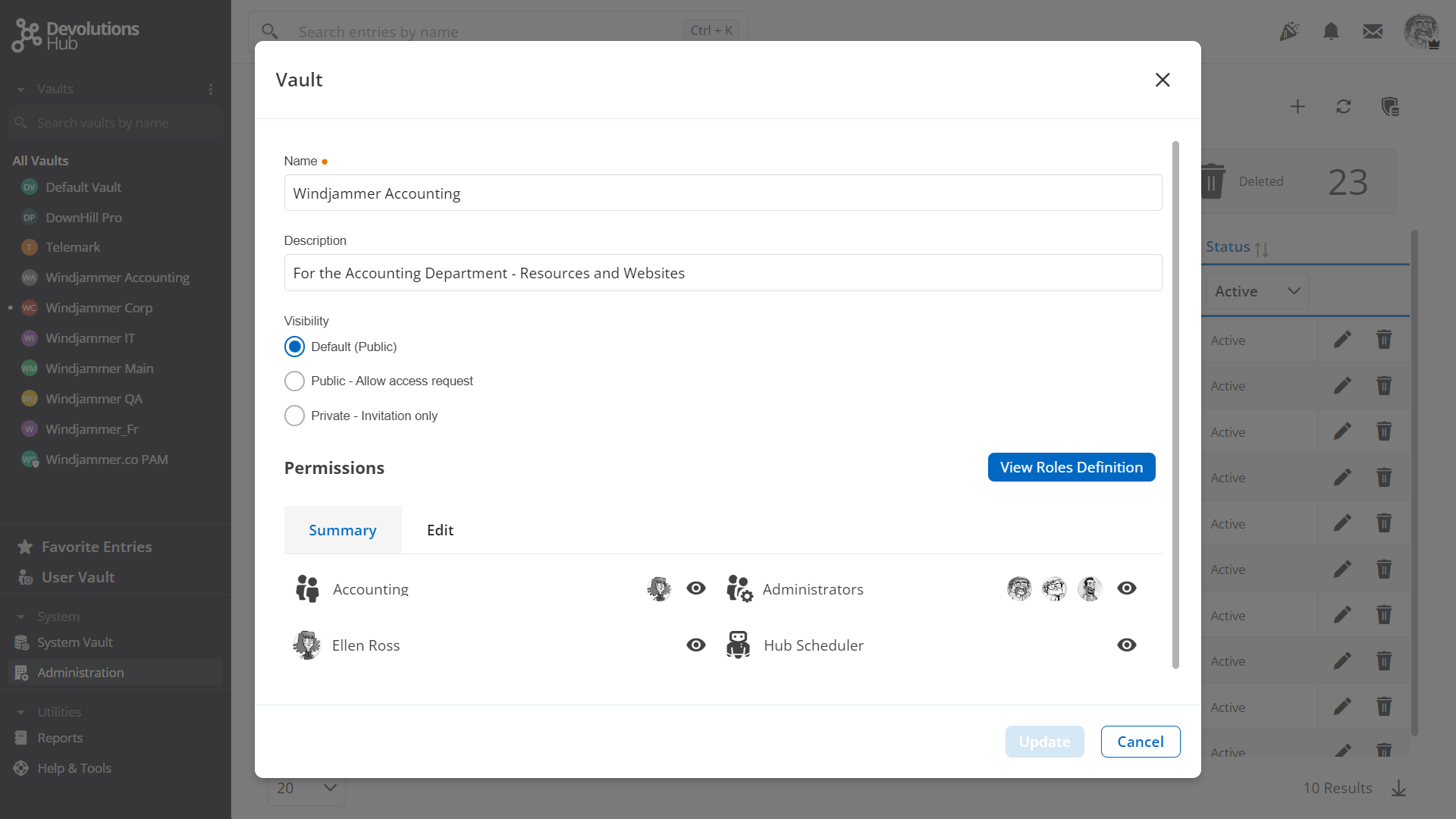
Setzen Sie rollenbasierten Zugriff in RDM durch, indem Sie Rollen, Gruppen und Berechtigungen in Hub Business definieren.
Ermöglichen Sie RDM den Zugriff auf einen Offline-Cache Ihrer Hub Business-Daten, wenn dies von Administratoren aktiviert wird.
Öffnen Sie Sitzungen mit RDM durch Anmeldeinformations-Injektion mit einem Klick unter Verwendung von in Hub Business gespeicherten Einträgen.
Hub in Aktion sehen
PAM in die Cloud bringen
In Kombination mit Devolutions PAM wird Hub Business zu einem sicheren Cloud-Tresor für privilegierte Konten und vertrauliche Anmeldeinformationen. Gemeinsam helfen sie Teams jeder Größe, PAM-Praktiken zu einem Bruchteil der Kosten herkömmlicher PAM-Lösungen einzuführen.
Speicherung privilegierter Anmeldeinformationen
Speichern Sie privilegierte Anmeldeinformationen, die von Devolutions PAM verwendet werden, in Hub Business – geschützt durch dasselbe Zero-Knowledge-Verschlüsselungsmodell auf Client-Seite wie alltägliche Passwörter.

Genehmigungsworkflows
Unterstützen Sie Least-Privilege- und Just-in-Time-Zugriff mit Checkout-Genehmigungen, erforderlicher Begründung und zeitlich begrenzten Zugriffsfenstern, die über Devolutions PAM verwaltet werden.


Passwortnutzungsrichtlinien
Automatisieren Sie die Passwortrotation nach der Nutzung, reduzieren Sie dauerhafte Berechtigungen und injizieren Sie privilegierte Anmeldeinformationen in Remote-Sitzungen, anstatt sie den Benutzern preiszugeben.
Compliance und Auditing
Stärken Sie die Audit-Bereitschaft mit detaillierten Aktivitätsprotokollen, Berichten und Rückverfolgbarkeit über Devolutions Hub Business, PAM, Remote Desktop Manager und Gateway hinweg.
Passwortverwaltung für das gesamte Unternehmen



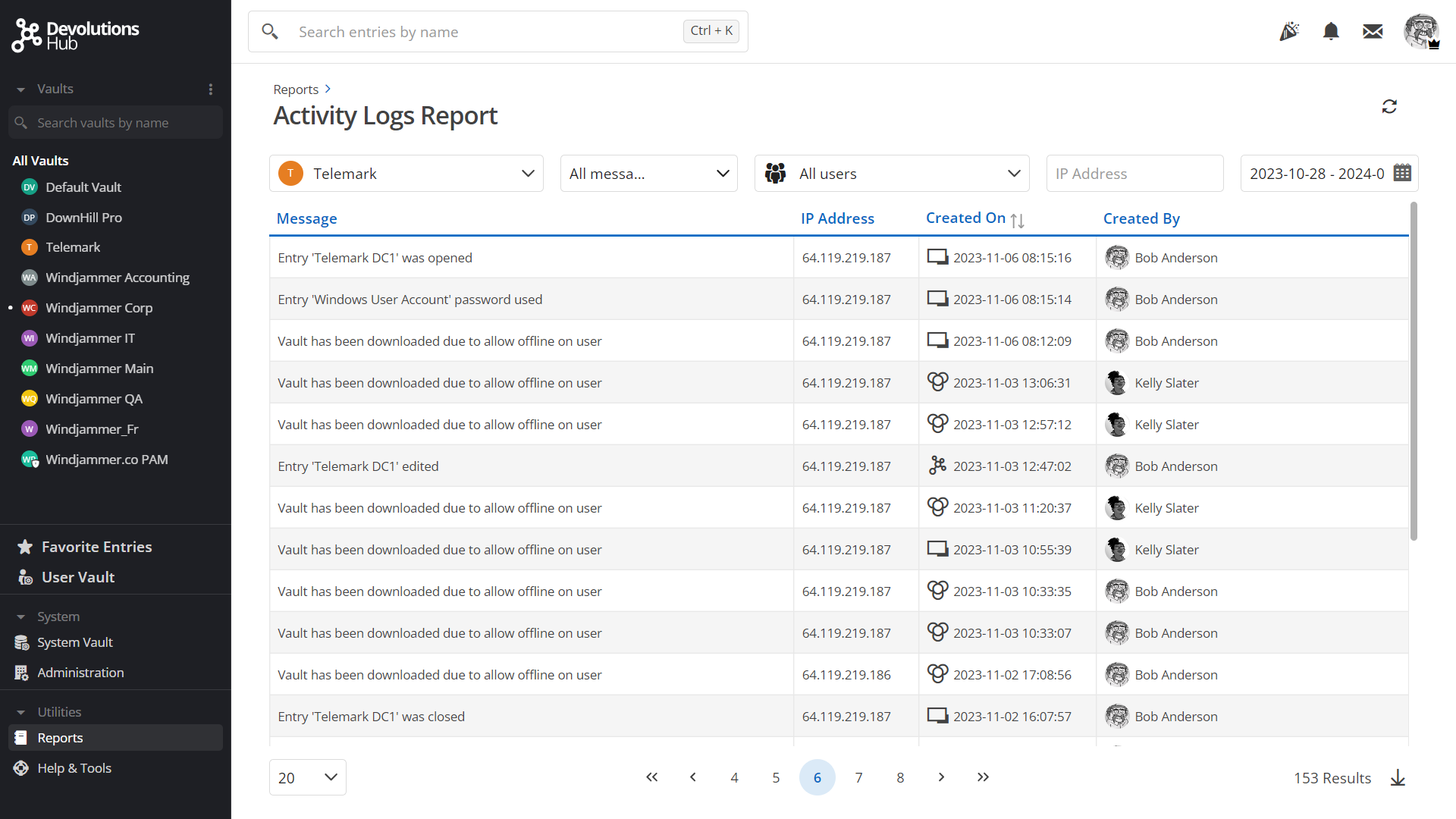
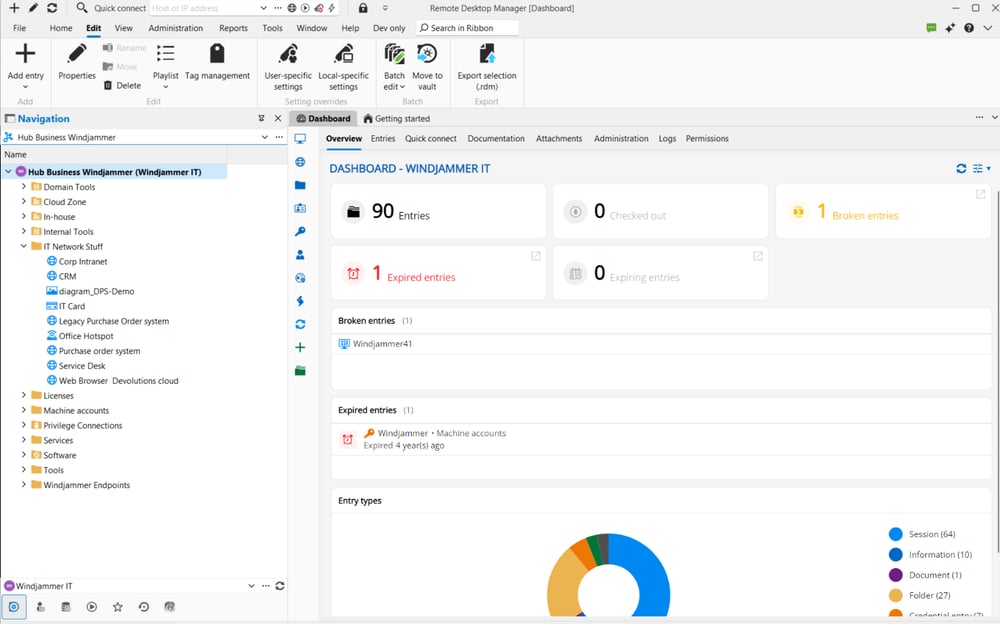
Hub aus jedem Blickwinkel
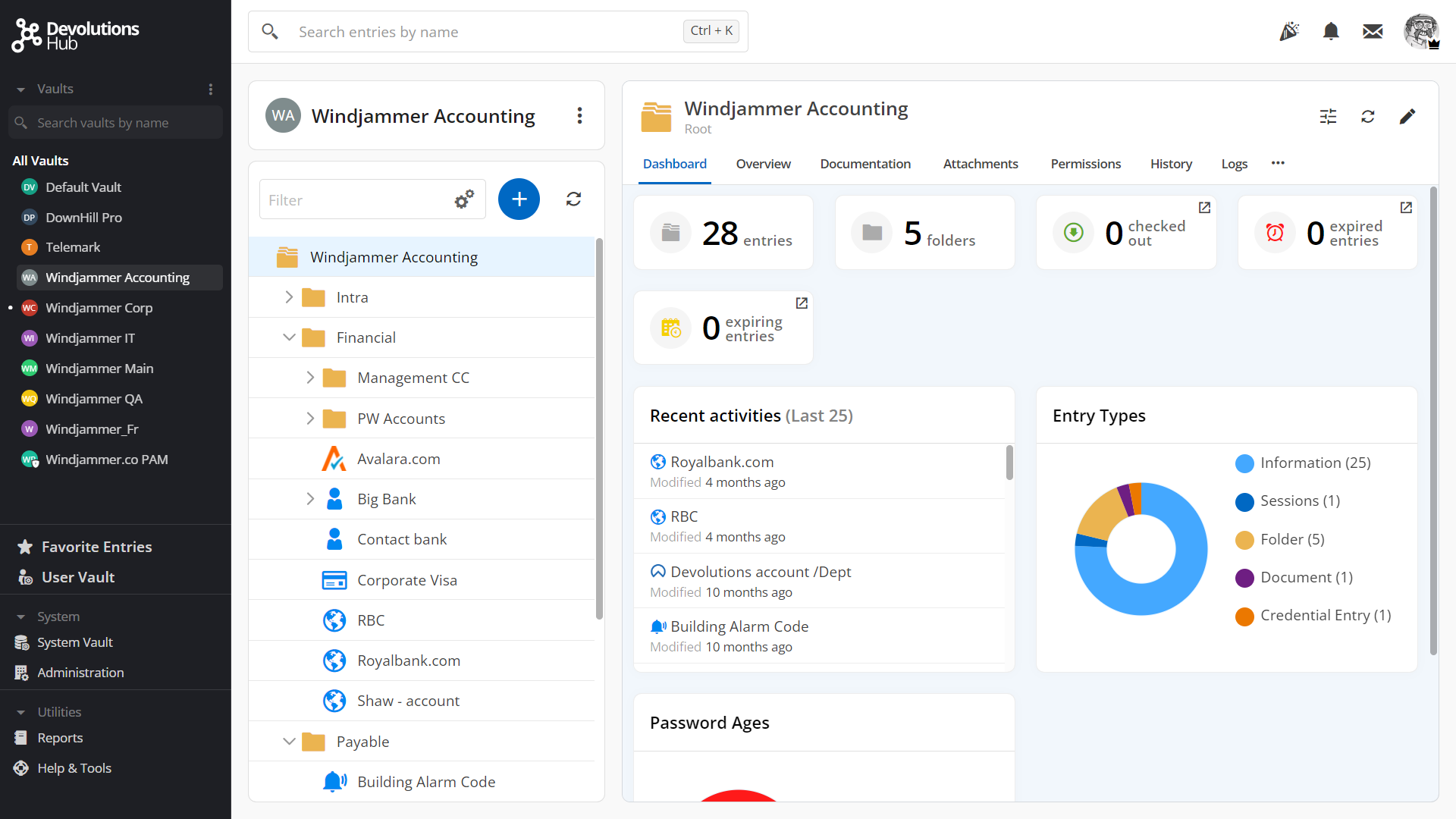
Sehen Sie, wie sich Devolutions Hub Business neben Devolutions Remote Desktop Manager, Devolutions PAM, Devolutions Gateway und Devolutions Workspace in realen Bereitstellungsszenarien einfügt. Die Galerie zeigt gängige Konfigurationen und Workflows.
Ressourcen
Für Teams, die tiefere technische Details benötigen, decken diese Ressourcen die Spezifikationen, das kryptographische Design und mehr von Hub Business ab.
Devolutions Hub Business FAQ
Anwendungsfälle
Was ist Devolutions Hub Business?
Devolutions Hub Business ist eine sichere, cloudbasierte Datenquelle, die zum Speichern, Verwalten und Kontrollieren des Zugriffs auf Anmeldeinformationen, Geheimnisse und andere vertrauliche Informationen entwickelt wurde, die von IT-Teams verwendet werden. Sie fungiert als zentrales Repository, das sich nahtlos in Devolutions-Tools wie Remote Desktop Manager und Devolutions Workspace integriert.
Für wen ist Devolutions Hub Business gedacht?
Devolutions Hub Business wurde für IT-Teams, Administratoren und Managed-Service-Provider entwickelt, die eine sichere, skalierbare und cloudgehostete Datenquelle zur Unterstützung täglicher Betriebsabläufe und Zusammenarbeit benötigen.
Wie unterscheidet sich Devolutions Hub Business von Devolutions Server?
Devolutions Hub Business wird vollständig in der Cloud gehostet und von Devolutions verwaltet und bietet schnelle Bereitstellung und reduzierten Infrastrukturaufwand. Devolutions Server ist eine selbst gehostete Lösung für Unternehmen, die vollständige Kontrolle über Hosting, Datenspeicherort und interne Infrastruktur benötigen. Beide bieten ähnliche Funktionen zur Verwaltung von Anmeldeinformationen.
Ist Devolutions Hub Business ein Passwortmanager?
Devolutions Hub Business geht über traditionelle Passwortverwaltung hinaus. Es handelt sich in erster Linie um eine sichere Cloud-Datenquelle, die Anmeldeinformationen, Geheimnisse und vertrauliche Daten speichert und diese verbundenen Tools und Workflows zur Verfügung stellt, anstatt als eigenständiger Tresor verwendet zu werden. In Kombination mit dem erstklassigen Devolutions Remote Desktop Manager (RDM) kann Devolutions Hub Business auch browserbasierte Remote-Sitzungen starten, indem es Devolutions Gateway nutzt und gängige Protokolle wie RDP, SSH, VNC und ARD unterstützt. Diese Funktion vereinfacht den Zugriff für externe Benutzer und bietet eine effiziente Alternative für interne Benutzer, die nicht die volle Funktionalität von RDM benötigen.
Lizenzierung und Editionen
Was ist der Unterschied zwischen Devolutions Hub Business und Devolutions Hub Personal?
Devolutions Hub Business – einschließlich Hub Business Free – ist für den professionellen Einsatz konzipiert und dient als sichere Cloud-Datenquelle für Anmeldeinformationen und vertrauliche Daten mit Unterstützung für Governance, Zusammenarbeit und Integrationen mit Tools wie Remote Desktop Manager. Die kostenlose Edition ist leistungsstark für einzelne IT-Fachleute, während unsere Pakete teambasierte Workflows mit erweiterten Funktionen unterstützen. Devolutions Hub Personal ist für den individuellen, nicht-kommerziellen Gebrauch gedacht und konzentriert sich auf die Verwaltung persönlicher Anmeldeinformationen ohne gemeinsamen Zugriff oder professionelle Integrationen.
Bereitstellung und Kompatibilität
Wo wird Devolutions Hub Business gehostet?
Devolutions Hub Business wird in sicheren Cloud-Umgebungen gehostet, die von Devolutions verwaltet werden, und gewährleistet hohe Verfügbarkeit, Leistung und kontinuierliche Wartung.
Gibt es eine mobile oder Desktop-App für Devolutions Hub Business?
Ja. Devolutions Workspace bietet eine mobile App, eine Desktop-App und eine Browser-Erweiterung für schnellen Zugriff auf Ihre Datenquelle(n). Wie Hub Business und Workspace bietet auch Remote Desktop Manager umfassende plattformübergreifende Unterstützung und ist für Windows, macOS, Linux, iOS und Android verfügbar.
Sicherheit und Zugriff
Wie werden Daten in Devolutions Hub Business gesichert?
Alle in Devolutions Hub Business gespeicherten vertraulichen Daten werden mit starken Verschlüsselungsalgorithmen verschlüsselt. Die Verschlüsselung erfolgt clientseitig, sodass die Daten sowohl bei der Übertragung als auch im Ruhezustand geschützt bleiben.
Verwendet Devolutions Hub Business ein Zero-Knowledge-Modell?
Ja. Devolutions Hub integriert ein Zero-Knowledge-Modell mit clientseitiger Verschlüsselung, das sicherstellt, dass nur der Dateneigentümer auf die Verschlüsselungsschlüssel zugreifen kann. Devolutions hat keinen Zugriff auf Kundenverschlüsselungsschlüssel oder gespeicherte Daten.
Welche Compliance- und Sicherheitsstandards werden unterstützt?
Devolutions Hub Business ist darauf ausgelegt, anerkannte Best Practices für Sicherheit und Datenschutz einzuhalten, und hilft Unternehmen, interne Sicherheitsanforderungen und Compliance-Verpflichtungen zu erfüllen. Devolutions Hub Business hat die SOC2 Type II-Attestierung, SOC3-Attestierung und ISO/IEC 27001:2022 abgeschlossen und aufrechterhalten und gewährleistet so die Einhaltung branchenführender Sicherheits- und Datenschutzstandards.
Wie authentifizieren sich Benutzer bei Devolutions Hub Business?
Devolutions Hub Business unterstützt mehrere Authentifizierungsmethoden, einschließlich nativer Authentifizierung und identitätsanbieterbasierter Authentifizierung, sodass Unternehmen den Zugriff an ihre bestehende Identitätsstrategie anpassen können.
Hub Business lässt sich mit Microsoft Entra ID und Okta für die Benutzerauthentifizierung integrieren.
Devolutions Account-Benutzer werden ebenfalls unterstützt, beispielsweise für Szenarien mit externen Auftragnehmern, Disaster Recovery oder anderen externen Benutzern.
SCIM (System for Cross-domain Identity Management) wird für Okta und Microsoft Entra ID (ehemals Azure AD) unterstützt. Mit SCIM können Sie Ihre Benutzer automatisch zwischen Ihrem Identitätsanbieter und Hub Business synchronisieren.
Unterstützt Devolutions Hub Business SSO?
Ja. Devolutions Hub Business unterstützt Single Sign-On (SSO) über unterstützte Identitätsanbieter und ermöglicht so eine zentralisierte Authentifizierung und verbesserte Zugriffskontrolle.
Welche Multi-Faktor-Authentifizierungsoptionen (MFA) sind verfügbar?
Multi-Faktor-Authentifizierung wird über Authentifizierungsanbieter unterstützt und fügt eine zusätzliche Sicherheitsebene hinzu, um den Zugriff auf vertrauliche Daten in Devolutions Hub Business zu schützen. Je nach Authentifizierungsmethode stehen verschiedene MFA-Optionen zur Verfügung:
Microsoft Entra ID (ehemals Azure Active Directory) und Okta bieten eine breite Palette von MFA-Methoden.
Devolutions Accounts unterstützen TOTP (Authenticator-Apps), Sicherheitsschlüssel (z. B. YubiKey) und Push-Anfragen über die Devolutions Workspace-App.
Integrationen und Automatisierung
Wie greift Devolutions Hub Business auf lokale Dienste zu?
Die installierbare Devolutions Hub Services-Anwendung ermöglicht den Zugriff auf lokale Ressourcen für die Verwaltung privilegierter Zugriffe. Der Dienst optimiert die Benutzererfahrung mit Single-Sign-On-Authentifizierung (SSO), um die Notwendigkeit individueller Benutzerkontoeinladungen zu eliminieren.
Welche Tools lassen sich in Devolutions Hub Business integrieren?
Devolutions Hub Business lässt sich direkt in Devolutions Workspace und Remote Desktop Manager integrieren, sodass Anmeldeinformationen und Geheimnisse sicher innerhalb betrieblicher Workflows genutzt werden können, ohne vertrauliche Daten preiszugeben.
Bietet Devolutions Hub Business eine API?
Aufgrund des Zero-Knowledge-Verschlüsselungsmodells auf Client-Seite bietet Devolutions Hub Business derzeit keine öffentliche API. Stattdessen ist es darauf ausgelegt, sicher über Devolutions-Tools genutzt zu werden, die Zugriff, Automatisierung und Governance übernehmen. Das Devolutions PowerShell-Modul bietet Eintrags- und Verwaltungsoptionen.
Verwaltung und Zuverlässigkeit
Wie werden Daten in Devolutions Hub Business organisiert?
Daten werden mithilfe von Tresoren und Ordnern organisiert, sodass Administratoren Anmeldeinformationen und Geheimnisse nach Team, Rolle, Projekt oder Anwendungsfall strukturieren können. Vererbung auf Tresor- und Ordnerebene vereinfacht die Verwaltung, und Einträge können für optimierte Aktualisierungen verknüpft werden.
Können mehrere Benutzer auf dieselben Daten zugreifen?
Ja. Devolutions Hub Business unterstützt gleichzeitigen Zugriff. Es gibt keine Begrenzung für die Anzahl der Benutzer, die einen Eintrag anzeigen können. Um Konflikte zu vermeiden und die Datenintegrität zu gewährleisten, ist der Bearbeitungszugriff jeweils auf einen Benutzer beschränkt.
Gibt es eine Begrenzung für die speicherbare Datenmenge?
Devolutions Hub setzt keine Begrenzung für die Anzahl der Anmeldeinformationen, Ordner oder Sitzungen, die Sie erstellen können. Für optimale Leistung empfehlen wir, jeden Tresor auf maximal 2.000 Einträge zu begrenzen und bei Bedarf mehrere Tresore zur logischen Trennung von Sitzungen zu erstellen.
Unterstützt Devolutions Hub Business den Offline-Zugriff?
Da Devolutions Hub eine cloudbasierte Anwendung ist, ist ein Internetzugang erforderlich, um auf die Weboberfläche zuzugreifen. Remote Desktop Manager und Devolutions Workspace bieten beide Offline-Modi und können auf Offline-Caches von Devolutions Hub Business zugreifen (der Offline-Zugriff muss in den Benutzerverwaltungseinstellungen von Hub aktiviert werden).
Welcher Support ist für Devolutions Hub Business verfügbar?
Devolutions bietet Dokumentation und technischen Support, um Unternehmen bei der Bereitstellung, Konfiguration und Nutzung von Devolutions Hub Business zu unterstützen.
Standard-Support ist in allen kostenpflichtigen Lizenzen enthalten. Erweiterter und Premium-Support ist ebenfalls verfügbar und umfasst telefonischen Support sowie dedizierte Customer-Success-Manager. Sehen Sie sich die Details unserer Support-Pläne an.