













All your passwords and work credentials in one place
Access your credentials across browser, desktop, and mobile—without
breaking your flow.
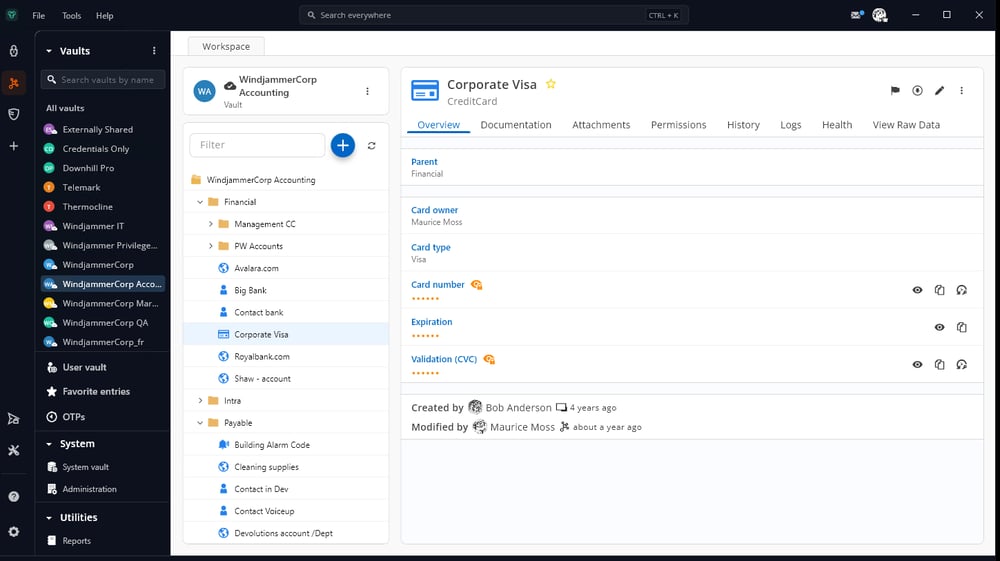
Access your workspace, your way
Devolutions Password Manager is your secure access command center, with a consistent, user-friendly experience across platforms.
Connect to your Devolutions (self-hosted or cloud) workspace
Access your sensitive data on any device
Keep credentials and approvals aligned with security policies
Browser extension
Secure credential access, right in your browser.
Bring Devolutions Password Manager into your everyday web workflows. Autofill credentials, generate strong passwords, and sign in securely—without leaving the page.
Autofill usernames, passwords, and payment details from your data source
Generate and save strong, unique passwords as you work
Apply group policies (GPO) to standardize settings

Desktop application
The full Devolutions Password Manager experience on your workstation.
Access credentials, manage entries, and enforce security policies from a powerful desktop interface built for daily use.
Connect to self-hosted or cloud-hosted password management vaults
Access, create, and manage entries with a streamlined desktop interface
View and manage one-time passwords (OTP) with the built-in authenticator
Enforce configuration and security settings centrally with GPO

Mobile application
Secure access, wherever work takes you.
Use credentials, view entries, and approve authentication requests securely from your mobile device.
Securely access vault entries from self-hosted or cloud-hosted workspace
Approve sign-ins with the built-in authenticator (OTP and push notifications)
Generate and store strong passwords directly in your vault
Quickly look up credentials and details when away from your desk
Your data, stored exactly where you need it
Devolutions Password Manager connects to multiple workspaces. Our native options, Devolutions Cloud and Devolutions Server, are purpose-built for teams that need centralized governance, SSO, audit logs, and deep product integration right out of the box.

Devolutions Cloud
Native cloud optionThe fully managed, cloud-hosted workspace. No servers or infrastructure to maintain — Devolutions handles everything so your team can stay focused on security and access.
- Zero maintenance — no servers, updates, or backups to manage
- SOC 2 Type II and ISO 27001 certified infrastructure
- SSO and MFA with Microsoft Entra ID, Okta, and more

Devolutions Server
Self-hosted optionA self-hosted workspace deployed on your own infrastructure. You retain full control over your data while benefiting from the same enterprise feature set as the cloud option.
- Hosted on your servers — you own and control the data
- Deep Active Directory and Microsoft Entra ID integration
- On-premise or private cloud deployment
See Devolutions Password Manager in action
Watch how Devolutions Password Manager brings your vaults, connections, and tools together into one secure experience across browser, desktop, and mobile.
Included in every Devolutions package
Devolutions Password Manager is included in every Devolutions package. It is the common workspace your users rely on, regardless of which solution package you choose.
Workforce password management
Start with the essentials: Devolutions Password Manager plus a workspace (Devolutions Cloud or Devolutions Server). This tier focuses on secure credential storage, governance, and everyday access.
… and beyond
As your environment grows, higher tiers expand on workforce password management with additional capabilities like Devolutions Gateway, Launcher, Remote Desktop Manager, and PAM—while Devolutions Password Manager remains the consistent access layer.
Get started in three steps
If you already use a Devolutions workspace, you're only a few clicks away from putting Devolutions Password Manager into your team's hands.
Install Devolutions Password Manager
Choose the Devolutions Password Manager experience that fits best with your current workflows (browser extension, desktop app, or mobile app) and start downloading.
DownloadConnect a workspace
Open Devolutions Password Manager and follow the on-screen instructions to set up your first space by linking to an existing workspace.
Learn howExplore
Enjoy your new desktop, mobile, and browser companion!
Devolutions Password Manager FAQ
Integrations and automation
Which Devolutions products can be accessed from Devolutions Password Manager?
You can connect the Devolutions Password Manager apps to Devolutions Cloud and Devolutions Server. This brings the web experience of these workspaces into a single, centralized desktop app, and extends it to mobile for on-the-go access.
The Devolutions Password Manager browser extension extends access further. In addition to surfacing credentials stored in your Devolutions advanced workspaces (Cloud/Server) directly in the browser as you browse and work online, the extension can also connect to Devolutions Remote Desktop Manager, giving users quick access to vault credentials, including those linked to a local workspace.
Security and access
What actions (view, add, edit, delete) can users do in workspace vaults from Devolutions Password Manager, and how does permission affect this?
In connected vaults, the Devolutions Password Manager apps let users view entries and (when permitted) add, edit, and delete entries directly in the app. Available actions always reflect the permissions defined in the underlying workspace (Cloud/Server): if a role does not allow adding, editing, or deleting entries, or does not allow viewing sensitive fields (such as passwords), those actions and fields will not be available in Devolutions Password Manager.
In the browser extension, entries cannot be edited directly. However, the extension includes an edit option that opens the workspace's web interface, reducing context switching by keeping the workflow in the same browser.
Administration and reliability
Can I use Devolutions Password Manager offline?
Yes. The Devolutions Password Manager apps (desktop and mobile) support an offline mode, but it is read-only. For advanced workspaces, offline mode must be enabled by an administrator in Devolutions Server and/or Devolutions Cloud before users can activate it in Devolutions Password Manager.