












PowerShell Universal ist jetzt Teil von Devolutions
Erstellen Sie Dashboards, APIs und Automatisierungen über eine einzige Plattform. Kostenlose Developer Edition verfügbar.
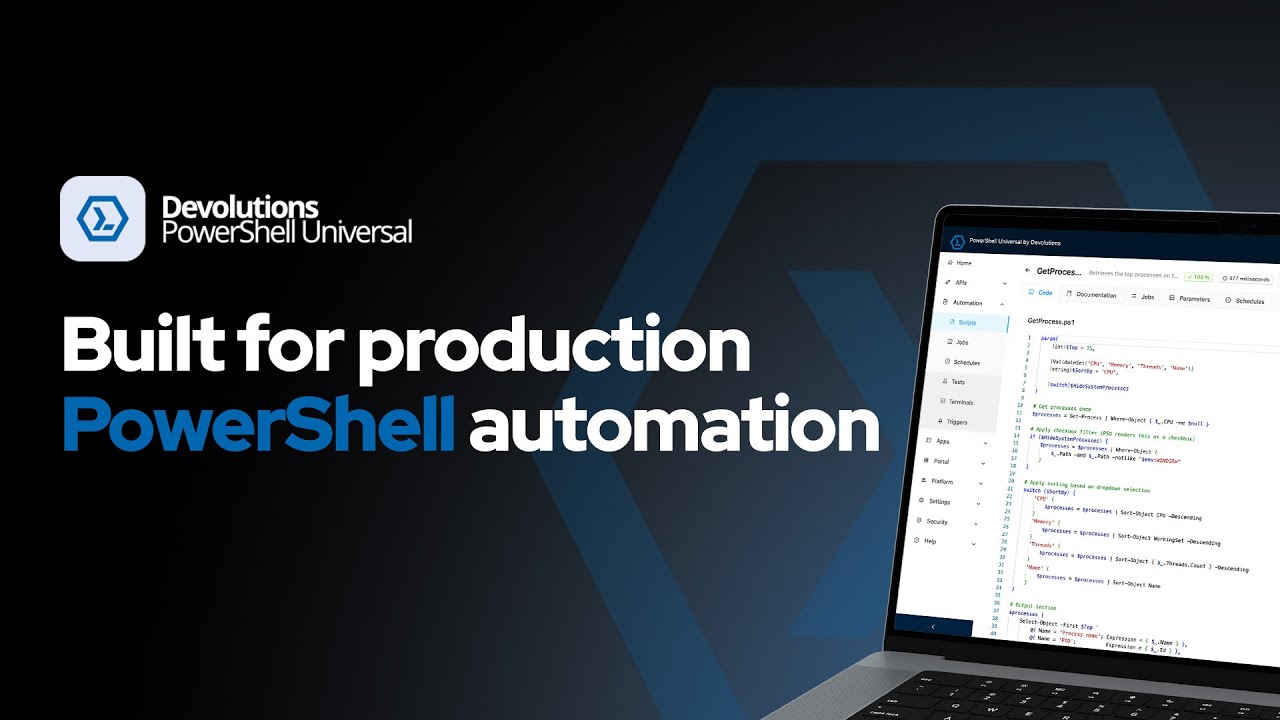




Eine einheitliche Plattform für PowerShell-Automatisierung
PowerShell Universal vereint alles, was Sie benötigen, um PowerShell im großen Maßstab zu erstellen, zu automatisieren und zu operationalisieren. Von internen Tools und Dashboards bis hin zu APIs und geplanter Automatisierung – PSU ermöglicht es Teams, von Skripten zu produktionsreifen Lösungen zu gelangen.

Schluss mit manueller Skriptausführung
Gehen Sie über Ad-hoc-Skripte hinaus. Planen, überwachen und verwalten Sie Automatisierung mit Transparenz und Kontrolle.
- Zentralisierte Automatisierungsverwaltung
- Skript- und Modul-Hosting
- Geplante Aufgaben und Trigger
- Ausführungsverlauf und Protokollierung

Stellen Sie Ihre Skripte jedem System in Minuten bereit
Stellen Sie PowerShell-Logik als REST APIs bereit, um sie mit externen Systemen, internen Tools oder DevOps-Pipelines zu integrieren.
- REST- und WebSocket-API-Generierung
- Token-basierte Authentifizierung
- Open-API-Dokumentation

Interne Tools erstellen – ohne Frontend-Team
Erstellen Sie interaktive Dashboards und benutzerdefinierte Webanwendungen mit PowerShell. Stellen Sie Daten bereit, visualisieren Sie Workflows und erstellen Sie interne Tools, ohne den Stack zu wechseln.
- Dynamische Dashboards
- Benutzerdefinierte Seiten und Komponenten
- Integriertes UI-Framework
Zugriffskontrolle auf Unternehmensniveau, direkt integriert
Kontrollieren Sie, wer auf was zugreifen kann – von Skripten bis zu Dashboards – mit Authentifizierung und Autorisierung auf Enterprise-Niveau.
- Rollenbasierte Zugriffskontrolle (RBAC)
- Mehrere Authentifizierungsanbieter
- Codebasierte Konfiguration
Überzeugen Sie sich selbst
Erfahren Sie in einer 30-minütigen Demo, wie es im Vergleich zu Ihrer aktuellen Automatisierungsplattform abschneidet.
Die vollständige Plattform. Kostenlos.
Die Developer Edition bietet den vollständigen Funktionsumfang von PowerShell Universal für die lokale Entwicklung – kostenlos. Dieselben Funktionen, die Sie mit einer Server-Lizenz in der Produktion nutzen können.
In 3 Schritten loslegen
Was enthalten ist
Vollständiger PowerShell Universal-Funktionsumfang
Automatisierung, APIs, Dashboards und Authentifizierung
Zugang zur Devolutions-Community und zu Tools mit Ihrem Devolutions-Konto
Wofür es gedacht ist
Lokale Entwicklung von PowerShell-Apps
Die Plattform vor dem Produktiveinsatz erkunden
Integrationen und Workflows testen
Wenn PowerShell Universal produktive Workloads ausführt, ist eine Server-Lizenz erforderlich.
Kostenlos herunterladen Alle Editionen & Preise ansehenAnwendungsfälle für PowerShell Universal
Typische Einsatzbereiche von PowerShell Universal in Teams – von Scripting, Zeitplanung und internen Apps bis hin zu Reporting und lokaler Entwicklung.
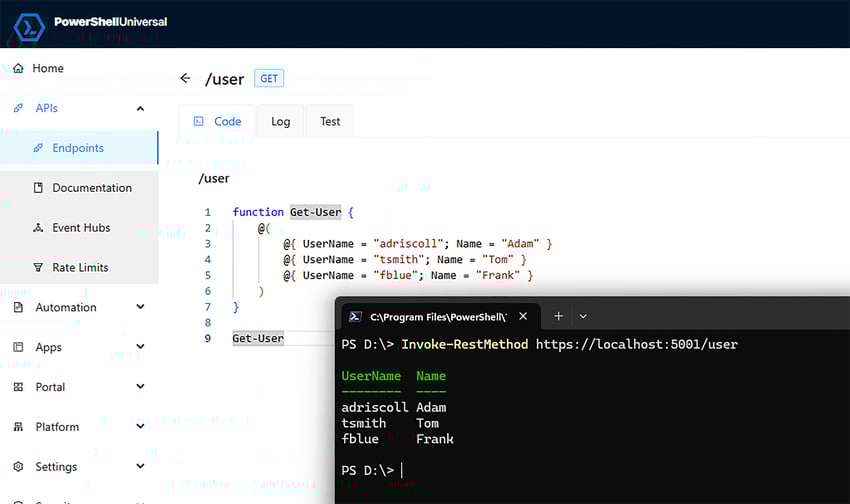
Organisieren, sichern, ausführen und auditieren Sie Skripte über eine zentrale Administrationskonsole mit browserbasierter Bearbeitung, Git-Integration und Zugriff auf die PowerShell-Module, auf die Ihr Team bereits setzt – darunter Azure, Microsoft Graph, VMware, WMI und Exchange Online.
Führen Sie wiederkehrende Aufgaben mit Ein-Klick-Zeitplänen oder komplexen CRON-Ausdrücken aus, skalieren Sie die Ausführung über mehrere PSU-Instanzen und gruppieren Sie Computer nach Umgebung, damit die Automatisierung am richtigen Ort mit klarer Statusmeldung ausgeführt wird.
Erstellen Sie interne Tools, Portal-Seiten und REST-APIs direkt in PowerShell – von Passwort-Reset-Formularen und Inventar-Abfrage-Tools bis hin zu Gruppenverwaltungs-Workflows und Datenerfassungsendpunkten – ohne einen herkömmlichen Frontend-Stack zu benötigen.
Erstellen Sie geplante Berichte aus PowerShell-Skripten, versenden Sie diese per E-Mail oder Chat-Benachrichtigungen und erstellen Sie interaktive Ansichten mit Tabellen, Datenrastern und Diagrammen direkt in PowerShell Universal-Apps.
Führen Sie PSU lokal aus, um Module und Geheimnisse zu verwalten, Skripte und Zeitpläne zu testen sowie Dashboards, APIs und Automatisierungen vor dem Produktiveinsatz zu validieren.
Nutzen Sie PSU direkt in Ihrem bestehenden Workflow
Kein neuer Workflow erforderlich. Arbeiten Sie mit VS Code, Git und der PSU-Web-Oberfläche, um Automatisierung in den Tools zu schreiben, zu versionieren, zu testen und bereitzustellen, die Ihr Team bereits nutzt.

VS Code
Schreiben und bereitstellen, ohne Ihren Editor zu verlassen. Nutzen Sie die offizielle PSU-Erweiterung für IntelliSense, Skriptnavigation, Verbindungsverwaltung und Bereitstellung mit einem Klick.

Git
Versionieren Sie Ihre Automatisierung wie Code. Verbinden Sie PSU mit Ihrem Repository, damit Skripte, Dashboards und APIs in der Quellcodeverwaltung bleiben und Ihrem normalen Review-Workflow folgen.

Browser-Editor
Schnelle Änderungen ohne Setup. Nutzen Sie den integrierten Skript-Editor mit Syntaxhervorhebung und IntelliSense, wenn Sie ein schnelles Update über die Web-Oberfläche benötigen.

Debugger
Testen Sie vor der Bereitstellung. Setzen Sie Haltepunkte und durchlaufen Sie die Skriptausführung direkt in PSU, bevor Sie Änderungen in die Produktion überführen.
Direkt an die Tools senden, die Ihr Team bereits nutzt
Integrieren Sie von der Community erstellte Trigger-Module in Ihre PSU-Instanz, um Benachrichtigungen zu senden, in Chats zu posten und Drittanbieterdienste anzubinden – ohne die Integrationslogik selbst schreiben zu müssen.
Keine Module gefunden, die Ihren Kriterien entsprechen.
Überblick
Downloads insgesamt
Neueste Version
Veröffentlicht
Installationsbefehl:
README
Versionsverlauf
Es werden die 25 neuesten Versionen angezeigt. Ältere Versionen sind in der PowerShell Gallery verfügbar.
Läuft dort, wo Sie es brauchen
Stellen Sie PowerShell Universal in den Umgebungen bereit, die Ihr Team bereits nutzt – von Windows-Servern und Linux-Hosts bis hin zu Containern und Azure-Diensten.
Windows
Linux
Docker
Azure
macOS
Devolutions PowerShell Universal FAQ
Lizenzierung & Editionen
Ist die Developer Edition von PowerShell Universal wirklich kostenlos?
Ja, die Developer Edition von PowerShell Universal ist für die lokale Entwicklung vollständig kostenlos. Sie umfasst den gesamten PSU-Funktionsumfang und erfordert lediglich die Anmeldung mit einem Devolutions-Konto. Für Produktions-Workloads ist eine kostenpflichtige Server-Lizenz erforderlich.
Was ist der Unterschied zwischen der Developer Edition und der Server-Lizenz?
Die Developer Edition von PowerShell Universal ist ausschließlich für die lokale Entwicklung gedacht – sie erfordert die Anmeldung mit einem Devolutions-Konto und kann nicht in der Produktion verwendet werden. Die Server-Lizenz ist die kostenpflichtige Edition für Produktions-Workloads; sie bietet denselben Funktionsumfang ohne die Einschränkung auf lokale Nutzung.
Kann ich die Developer Edition in der Produktion verwenden?
Nein, die Developer Edition von PowerShell Universal kann nicht in der Produktion verwendet werden. Für Produktions-Workloads ist eine Server-Lizenz erforderlich.
Entwicklung & Bereitstellung
Enthält die Developer Edition alle Funktionen?
Ja, alle Funktionen von PowerShell Universal sind in der Developer Edition verfügbar, einschließlich Automatisierung, REST-APIs, Dashboards, Authentifizierung, rollenbasierte Zugriffskontrolle und Git-Integration.
Wie wechsle ich von der Entwicklung in die Produktion?
Um PowerShell Universal von der Entwicklung in die Produktion zu überführen, erwerben und installieren Sie eine Server-Lizenz. Dieselben Skripte, Dashboards und APIs, die lokal mit der Developer Edition erstellt wurden, laufen unverändert unter der Server-Lizenz.
Warum hat sich die Versionsnummer auf 2025.3.x geändert?
Die Versionsnummerierung von PowerShell Universal wurde an das unternehmensweite Versionierungsschema von Devolutions angepasst. PSU 2025.3.x gilt als dieselbe Hauptversion wie die vorherige 5.x-Reihe – es handelt sich nicht um eine grundlegende, inkompatible Änderung.
Sicherheit & Zugriff
Wie funktioniert die Authentifizierung?
Die Authentifizierung von PowerShell Universal kann über lokale Konten oder durch Integration mit einem externen Identitätsanbieter wie LDAP, SAML oder OpenID Connect (OIDC) konfiguriert werden. Alle Authentifizierungsmethoden unterstützen rollenbasierte Zugriffskontrolle.
Kann ich den Zugriff auf Skripte und Dashboards steuern?
Ja, PowerShell Universal verfügt über eine integrierte rollenbasierte Zugriffskontrolle (RBAC), die für Skripte, Dashboards, APIs, geplante Aufgaben und Konfigurationen gilt. Berechtigungen können pro Benutzer, Gruppe oder Rolle festgelegt werden.
Ist PSU für regulierte Umgebungen geeignet?
Ja, PowerShell Universal wird vollständig lokal betrieben und benötigt keine externen Netzwerkverbindungen. Dadurch eignet es sich für Air-Gap-, regulierte und Compliance-sensible Umgebungen.
Devolutions & Ökosystem
Ist PowerShell Universal mit anderen Devolutions-Produkten integriert?
Die Integration zwischen PowerShell Universal und anderen Devolutions-Produkten (Remote Desktop Manager, Devolutions Server, PAM) erfolgt durch das Erstellen von PowerShell-Skripten, die die APIs dieser Produkte aufrufen, und deren Ausführung innerhalb von PSU. Devolutions arbeitet aktiv an einer engeren nativen Integration.
Wie schneidet PSU im Vergleich ab?
Wie schneidet PowerShell Universal im Vergleich zu ScriptRunner, au2mator und Rundeck ab?
PowerShell Universal ist die einzige Plattform, die Scripting, Scheduling, Dashboards, REST-APIs und Zugriffskontrolle in einem einzigen Produkt vereint – alles in PowerShell, ohne zusätzlichen Stack. ScriptRunner konzentriert sich auf PowerShell-Orchestrierung und -Delegation, bietet jedoch keine Dashboards, benutzerdefinierten Web-Apps oder REST-APIs als vollwertige Plattformfunktion. au2mator ist ein Self-Service-Frontend für Automatisierung, die anderswo ausgeführt wird. Rundeck ist ein Multi-Tool-DevOps-Orchestrator und nicht PowerShell-nativ.
| PSU | ScriptRunner | au2mator | Rundeck | |
|---|---|---|---|---|
| Hauptfokus | Vollständige Plattform: Skripte, Dashboards, APIs, Scheduling | PS-Orchestrierung & Delegation | Self-Service-Portal für bestehende Automatisierungen | Runbook-Automatisierung & Incident Response |
| Dashboards / Web-Apps | Ja – integriertes UI-Framework | Nein | Nein (nur Self-Service-Formulare) | Nein |
| REST-APIs aus Skripten | Ja | Nein | Nein | Eingeschränkt (API für Jobs) |
| Native Sprache | PowerShell | PowerShell | PS, Azure Automation, SC Orchestrator | Agnostisch (Bash, Python, PS, Ansible…) |
| Kostenloses Dev-Tier (lokal) | Ja – vollständige Developer Edition | Nein – angebotsbasierte Preise | Eingeschränkte kostenlose Version | Open-Source Community; Enterprise kostenpflichtig |
| Bereitstellung | Windows, Linux, Docker, Azure, macOS | Windows On-Prem, Azure | Windows On-Prem | Multi-Plattform, Container |
| Git-Integration | Ja – nativ | Ja | Nein | Ja |
| VS Code-Erweiterung | Ja | Ja | Nein | Nein |
| Genehmigungsworkflows | Über RBAC | Ja (v7.2+) | Ja – mehrstufig | Ja (Enterprise) |
vs ScriptRunner – Der nächste PowerShell-zentrierte Wettbewerber. ScriptRunner konzentriert sich auf Ausführung und Delegation; es bietet keine Dashboards, benutzerdefinierten Web-Apps oder REST-APIs als vollwertige Plattformfunktion. Es gibt in der Regel kein öffentliches kostenloses Tier.
vs au2mator – Ein Self-Service-Frontend für Automatisierung, die anderswo ausgeführt wird (Azure Automation, Orchestrator usw.). PSU ist gleichzeitig Ausführungs-Engine und UI. au2mator ersetzt keine vollständige Scripting- und API-Plattform.
vs Rundeck – Starke mehrsprachige Orchestrierung für DevOps/SRE. Nicht PowerShell-nativ und nicht auf Dashboards/interne Apps ausgerichtet. Enterprise-Preise sind oft eine erhebliche Investition; PSU eignet sich für Windows/PowerShell-Teams, die einen einzigen Stack wollen.
Kurz gesagt: Wenn Sie ein Self-Service-Portal für bestehende Automatisierung benötigen, schauen Sie sich au2mator an. Wenn Sie einen Multi-Tool-Orchestrator für DevOps benötigen, schauen Sie sich Rundeck an. Wenn Sie PowerShell-Skripte in Dashboards, APIs, geplante Jobs und interne Tools verwandeln möchten – von einer einzigen Plattform aus, mit einer kostenlosen Developer Edition – dann ist PowerShell Universal genau dafür gebaut.
PowerShell Universal mit Community-Modulen erweitern
Durchsuchen Sie Dashboards, Skripte, Icon-Pakete und mehr aus der PowerShell Gallery – bereit zur Installation in Ihrer PSU-Instanz.