Jenny Knafo
For IT pros, we know that it can be irritating to work with SSH keys on multiple machines. But don’t worry, that’s where RDM’s Key Agent Forwarding comes in! Do not confuse this with our own RDM Agent, it’s a completely different beast. This Key agent forwarding allows you to use your local SSH keys instead of leaving keys sitting on your server.
Obviously, this feature is available for specific session types: SSH Shell, SSH Tunnel and SSH Port Forward.
Here’s how to use the Key Agent Forwarding:
In the Advanced tab of your session, enable the Use SSH authentication agent option to allow initial authentication. Also enable Allow SSH authentication agent forwarding to use key authentication within the session.
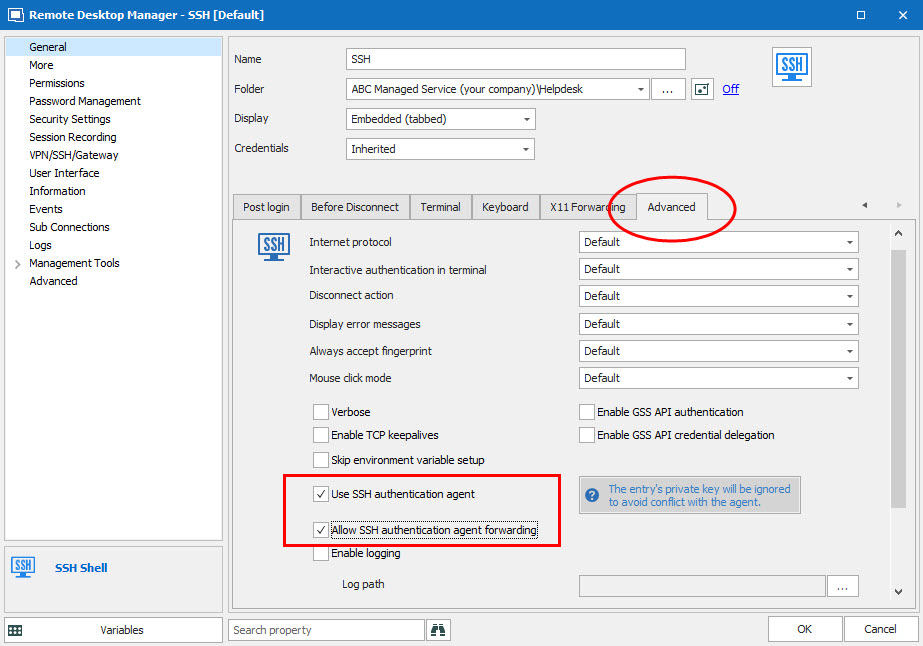
For example, once you’ve SSHed into a machine, it will continue to SSH from it to the next machine, using the same key. I’m sure you can see how useful this can be when comes time to deploy to a server! It will allow you to use your local SSH keys instead of having to leave them hanging on your server without any passphrase protecting them.
And that’s it! You can now pour yourself a nice glass of wine, and have one less hassle in life to deal with!
As always, please let us know your thoughts by using the comment feature of the blog. You can also visit our forums to get help and submit feature requests, you can find them here.
 Steven Lafortune
 Coralie Lemasson