
 Jean-Philippe Charest
If you have dozens, hundreds or thousands of entries in Remote Desktop Manager (RDM), you probably wish there was a fast and easy way to find the specific entry you need, when you need it. Well guess what? Your wish is our command: behold the mighty Tag Manager!
Tag Manager is available in the latest official release of RDM. It’s just one of the many improvements we’re making to existing features, which will accompany several brand new features of what’s in store for RDM 13).
What is Tag Manager?
As you might have guessed from the name, this helpful feature allows you to organize entries by tagging them with customized keywords. Once you’ve tagged your entries, you simply search for tag(s) and filter entries based on what you’re looking for.
How to Use Tag Manager
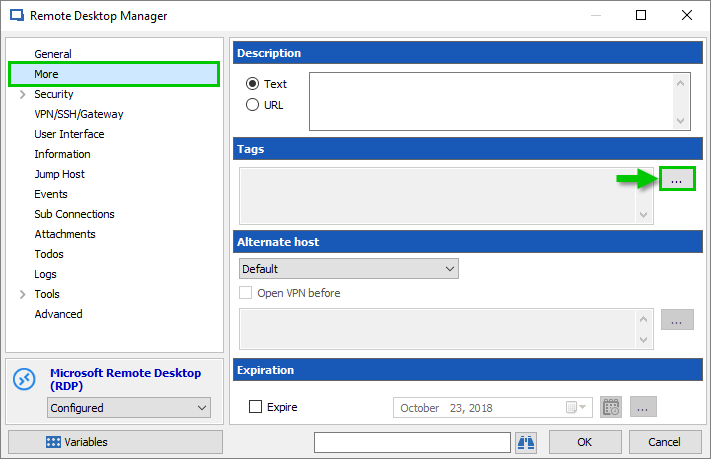
Start by editing any entry.
Click more from the side menu.
In the tags section, click the ellipsis button.

In the Tag Selection dialog, type a keyword in the text box (e.g. “Workstation”).
Click Add.
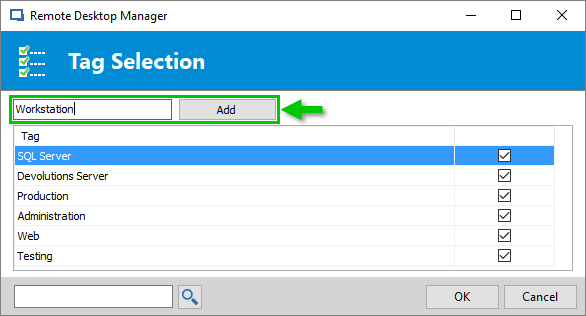
And that’s it! Your customized keyword has been associated with a specific entry.
Searching for Tags
- Press Ctrl+F to access the search box.
- Make sure to Include Tags in the search.
When using the search feature, you can search for tags and filter entries related to a specific tag.
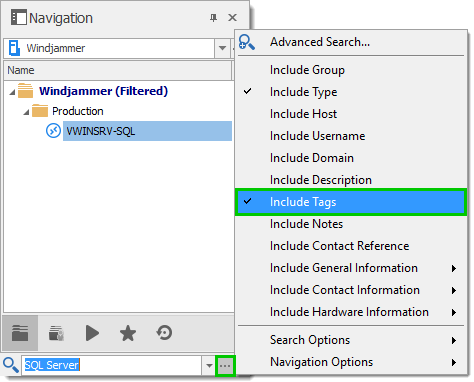
There you go! Just one more way RDM will save you time!

 Steven Lafortune

 Coralie Lemasson