Max Trottier
Hello RDMers! As you know, our development team is working hard to release new features or to fix bugs in Remote Desktop Manager. This results in new versions being released frequently. Some of you are working in a team environment in which the update of an application has to be coordinated. This means that we often get questions like : How can I disable the auto update in Remote Desktop Manager? You can disable the auto update verification in Remote Desktop Manager via File –> Options –> General –> Application Start. You can uncheck both options “Check for update at startup” and “Includes Beta versions”. 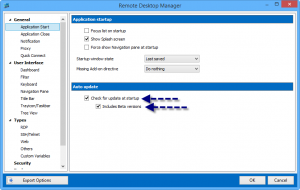 For more information on those 2 options, you can consult our online help at http://help.remotedesktopmanager.com/file_options_general_applicationstart.htm As you can see, it’s very simple to turn off the auto update verification. I think it’s easier to do this than to put your shoes on! The Devolutions Team
Is there a way to disable auto update?
Hello RDMers! As you know, our development team is working hard to release new features or to fix bugs in Remote Desktop Manager. This results in new versions being released frequently. Some of you ...
 Steven Lafortune
 Coralie Lemasson