











 Derick St-Hilaire
Les miniatures sont utiles, car elles nous renseignent sur ce que nous voulons savoir en un coup d’œil. Par la suite, nous décidons si cela vaut l’effort d’approfondir notre compréhension et d’en apprendre davantage. Savez-vous ce qui est encore mieux que les miniatures? LES MINIATURES EN DIRECT! Je suis ravi de déclarer que nous avons ajouté cette fonctionnalité à Remote Desktop Manager 2021.1 pour Linux.
Miniatures en mode sombre
Les miniatures en direct dans RDM 2021.1 pour Linux ne sont pas images statiques. Ce sont des sessions cliquables, interactives et dynamiques. Par exemple, lorsque vous avez besoin de lancer des commandes ou une mise à jour sur plusieurs serveurs simultanément, vous pouvez le faire directement à partir de l’onglet miniature en direct sans changer de fenêtre. (Veuillez prendre en note qu’à l’heure actuelle, cette fonctionnalité est disponible lorsque vous lancez une session Apple Remote Desktop, VNC ou Microsoft RDP.)
Création de miniatures en direct
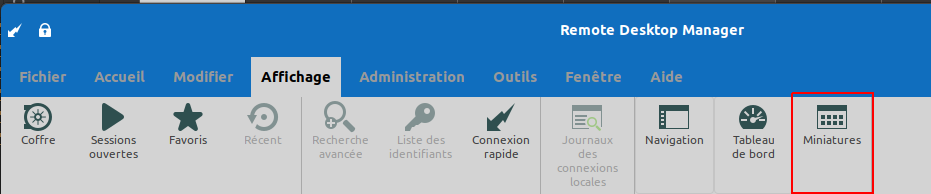
Cliquez sur Miniatures dans le menu affichage.
Ensuite, pour créer une session interactive cliquable, il suffit d’appuyer sur le bouton situé dans le coin inférieur droit.
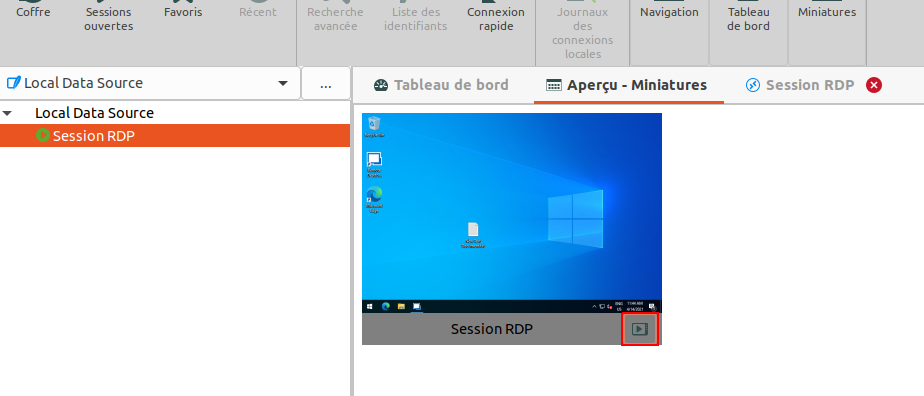
Et c’est tout ce qu’il y a à retenir! De cette façon, vous pourrez veiller sur vos sessions, ce qui vous aidera à épargner temps et efforts.
Faites-nous savoir ce que vous en pensez!
Comme toujours, merci de nous faire part de votre avis afin de faciliter le travail de notre équipe de développement en ce qui concerne les améliorations et changements vous aidant à maîtriser le chaos relié aux TI.