











 Jenny Knafo
Qui dit début d’année dit résolutions. Si vous êtes comme moi, ça veut surtout dire reprendre les mêmes résolutions d’année en année (ça doit faire environ dix ans que « manger plus sainement » figure sur ma liste)!
Contrairement à moi, chez Devolutions, on TIENT nos promesses, y compris notre engagement à améliorer nos produits et les rendre plus utiles pour vous. C’est ce qu’on a fait en intégrant Bitwarden à Remote Desktop Manager Enterprise!
À propos de Bitwarden
Bitwarden, c’est un logiciel de gestion de mots de passe gratuit et open source qui stocke des informations sensibles comme les noms d’utilisateur et les mots de passe dans un coffre chiffré. La plateforme Bitwarden offre une variété d’applications clientes, dont une interface web, des applications de bureau, des extensions pour navigateurs, des applications mobiles et une ILC.
Ajoutez votre compte Bitwarden
Intégrer votre compte Bitwarden dans Remote Desktop Manager, c’est rapide et facile. Voici ce qu’il faut faire :
-
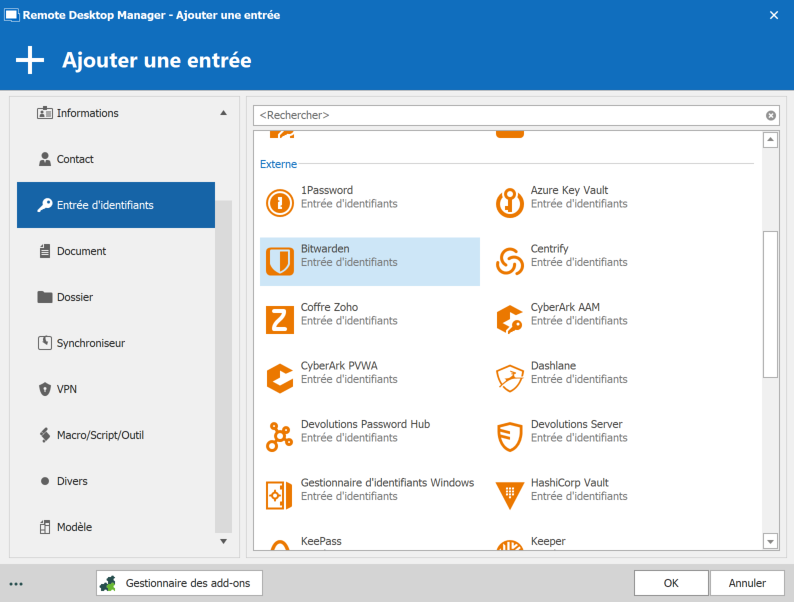
Pour commencer, ajoutez une entrée d’identifiants, puis sélectionnez Bitwarden.
-
Entrez l’adresse courriel et le mot de passe de votre compte Bitwarden pour vous connecter.
-
Vous avez deux options : Liaison d’identifiants statique ou Liaison d’identifiants dynamique.
-
La liaison d’identifiants statique lie votre entrée à des identifiants spécifiques stockés dans votre compte Bitwarden.
-
La liaison d’identifiants dynamique accorde un accès direct à votre liste d’identifiants de Bitwarden chaque fois que vous vous connectez. Ça crée un pont entre Remote Desktop Manager et Bitwarden, ce qui vous permet de créer encore plus facilement une seule entrée d’identifiants, utilisable avec plusieurs sessions.
C’est tout! Vous êtes maintenant prêt à profiter de tous les avantages de Bitwarden et de Remote Desktop Manager!
Comme toujours, faites-nous part de votre avis en commentant ci-dessous. Vous pouvez également vous rendre sur notre forum pour obtenir de l’aide et soumettre des demandes de nouvelles fonctionnalités.