











 Stéfane Lavergne
Need
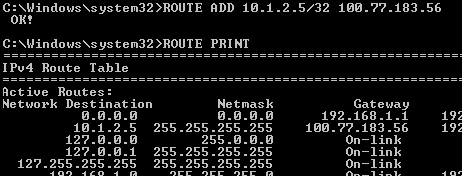
As you probably know, establishing a VPN connection using Remote Desktop Manager is easy. Unfortunately, adding routes has to be done manually. Wait for the adapter to connect, find the IP and add the desired routes. Even if you use a script (such as a Power Shell script), it’s still a redundant time-consuming task - and one you can certainly live without.
Solution
Well, helping you live without unwanted, time-consuming tasks is what we do here at Devolutions! And that’s why we’re delighted to share with you that in the current beta release of Remote Desktop Manager, you’ll enjoy full built-in route support. This feature is part of a larger concept called Post/Pre VPN Commands, and allows you to run any type of script or executable post-VPN-connect and pre-VPN-disconnect.
How-to
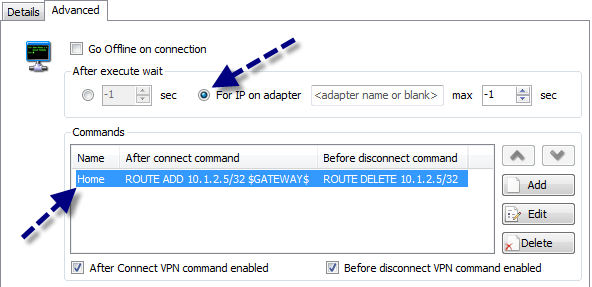
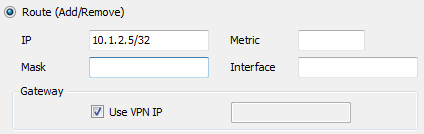
Getting set up is simple. First, configure the VPN to wait until the adapter connects and gets assigned an IP (we’ll be using the adapter’s IP to define the routes). Second, create a route definition by selecting “Route (Add/Remove)”. Finally, set the IP and any other required information. That’s it - you’re done!
Conclusion
As you can see, defining routes is easier than ever, and you have full control. Options like; keep the route even after the VPN connection is closed. We hope you enjoy this new feature - the possibilities are endless
A Special Thank You
I’ve saved this special thank you for last, not because it’s the least important, but rather because it’s the MOST important and I wanted to make sure that it received its own spotlight. This great new feature was first suggested by two community members in our very active forum (click here to visit). We would like to thank them for helping us make Remote Desktop Manager better - not for us, but for our thousands of users around the world. Listening to the needs of our community of IT experts is the most important thing we do. We love it when you tell us what you like or, sometimes, what you don’t like. We’re always listening, and are grateful for your support and desire to help us constantly improve!
 Steven Lafortune

 Coralie Lemasson