













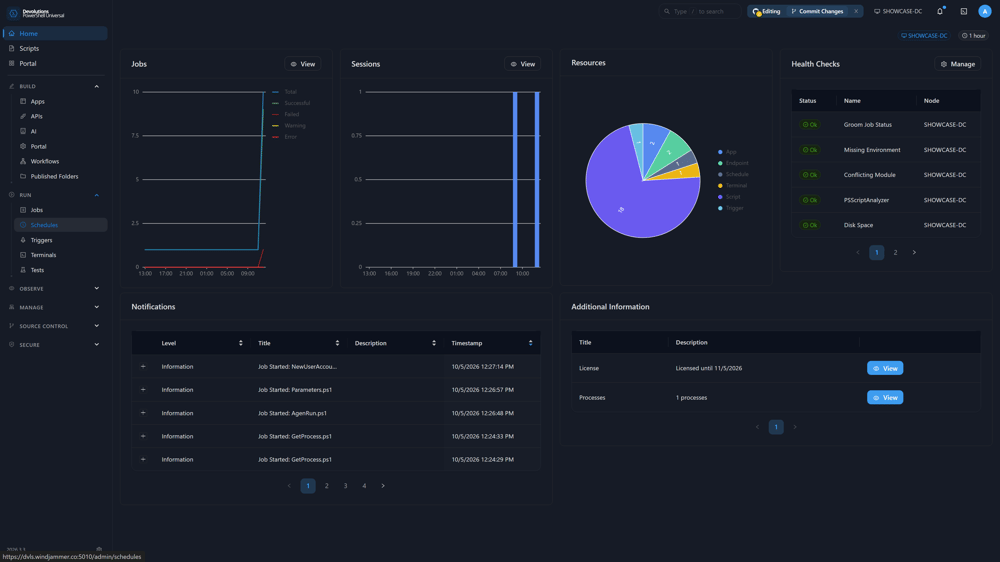



A unified platform for PowerShell automation
PowerShell Universal brings together everything you need to build, automate, and operationalize PowerShell at scale. From internal tools and dashboards to APIs and scheduled automation, PSU lets teams move from scripts to production-ready solutions.

Stop running scripts by hand
Move beyond ad-hoc scripts. Schedule, monitor, and manage automation with visibility and control.
- Centralized automation management
- Script and module hosting
- Scheduled jobs and triggers
- Execution history and logging

Expose your scripts to any system in minutes
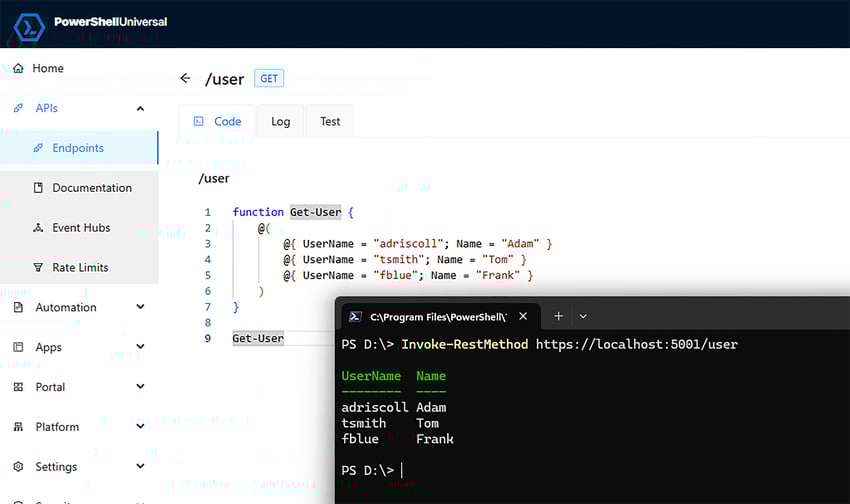
Expose PowerShell logic as REST APIs to integrate with external systems, internal tools, or DevOps pipelines.
- REST and WebSocket API generation
- Token-based authentication
- Open API documentation

Build internal tools without a frontend team
Create interactive dashboards and custom web applications using PowerShell. Expose data, visualize workflows, and build internal tools without switching stacks.
- Dynamic dashboards
- Custom pages and components
- Built-in UI framework

Enterprise access control, built in
Control who can access what — from scripts to dashboards — with enterprise-grade authentication and authorization.
- Role-based access control (RBAC)
- Multiple authentication providers
- Code-based configuration
If you are a reseller, log in to see your price book.
Purchased on the previous platform? Sign in with your Ironman Software account
See it in action!
Get the full platform. Free.
The Developer edition unlocks the complete PowerShell Universal feature set for local development at no cost — the same capabilities you can run in production with a Server license.
Get started in 3 steps
What's included
Full PowerShell Universal feature set
Automation, APIs, dashboards, and authentication
Access to the Devolutions community and tooling with your Devolutions account
What it's for
Developing PowerShell apps locally
Exploring the platform before production
Testing integrations and workflows
When PowerShell Universal runs production workloads, a Server license is required.
Download for FreeSee all editions & pricingPowerShell Universal use cases
Common ways teams use PowerShell Universal across scripting, scheduling, internal apps, reporting, and local development.
Organize, secure, execute, and audit scripts from a central admin console with browser-based editing, Git integration, and access to the PowerShell modules your team already relies on, including Azure, Microsoft Graph, VMware, WMI, and Exchange Online.
Run recurring jobs with one-click schedules or complex CRON expressions, scale execution across multiple PSU instances, and group computers by environment so automation runs in the right place with clear status reporting.
Build internal tools, portal pages, and REST APIs directly in PowerShell, from password reset forms and inventory lookup tools to group management workflows and data collection endpoints, without requiring a traditional frontend stack.
Generate scheduled reports from PowerShell scripts, deliver them through email or chat notifications, and build interactive views with tables, data grids, and charts directly inside PowerShell Universal apps.
Run PSU locally to manage modules and secrets, test scripts and schedules, and validate dashboards, APIs, and automation before moving to production.
Use PSU directly in your existing workflow
No new workflow required. Work from VS Code, Git, and the PSU web UI to write, version, test, and ship automation in the same tools your team already uses.

VS Code
Write and deploy without leaving your editor. Use the official PSU extension for IntelliSense, script navigation, connection management, and one-click deployment.

Git
Version your automation like code. Connect PSU to your repository so scripts, dashboards, and APIs stay in source control and follow your normal review workflow.

Browser editor
Quick edits with no setup. Use the built-in script editor with syntax highlighting and IntelliSense when you need a fast update from the web UI.

Debugger
Test before you ship. Set breakpoints and step through script execution directly in PSU before pushing changes to production.
Push to the tools your team already uses
Drop community-built trigger modules into your PSU instance to send notifications, post to chat, and connect to third-party services without writing the integration plumbing yourself.
No modules found matching your criteria.
Overview
Total downloads
Latest Version
Published
Install command:
README
Version history
Showing the 25 most recent versions. Older releases are available on PowerShell Gallery.
Runs where you need it
Deploy PowerShell Universal in the environments your team already uses, from Windows servers and Linux hosts to containers and Azure services.
Windows
Linux
Docker
Azure
macOS
Last reviewed: May 2026 · Maintained by the PowerShell Universal team at Devolutions · Originally created by Adam Driscoll, who continues to lead PSU development.
Security & compliance · ISO 27001 · SOC 2 Type II · on-premises deployment for regulated environments
Devolutions PowerShell Universal FAQ
Licensing & editions
Is PowerShell Universal Developer edition really free?
Yes, the PowerShell Universal Developer edition is completely free for local development. It includes the full PSU feature set and only requires a Devolutions account login. A paid Server license is required when you run production workloads.
What's the difference between Developer edition and Server license?
The PowerShell Universal Developer edition is for local development only — it requires a Devolutions account login and cannot be used in production. The Server license is the paid edition required for production workloads; it has the same feature set without the local-only restriction.
Can I use Developer edition in production?
No, the PowerShell Universal Developer edition cannot be used in production. A Server license is required for production workloads.
Development & deployment
Does Developer edition include all features?
Yes, all PowerShell Universal features are enabled in the Developer edition, including automation, REST APIs, dashboards, authentication, role-based access control, and Git integration.
How do I move from development to production?
To move PowerShell Universal from development to production, purchase and install a Server license. The same scripts, dashboards, and APIs built locally with the Developer edition run unchanged under the Server license.
Why did the version number change to 2025.3.x?
The PowerShell Universal version numbering changed to align with Devolutions' company-wide versioning scheme. PSU 2025.3.x is considered the same major version as the previous 5.x line — it is not a major breaking change.
Security & access
How does authentication work?
PowerShell Universal authentication can be configured using local accounts or by integrating with a third-party identity provider such as LDAP, SAML, or OpenID Connect (OIDC). All authentication methods support role-based access control.
Can I control access to scripts and dashboards?
Yes, PowerShell Universal includes built-in role-based access control (RBAC) that applies to scripts, dashboards, APIs, scheduled jobs, and configuration. Permissions can be scoped per user, group, or role.
Is PSU suitable for regulated environments?
Yes, PowerShell Universal runs entirely on-premises and does not require external network connections to function. This makes it suitable for air-gapped, regulated, and compliance-sensitive environments.
Devolutions & ecosystem
Is PowerShell Universal integrated with other Devolutions products?
Integration between PowerShell Universal and other Devolutions products (Remote Desktop Manager, Devolutions Server, PAM) works by authoring PowerShell scripts that call those products' APIs and executing them within PSU. Devolutions is actively working on tighter native integration.
How does PSU compare?
How does PowerShell Universal compare to ScriptRunner, au2mator, and Rundeck?
PowerShell Universal is the only platform that combines scripting, scheduling, dashboards, REST APIs, and access control in a single product — all in PowerShell, with no additional stack required. ScriptRunner focuses on PowerShell orchestration and delegation but does not offer dashboards, custom web apps, or REST APIs as a first-class platform. au2mator is a self-service front end for automation that runs elsewhere. Rundeck is a multi-tool DevOps orchestrator rather than PowerShell-native.
| PSU | ScriptRunner | au2mator | Rundeck | |
|---|---|---|---|---|
| Main focus | Full platform: scripts, dashboards, APIs, scheduling | PS orchestration & delegation | Self-service portal for existing automations | Runbook automation & incident response |
| Dashboards / web apps | Yes — built-in UI framework | No | No (self-service forms only) | No |
| REST APIs from scripts | Yes | No | No | Limited (API for jobs) |
| Native language | PowerShell | PowerShell | PS, Azure Automation, SC Orchestrator | Agnostic (Bash, Python, PS, Ansible…) |
| Free dev tier (local) | Yes — full Developer Edition | No — quote-based pricing | Limited free version | Open-source Community; enterprise paid |
| Deployment | Windows, Linux, Docker, Azure, macOS | Windows on-prem, Azure | Windows on-prem | Multi-platform, containers |
| Git integration | Yes — native | Yes | No | Yes |
| VS Code extension | Yes | Yes | No | No |
| Approval workflows | Via RBAC | Yes (v7.2+) | Yes — multi-level | Yes (enterprise) |
vs ScriptRunner — The closest PowerShell-centric competitor. ScriptRunner focuses on execution and delegation; it does not offer dashboards, custom web apps, or REST APIs as a first-class platform. It typically has no public free tier.
vs au2mator — A self-service front end for automation that runs elsewhere (Azure Automation, Orchestrator, etc.). PSU is both execution engine and UI. au2mator does not replace a full scripting and API platform.
vs Rundeck — Strong multi-language orchestration for DevOps/SRE. Not PowerShell-native and not aimed at dashboards/internal apps. Enterprise pricing is often a significant investment; PSU fits Windows/PowerShell teams who want one stack.
In short: If you need a self-service portal for existing automation, look at au2mator. If you need a multi-tool orchestrator for DevOps, look at Rundeck. If you want to turn PowerShell scripts into dashboards, APIs, scheduled jobs, and internal tools — from one platform, with a free Developer Edition — PowerShell Universal is built for that.