











 Marc-André Moreau
Note: this long-form post was originally written for The Pragmatic Engineer’s essay challenge on how software engineering is changing.
October 2025. Claude Sonnet 4.5 has just come out, and everyone at Devolutions is going through AI training from Mindstone. The message from the CEO is clear: we are taking all the necessary steps to make the company AI-native. Employees are offered a voluntary departure package if they don’t want to be a part of this new “Devolutions 2.0”. Those who stay need to be committed and go all-in on AI with the rest of us. Here is the story of the profound shift that happened at Devolutions, and how a major migration originally estimated at three years was completed in just one.
Devolutions is a bootstrapped Canadian software company with its main office in Lavaltrie, Quebec and over 250 employees all over the world. The name “Devolutions” stands for “Development Evolutions”, from back in the day when the founder, David Hervieux, was doing software development contracts, long before the current commercial success of our flagship product, Remote Desktop Manager (RDM). RDM is a connection manager: it takes care of launching connections with credential injection for protocols like RDP, SSH, VNC, ARD, PowerShell, etc. If it accepts credentials and connects to something, RDM likely already supports it.
My team is a bit special: it includes the developers from the Ottawa branch office, but also developers in the US, Germany and Japan. We call it the “architecture” team internally because we are responsible for building a lot of reusable components that other teams use. It is a very loose structure, but everyone is highly autonomous, motivated, and responsible. Most teams at Devolutions are in person, not remote, in the Lavaltrie main office.
As for me, I am the Devolutions CTO. In a past life, I founded the FreeRDP project. I am a Microsoft MVP in the Windows and PowerShell categories. My primary area of expertise is in Windows protocols, especially for RDP and authentication. I have a knack for reverse engineering and digging into system internals. I like to experiment with technology in order to find ways we can assemble the pieces of the puzzle to build the products that we want.
Windows desktop applications are often left behind in the world of AI: most popular tooling first came out without Windows support, and when it finally did, it was partial. Desktop applications, unlike web applications, are at a strong disadvantage because they are much harder to automatically validate with AI. Despite these challenges, we managed to port Remote Desktop Manager, a massive .NET enterprise application with thousands of UI dialogs, to Avalonia, a cross-platform UI framework, in less than a year. Even more surprising is that the Windows migration reached 100% first, ahead of other platforms with less technical debt.
Compressing three years into one
The great Avalonia migration project
We’re desktop-first, and we’re committed to making great desktop applications, which is why we are sponsoring Avalonia with $3 million over 3 years. The reason is simple: we don’t want to sacrifice the desktop application experience by using a web application in a trenchcoat like Electron, but we still need to reduce the burden of development by migrating to a cross-platform UI framework in .NET. We have a lot of legacy and advanced features accumulated over the years, so we cannot afford to rewrite everything to a new UI framework between two major releases. Pre-AI, we estimated the effort to take at least 3 years. Avalonia gave us the means to do a partial migration, such that we could mix native UI elements with Avalonia.
This is the most ambitious migration ever attempted at Devolutions: 1,500+ WinForms UI elements dating back to more than a decade’s worth of work, just for RDM Windows. Other platforms have far fewer native UI elements. In October 2025, I was looking into how we could use AI to accelerate this, because at this point in time, the migration was still mostly manual. The first thing I did was create a script that would scan source files in our monorepo to record the number of platform-specific UI elements to be migrated, starting from the very first commit where Avalonia was introduced. This number became our baseline, and each platform would have to bring that number down to zero by removing them as they were replaced by Avalonia.
The total count for all platforms combined was over 5,800 UI elements to port, and at that point, progress was barely a few percent for each platform.
The AI slop cannon phase
Early attempts at accelerating the Avalonia migration led to a lot of AI slop, most of which I was personally responsible for. Thankfully, the frustration it caused was only temporary, and looking back on things, it was a necessary step to take in order to learn. The real value of the AI slop cannon phase was to give a wake-up call to the developers who knew what they were doing to start adding and improving instructions for AI to make fewer mistakes.
Here were the challenges:
- I didn’t do much UI myself, so I didn’t know what I was doing
- AI models from a year ago made a lot of mistakes
- AI didn’t have the right tools to see before and after
RDM supports a lot of connection entries, especially VPNs which users can use as a dependency for another connection entry. For instance, you can have an RDP connection automatically launch a WireGuard VPN if it’s required to connect to the associated RDP server. I decided to try porting the VPN connection entry first, in the hope of extracting enough instructions for AI to become good at porting all the other VPN entries. It took a couple of attempts and I had to ask colleagues to help me fix things on an experimental branch, after which I updated the instructions by pointing the LLM at the commits to learn from them. After a couple of iterations like this, the instructions became good enough that I could automatically port a few other VPN entry types, but they would still require a lot of fixing.
The process became semi-manual: I would launch a session in which I instructed the agent to analyze and list the next simplest VPN entry types I could port next. I’d do a batch of 10 of them at a time, then manually launch RDM to take screenshots before and after, and paste those back into the AI agent. The screenshots alone helped a lot to get the visuals right, but many problems only surfaced by clicking and trying things out. Many elements required the detection of specific VPN software installed and usable, so it wasn’t easy to test everything. I migrated about a hundred connection entries this way, which worked to the best of my knowledge, but a lot of small problems slipped through the cracks which others had to spend time fixing.
I took a pause at that point, since my goal was to bootstrap the AI migration process: a single markdown file of 5,000 lines of WinForms-to-Avalonia instructions honed over those early attempts was now used by a few developers successfully. The migration wasn’t going at breakneck speed, but it was still going faster than before. Deep down, I knew that we were just months away from the right person picking up the pace, having fully understood how to efficiently optimize the process to spend most of the time reviewing and doing quick fixes, with the vast majority of execution done by AI. Imagine someone doing QA-style testing, going through hundreds of UI dialogs to validate things, who can also have the confidence to fix the code instead of simply opening a ticket. Thankfully, this eventually happened!
The Avalonia migration acceleration
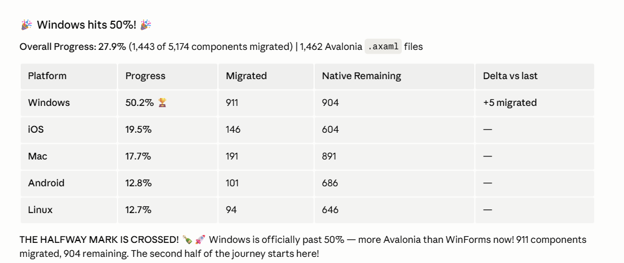
At the beginning of April 2026, RDM Windows reached 25% completion for the Avalonia migration. By the end of the same month, the 50% completion milestone was reached.
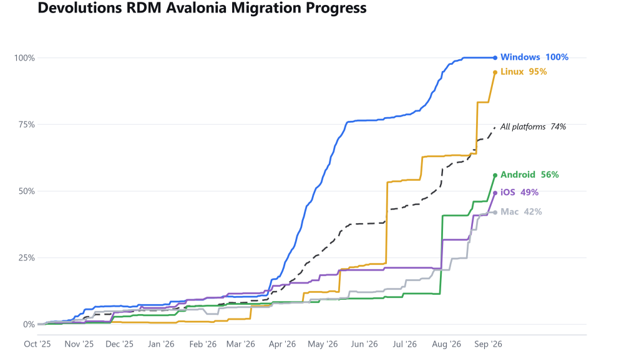
Significant progress was made over the summer, until we reached the 100% milestone in RDM Windows at the beginning of September:
This is a major departure from the pace of the migration of the early days, so what changed?
- A lot of shared, reusable Avalonia components were added to facilitate migrating
- People who knew what they were doing took the time to improve AI instructions
- A handful of people went through hundreds of UI components at a time
The original AI migrations that introduced slop also helped surface a list of problems that needed clean, foundational work. For instance, there was no cross-platform file picker component yet, so a proper one was made, and AI instructions were updated to use it. Otherwise, AI would often wrap platform-specific file pickers behind conditional compilation, and repeat that multiple times without reuse. We initially had to spend time building those required building blocks of higher complexity before trying to go faster.
This work was then picked up by others who would go and “claim the gains” by migrating the newly unblocked components of lower complexity and validating them in large batches. This is important: even if in theory you have a hundred UI components that can be migrated, the work is only done once the original source files are removed. Otherwise, you can never be sure of your real state of progress.
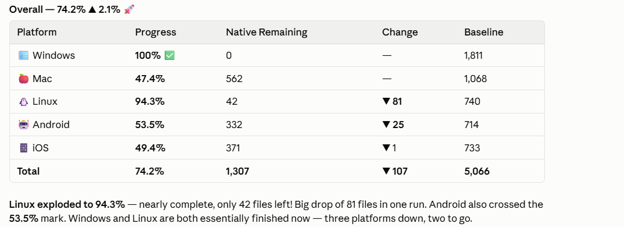
If you look closely at the other platforms, you may notice a huge increase in percentage between the 50% and 100% milestones of RDM Windows, specifically for RDM Linux, which went from 12.7% to 94.3%. A lot of the components migrated from WinForms in RDM Windows could now be reused as-is in RDM Linux. That alone wasn’t sufficient, otherwise we would have seen RDM Linux reach 50% (or more) earlier. The shift happened when RDM Linux developers started aggressively claiming the gains by replacing hundreds of the original Linux components by the new Avalonia components and validating them in large batches.
How software development changed
Making changes you aren’t comfortable with
With my early attempts at migrating WinForms to Avalonia with AI, I didn’t truly understand what I was doing. I’m not a UI developer, never was, and probably never will be (without AI). It may be counterintuitive, but there is a lot of value in making changes you aren’t comfortable with. In the case of the Avalonia migration, the intention was to hone sufficient AI instructions to automate most of the grunt work, leaving manual reviewing and post-migration fixups to the developer.
In 2025, Devolutions acquired PowerShell Universal, and the creator of the product, Adam Driscoll, joined my team. Shortly after, we hired another developer to work on the product, effectively doubling the size of the original one-person team. PowerShell Universal (PSU) is an ASP.NET application written in C# that enables an IT administrator to turn scripts into fully functional web applications exposed to end users. It can also execute scripts on a remote machine using an agent.
Devolutions already had an agent with more advanced features that included remote execution capabilities, so it didn’t take long before we planned to replace the original PSU agent written in C# with the existing Devolutions Agent written in Rust. The challenge was that the PSU developers didn’t know Rust, and the Devolutions Agent developers didn’t know PSU. In theory, it was a simple integration; in practice, I didn’t see real progress, only mockups and demos, not pull requests that would bring us closer to something we could ship.
I asked the C# developers to do something they weren’t comfortable with: just vibe code what you need in the Rust code to the best of your knowledge, knowing how you want it done for consumption in PowerShell Universal. Intent matters: we knew that the changes would correspond to what they wanted, even if we would likely change the shape through multiple adjustments. The starting point was a functional build of Devolutions Agent that we knew for a fact corresponded to what was desired for PowerShell Universal. Not a mockup, not a design specification!
I helped review the way things were done, and we had a lot of back-and-forth between the C# and Rust developers, until we finalized the shape of how Devolutions Agent would connect to PowerShell Universal and be configured as a remote execution host for PowerShell scripts. This is one of my proudest moments: accelerating development by having developers change code they didn’t understand, because they understood the intent better than the ones who would review it later.
Why does this work? Because like in many integrations, developers often only know their part well, but don’t have deep knowledge of what they are integrating with. This approach makes it easier for both sides to iterate on the real code until consensus is reached. It doesn’t matter how good your mockup is, the real code will always be better.
Closing the agentic feedback loop
AI changes a lot of things, but some basic rules remain. AI is only as good as the tools it can work with. If your AI doesn’t have eyes, it won’t see broken visual layouts: it will only guess that it did the right thing. If your AI can’t use a debugger, it will instrument the code with logging to figure out which code paths are taken. In many cases, the lack of efficiency is not important as long as it eventually figures things out on its own, or if a human is in the loop to validate things.
If there is one lesson to remember from this year, it is that you should be investing in closing the AI agentic feedback loop in order to reap the biggest benefits. The feedback loop wasn’t fully closed for the RDM Avalonia migration, but it was compensated by developers validating and iterating quickly on the changes.
Earlier this year, we acquired the UniGetUI open-source project. UniGetUI is a user interface over multiple package managers like WinGet, Chocolatey, PowerShell, npm, pip, etc. The project was originally only for Windows, written in C# with WinUI. It is now fully cross-platform using Avalonia, and you can use it with Homebrew on macOS, or distribution-specific package managers on Linux. This migration required several attempts before initial success, and was done very differently than the one for RDM.
I personally brokered the deal to acquire UniGetUI, which transferred maintenance and ownership of the project to Devolutions, without the original author being involved. I did all the initial work for the transition until we assigned a full-time developer to the project. I made two attempts at automatically migrating UniGetUI to Avalonia, both of which failed, since LLMs couldn’t figure out how to correctly call the Avalonia APIs, and also because I didn’t have the right tooling to close the feedback loop with the AI agent by giving it eyes on the result.
For my third attempt, I configured the Avalonia Build MCP which let the LLM fetch the API docs efficiently, and I instrumented the application to be usable with the Avalonia DevTools MCP. I now had accurate usage of the Avalonia APIs, but more importantly, the LLM could now launch the Avalonia application to interact with it, and inspect the visual result in a way that closely resembles the Playwright MCP server for web applications. I let it run for over 24 hours on its own, basically just telling GitHub Copilot to keep going. In the end, I had a first functional, usable version of UniGetUI in Avalonia that looked close enough to the original one in WinUI.
This was what I handed off to the new developer we had assigned to work full-time on UniGetUI. With a couple more weeks of tweaks and fixes from someone who knew how to work with Avalonia better than I did, we finally achieved something decent. Since switching the UI framework is something users are particularly sensitive to, it took about two months before we reached the point where we could delete the original WinUI version and stick only to the new Avalonia frontend.
Paying down technical debt
Devolutions Server is an ASP.NET application that uses SQL Server without an ORM. It’s been like that since the beginning, and since it has a lot of legacy, we can’t easily “just” add support for another database like PostgreSQL. To make matters worse, the one person within the company who knows this tricky part of the application is about to retire (he’s our former CTO). When Fable 5 was released on June 9th, I saw the perfect opportunity to give the PostgreSQL migration a try, because soon, the arcane knowledge of that technical debt would become unavailable.
I carefully created a plan in GitHub Copilot with Fable 5, then launched the agent. I managed to get it working to a minimal functional level within the first 24 hours. I then did an exhaustive gap analysis to find holes that needed to be fixed, generated a new plan with more test coverage, and more end-to-end testing. I had GitHub Copilot use its browser canvas to load the web application, log in with a test user, click around and validate that it truly worked. I even had it go through tests that involved waiting for scheduled tasks to run. By the evening of June 12th, when a US export-control directive forced Anthropic to pull Fable 5 for everyone, only three days after its release, I had completed the bulk of the work.
While I didn’t have a deep understanding of databases and this part of the application, by that point, I had honed my skill for doing large and complex migrations with AI. I used detailed, exhaustive gap analysis to figure out what needed to be done, what needed fixing, what wasn’t behaving like the original. I generated plans to add unit testing, but also integration testing, and combined that with end-to-end testing by the AI agent interacting with the application. What I produced was useful and proven to work to a certain extent, but not yet reviewed in depth.
Now here’s where it gets interesting: I have never had more fun with our former CTO than in the past year. He was very impressed with the progress, and proceeded to start fixing things he could find with Claude Code. I handed off my branch to him after bringing it up to the level that I could, and he took it from there, having a different perspective that I didn’t have. It took a few weeks to really find all the subtle problems that remained, but we made a really good team, and got it done.
My recommendation when it comes to paying down technical debt in high-risk areas of the code is not to be cheap on the tokens. Use the biggest models and spawn a lot of focused reviews to surface various kinds of problems you are worried may happen. It is very easy to make things work, but it takes a lot more time and effort to get them right.
How code reviews have changed
Do we have humans reviewing every single line of code? No, as it doesn’t scale. Nobody can review a constant stream of massive pull requests while remaining sufficiently focused to catch all problems. The good news is that an AI agent never gets tired of catching problems. Code reviews at Devolutions often involved explaining your changes to a colleague, and they would ask questions in return. With AI, you can perform a first local review of your changes, then have another AI agent perform a second review when you open the pull request.
Here’s a funny story about GitHub Copilot code review: we once had someone “complain” that it kept finding issues on their pull requests, and since they were legitimate problems, they couldn’t argue against them. If all these issues exist in the code, why can’t it report 50 of them at once, instead of 10 at a time? The real annoyance here was looping until the AI code review stopped finding real issues to fix.
For changes with a potentially large blast radius, we normally have someone pay closer attention to the changes. Instead of going line by line in the GitHub web UI, we found it much more efficient to simply check out the branch locally to ask AI the questions you would have normally asked the author of the pull request. You can do a “brain dump” of all your concerns and wait for AI to validate if the changes match your expectations. It is also easier to ask AI to explain how changes were made, and what parts of the application it affects, and how. You can then just ask AI to submit findings as inline comments on the pull request.
In order to avoid “rubber stamping” pull requests, we currently have a pilot project for automatic pull request approvals by AI if the changes match certain criteria. There’s no point in waiting for a human to press a button if the blast radius is not critical.
Scaling AI across Devolutions
The AI tooling explosion
By January 2026, we had a team of AI champions internally, with the role of promoting AI usage by sharing their own experience with their peers. AI instructions were maintained by a few developers in the monorepo. The message sent to everyone was to update AI instructions so that it would become better at understanding the code instead of resisting AI and complaining that it made too many mistakes. Internally, most developers were using Claude Code, with smaller groups using GitHub Copilot, Cursor or Codex. We had two AI committees: a steering committee with executive leadership, to discuss higher-level AI initiatives, or foundational AI projects, and an AI “center of excellence” committee with the AI champions, more hands-on, operational.
The temptation is there to try and standardize which AI tools we offer, but we resist it. Developers have their own preferences and we don’t want to force them to use a tool they don’t like. I personally never liked Claude Code and went all in with GitHub Copilot. I can’t argue with someone who feels productive in a tool I wouldn’t use myself, even if I can’t rationally explain it. My theory is that the productivity gain of AI tools is so big that the comparison is made with pre-AI tools, not between AI tools. The moment someone feels successful with one AI tool that fits their mental model and workflow, they’ll want to stick with it. I was a big user of VS Code pre-AI, so I naturally went with GitHub Copilot first. Many developers prefer to use Claude Code in a terminal alongside their main IDE (Visual Studio or JetBrains), and see VS Code as just another IDE alongside their existing IDE.
We experienced the first AI “downtime” when we reached a monthly limit of $5,000, which required us to upgrade our account with Anthropic to keep going. We had a few days where some Claude Code users temporarily switched to GitHub Copilot while the issue of the limit on our account was resolved. Those numbers looked big back then for the entire company. Now they’re just what a single power user can easily consume. GitHub Copilot is still using the premium request model that made it incredibly cheap if you knew how to use it efficiently. Cursor is more expensive, but we started offering it to our web developers and marketing department because of its advanced built-in agentic browser capabilities.
One side effect of the explosion of new AI tools is that our vendor management process quickly became a bottleneck. With a new AI tool that looks interesting coming out every day, and a clear message from the CEO that we are going all-in on AI, the number of requests to vet new products from various vendors grew beyond what our legal and security departments could handle in a timely manner. Even if you managed to go through the entire process to get the tooling approved, what about new features that should probably also be vetted again, like cloud sandboxing features? What about new AI models that come out but are served by a new inference provider that wasn’t used when the original vetting was done? We’ve streamlined our process, but it is still a problem today.
The great AI markdown wars
Do you remember when agent skills and AGENTS.md weren’t a thing yet, and every tool used a different convention for markdown files? I like to call it the “great AI markdown wars”: different file names, paths, format, etc. Unless you standardized on a single AI tool, you were bound to hit the problem of incompatibilities. GitHub Copilot using .github/copilot-instructions.md, Claude Code using CLAUDE.md with possible nesting. Reusable “slash commands” and path-specific instructions. All of them were only readable by their own tools, until Claude skills became agent skills that most tools would adopt and read from the same paths, all except Claude. AGENTS.md became the new norm, which again would not be read by Claude, and required CLAUDE.md instead.
We originally wrote scripts to synchronize and adapt the agent skills and markdown files for compatibility in our monorepo, with a CI job to run it every time one of the files was modified, but this made it hard to iterate on updating instructions locally. We eventually switched to git symlinks, which are a real pain to use on Windows because symlinks require special configuration to be properly enabled. We started moving instructions out of the primary AGENTS.md/CLAUDE.md into smaller markdown files, with reusable workflows extracted into their own agent skills. Do you remember that massive 5,000-line markdown file for Avalonia migrations? It was split into many smaller agent skills, with platform-specific conventions extracted into their own markdown files.
New skills keep getting added to the main Devolutions monorepo: more than 25 alone are for specific Avalonia-related tasks. Agent skills were added to edit translation files; the original version of those skills would naively cause the LLM to read very large .resx files just to change a line. Those were later rewritten and optimized to use a helper script, bringing the cost of an edit down from $1 to a few cents, as the LLM didn’t need to read the whole file, just the line it wanted to edit.
The AI agent skills hackathon
However, most agent skills were still authored by a handful of individuals within the company, a recurring issue that came up in our AI committees. The solution we came up with was to organize a company-wide “AI agent skill” hackathon for developers in March. We had held many hackathons in the past, but interest had dwindled in recent years, with fewer people participating. It was time for something new with a different format to break the “hackathon fatigue” that set in.
I took the time to bootstrap a dedicated agent skill repository that the developers could simply clone and open in the tool of their choice, with a README.md and a few pre-existing agent skills to get started. I crafted a good AGENTS.md with authoritative references to use for authoring agent skills, with instructions to use cross-platform PowerShell scripts alongside SKILL.md for helper scripts. IT had pre-deployed PowerShell 7 on all machines, making sure macOS, Linux and Windows users would be able to use those agent skills out of the box.
In the weeks before the hackathon, we made various announcements to encourage participants to think of what they’d like to do, and add their name and project idea ahead of time in a Slack canvas for everyone to see. We kicked off the day of the hackathon with a short conference call in which I presented the git repository to use, showed a few sample agent skills, how to get started and where to find more detailed instructions. The goal was simple: clone this repository, author an agent skill for anything you want, and submit a pull request when you’re done. Don’t worry about making the best agent skill or the most complex one, focus on finishing at least one. At the end of the hackathon, everyone would feel comfortable authoring their own agent skills, no more excuses. Agent skills that needed to be within a specific project to work could be developed in another repository, as long as a copy was made in the dedicated hackathon git repository for pull request submission.
This single git repository approach for the hackathon really helped make it feel like everyone was working on the same thing collaboratively, instead of everyone in their own separate projects. There was a lot of activity going on in the hackathon Slack channel as participants shared links to their own pull requests or asked questions. It was by far the most successful hackathon we’ve had in years, and by the end, we had 60 agent skills contributed.
Expanding AI beyond developers
The success of the “developer” hackathon was so great that it led to a “no-code” hackathon being organized in May. We adapted the format a little bit, especially for tooling which was changed to ChatGPT or Claude, accepting custom GPTs and other kinds of custom AI agent instructions that work best in chatbots. Conference rooms were reserved for the day, with organizers who made themselves available to assist. Many non-developers really enjoyed being able to have an expert take the time to help them achieve things they didn’t even know they were capable of.
Let’s not forget that even in a software development company, there is a huge portion of the business that relies on non-developers, and they need to be part of the AI transformation as well. As developers, the rift between developer and non-developer AI tooling is more obvious to us than it is for non-developers when they look at our tools. With the prompt as the new user interface, is there a way we could set up developer tooling to be used by our product marketing team? The answer, as it turns out, is yes!
For context, a lot of internal requests to our product marketing team involve updating or changing the website, with the changes done by the web marketing team. We had already onboarded Cursor for the web developers because of its built-in browser that feels like Chrome’s “inspect element” but infinitely more powerful. I bootstrapped a new git repository similar to the one used for the hackathon, and authored a set of agent skills that would allow fetching and mirroring any website easily, such that Cursor could edit static sites and produce mockups. No more Figma with lots of back and forth: you could just edit the real website by prompting, and I even added an agent skill to export the locally-modified static site to a single .htm file.
This enabled much faster iterations with a copy of the real website you could interact with, which feels very different than screenshots, or even interactive mockups that simulate the website but aren’t truly based on it. This significantly reduced the number of handoffs and lengthy processes to make changes to the website. Best of all, the developer could now feed the exported modified static site into Cursor to get the changes done properly on the source code the website is built from.
Today, that team is one of our most advanced in AI adoption, and can trigger website edits by tagging the Cursor bot in a Slack conversation. The website gets modified, built, and temporarily deployed with a link you can just open to see if the changes are good. If approved, it gets merged and deployed automatically. This would of course be much more difficult for desktop and mobile applications like Remote Desktop Manager, but if what you develop is using a web stack, you have the advantage of being able to close the loop much more easily in cloud sandboxed environments.
The new economics of building software
Hiring without growing headcount
We had no mass AI layoffs at Devolutions. Instead, we offered voluntary departure packages. In the fall of 2025, only a few employees decided to take it. We didn’t want employees to feel trapped in a “Devolutions 2.0” that might no longer be right for them. In 2026, we offered generous early retirement packages which were accepted by most eligible employees. Even if the year isn’t over yet, we are on track to have a balanced number of departures and new hires, such that the total headcount remains the same. We haven’t stopped hiring, but we have stopped replacing. AI has been an important factor in redistributing the workforce: every new hire supports the new Devolutions, while every departure brings us further apart from the old Devolutions.
New AI projects galore
In 2026 alone, I have created a large number of new major projects from scratch, all using the GitHub Copilot app. My laptop is now permanently awake, and running agents most of the time. When I come back home, I connect it, and re-launch my sessions. Before going to sleep, I ensure my sessions are not idle, and send them on overnight jobs. When I wake up in the morning, I often just kick them off again and by the time I leave for the office, they have already made progress. I’m sure that other CTOs are experiencing the same: time is a currency with long-running AI agents. All that downtime where you are not in front of the computer can suddenly become productive.
I’m still not entirely sure how healthy this is in the long term, but this is the new reality that I try to adapt to. I have always had way more ambitious ideas than I have had the time and resources to achieve, so it is very exciting and draining at the same time. In the past, I would be constrained by the fact that I couldn’t take away critical resources to build a side project on a whim. Now, it’s down to how much time I can spend preparing a plan to launch an agent. Combine that with an unlimited token budget, and I have built more software in the past few months than in my entire life.
Here is a short list of experiments that worked well enough that I cleaned them up for proper publishing, and they are all used in production, either as tools or as components of one of our products:
- Pinget: C# and Rust ports of winget-cli (C++), made cross-platform. Available as a NuGet package for consumption in UniGetUI.
- psign: Rust cross-platform code signing tool that supports all Authenticode file formats, with support for Azure Key Vault and Azure Artifact Signing.
- windbg-tool: Rust command-line tool using the WinDBG engine, designed specifically to allow AI agents to inspect process dumps, which I have used to investigate BSODs on my laptop.
All of these massive projects were completed in a matter of weeks, at a small fraction of the cost it would have taken in the past. Historically, I could only select a few of these ideas and plan the work over several months or years for others to do. I think this is why a lot of C-level executives are enjoying AI so much: if you are used to figuring out what you want others to build in a very specific way, fitting your requirements, talking to an AI agent will feel very natural to you.
I now burn a minimum of $15,000 per month in GitHub Copilot. It may seem like a lot, but it’s still really nothing compared to delegating that kind of work to a team of full-time developers. Not only is it cheaper, but you can usually evaluate feasibility within the first 24 hours, and abort doomed experiments early. In the past, resources would be taken for much longer before hitting an unforeseen deal breaker.
Building software for AI, not just with AI
AI can write a lot of code quickly, but it should only be considered good after it’s been confirmed to execute properly at least once. Tests are the simplest way to execute code to ensure it matches the expected behavior, but not everything is easily testable. Many parts of an application can be difficult to automate or require a specific live environment. The good news is that AI can now help you achieve high levels of testability much more easily than before.
Beyond tests, you should invest in building tools designed specifically for an AI agent. Back in my FreeRDP days, I still recall the long hours I would spend making a change, building, running a command to connect to a Windows VM, clicking and typing something to trigger a specific RDP feature I was working on, seeing if it worked. Rinse and repeat forever.
Fast forward to today with IronRDP, the spiritual successor of FreeRDP, written in Rust instead of C. This is a multi-year effort that I began at Devolutions long before AI, knowing full well the gigantic effort required. The project is very active with many internal and external contributors. Given what AI could do, I set out to build an agentic RDP client with one goal in mind: have my AI agent do the boring, repeatable part I used to do manually.
The strategy is simple: ironrdp-agent spawns a daemon process for the remote desktop connection, which can be controlled by repeated IPC calls from the CLI. The AI agent can then take screenshots, interact with the desktop by clicking and typing, use the clipboard, run scripts, copy files, etc. This means I can have my AI agent spend hours doing the grunt work of exhaustively testing features that used to require human interaction, all while I’m sleeping.
Who doesn’t like to wake up to a long list of “manual” test cases confirmed to be working in the morning? This is how I added filesystem redirection for Windows in IronRDP. It copied complex structures of files and directories, checked file hashes before and after. It even copied an 8 GB ISO to confirm it could transfer files over 4 GB without corrupting them.
The new economic reality of AI means that there is a very high return on investment in building tools meant specifically for AI agents. Not only that, but developing those tools is cheaper than before, so you don’t have to pick and choose. With traditional development, the cost of building complex development tools would often exceed the productivity gains.
What comes next
Closing the Windows desktop application feedback loop
The RDM Windows Avalonia migration didn’t leverage a full feedback loop with the AI agent, but it was compensated by developers iterating fast on the validation phase. The UniGetUI Avalonia migration was done mostly using a closed feedback loop with the AI agent over 24 hours, followed by a couple of weeks of fixes made by a developer. The part I didn’t tell you is that the only effective way to close the feedback loop on a Windows desktop application right now is to let the AI agent take control of the computer.
If you install the winapp CLI and the associated agent skills for UI automation in the GitHub Copilot app, you can have the AI agent launch your application and interact with it the same way it would with a web application running in Playwright. The only issue is that Windows only supports one application having the input focus at a time, so you can’t really do anything else while the AI agent is controlling the computer. This is why I would often let long-running UI validation tasks run overnight, when I was not in front of the computer.
The challenge for the next year will be to close the Windows desktop application feedback loop in a way that AI agents can launch and test GUIs without interrupting anything. A full remote desktop environment could work, but requires a lot of additional tooling to support remote deployment and execution. As for Windows Sandbox, it is still RDP under the hood, but it is unfortunately limited to a single connection at a time, so concurrent sessions would not be possible.
With my status as Microsoft MVP, I can provide direct feedback to Microsoft, and hope to find a solution to this problem, possibly contributing part of the technical solution with IronRDP. This will be an area of focus for the next year, given the productivity gains it would unblock with AI agents for us.
My predictions for the next year
This past year had so much going on that it felt like a decade to me. So much that felt naively ambitious in recent memory has become fairly easy to achieve in recent months. I don’t think we are close to seeing AI reach a plateau: it just keeps on accelerating at a dizzying rate. I recently felt deep unease after finishing in a few hours something for which I had been given an estimate of 4 months of work using traditional development methods.
Agentic workflows without a human in the loop will become more common: a lot more workflows will be triggered automatically rather than manually, and will perform more actions without a human in the loop. For instance, automatically updating docs to match the source code of a product. Automatically finding security issues and opening a pull request with a tentative fix. Humans will often remain in the loop somewhere, but in fewer places.
AI spending will become a permanent, significant portion of a company’s budget: a few months ago, we were on track to $1 million per year based on the monthly costs, but it has since grown to $2 million per year. We still have no plans to cut our AI spending. Keep in mind that this is for a company of 250 employees, so that’s about $8,000 per employee. I expect this number to only keep growing, even once we decide to try optimizing costs.
What stayed the same
In a world that changes so fast, what are truths that remain?
Finding and configuring the right tools for the job still matters: you want to reverse engineer software written in C/C++? Take the time to install Ghidra or IDA Pro, and configure an MCP server to expose its functionality to your AI agent. Otherwise, you’ll essentially be driving a fast car with flat tires: it won’t go anywhere, and you’ll waste a lot of tokens trying.
Deep knowledge of software architecture remains relevant: do not mistake having successfully achieved a goal with having done it the right way. AI is great at doing what you ask, but if you only have surface-level understanding, you’re leaving a lot of important decisions to pure luck. Deep understanding is what helps you steer AI in the right direction such that it doesn’t take shortcuts that may conflict with your intended requirements.
Building the house before the foundations is still a bad idea: a good portion of the Avalonia migration effort went into building proper components that could be reused in several places. If we had pushed through the migrations that depended on those, the AI agent would have created a lot of highly similar boilerplate code and helpers. Building proper foundations under a house that’s already built is doable, but it costs a lot of tokens and time.
Lessons learned
I have learned a lot over the past year, but if I had to bring it down to a small list, here it is:
- Execution is compressed: there is more value in knowing what to do than doing it
- You should be actively paying down technical debt to regain previously lost agility
- Invest in building tools that allow AI agents to close the feedback loop
- Code reviews still exist, but are now performed with AI at different levels
- Making changes in code you don’t understand can accelerate development
I hope that my experience as the Devolutions CTO in this past year of AI has been relevant to your reality on the ground, and that you learned something from it. I look forward to next year on this never-ending roller coaster ride!