












 Sebastien Duquette
Supply chain attacks have moved from the occasional headline to something close to a weekly occurrence. “Update early, update often” has long been standard advice in software maintenance to ensure security vulnerabilities are patched quickly, but the flurry of recent supply chain attacks affecting popular libraries and security tools like Axios, TanStack, Trivy, and Bitwarden is calling this advice into question. The pattern is almost always the same: a malicious version of a trusted package ships, gets pulled into thousands of environments, and is caught and removed within hours or days. By then, the damage is done for whoever updated first.
That’s why many are now advocating for dependency cooldowns, where updates are delayed for a few days after release, because compromised packages are often discovered and removed within hours or days. Many package managers, such as pip, npm, and Cargo, now support cooldowns.
Bringing cooldowns to UniGetUI
We wanted to bring that same protection to the desktop side of the house, so we added a Minimum Age for Updates setting in UniGetUI to apply this approach to software updates. When an update is available, UniGetUI checks the package’s publication date and temporarily holds it back if the release is newer than the threshold you set. After the minimum age is reached, the update appears like any other.
What the setting can and can’t do
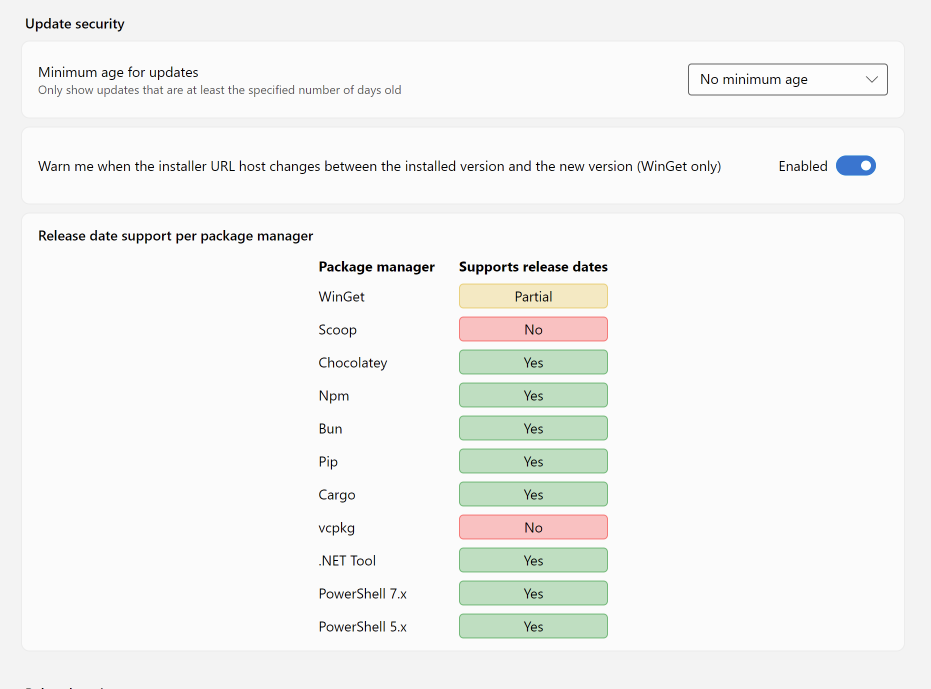
There are a few limitations worth knowing about before you turn it on. The release date is optional in WinGet packages, and package managers such as Scoop and vcpkg do not provide the release date in the package metadata. When the release date is not available, UniGetUI behaves as if the Minimum Age for Updates was disabled for those packages. UniGetUI also only checks the publication date of the top-level package; packages that are built at install time may pull dependencies that are more recent than the configured minimum age.
How to enable it
To enable this configuration, navigate to Package update preferences in Settings and set Minimum Age for Updates to the number of days that fits your risk tolerance. This setting can be fine-tuned per package manager in the Package Managers section.
Final thoughts
Patching quickly still matters, but it is no longer the only variable to optimize for. A short cooldown costs you very little in exposure to known CVEs and buys you a meaningful amount of protection against the kind of attacks that have dominated 2025 and 2026 so far. With Minimum Age for Updates, you get to decide where that line sits for your environment, package manager by package manager, instead of being forced into an all-or-nothing choice between “always latest” and “manual review of everything.” For most teams, even a two- or three-day delay is enough to let the community catch a poisoned release before it lands on your machines.