












 Adam Listek
We’re thrilled to introduce Devolutions Cloud 2025.1, our first major release of the year, packed with exciting new features and improvements inspired directly by your feedback. Read on for the key highlights, and be sure to check out the release notes for the full list of enhancements and fixes.
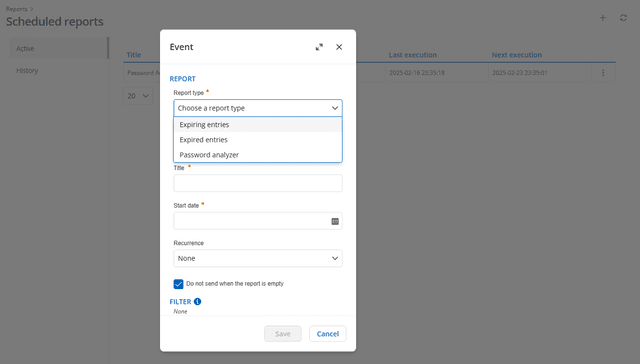
Scheduled reports with the Devolutions Cloud reporting service
Using Devolutions Cloud Services, you can now run reports on a schedule instead of only on demand. Schedule expired entry, expiring entry, and password analyzer reports to be sent by email to any number of users.
“My privileged credentials” and “My personal credentials” in Devolutions Cloud
Many IT professionals maintain standard user and privileged (administrator) accounts. Remote Desktop Manager (RDM) supports “personal credentials” and “privileged credentials” linked to each user. If everyone in a data source uses their linked accounts, RDM sessions can be configured to automatically use the personal or privileged credentials associated with a user’s account.
Before version 2025.1, both credentials were stored locally within RDM. However, starting with version 2025.1, both credentials are now saved in the Devolutions Cloud data source, providing a more robust configuration.
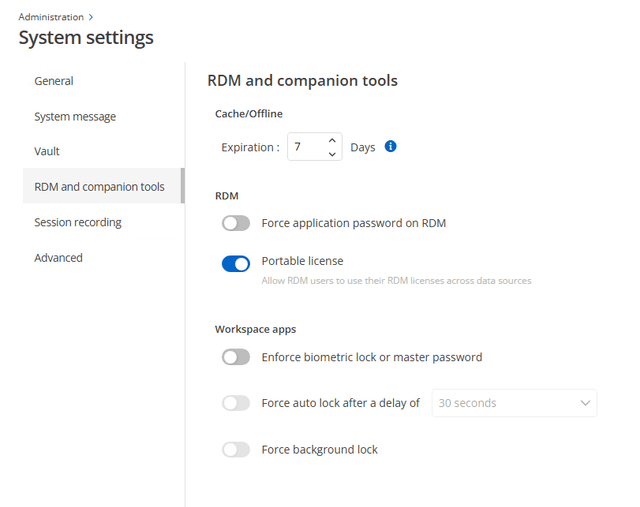
Support for portable licenses
A portable license allows a time-limited reassignment to a specific data source. Great for MSPs that manage other Cloud instances for customers, portable licenses avoid the need for an MSP to have a license for each. Under Administration > System settings > RDM and companion tools, you can configure portable license availability.
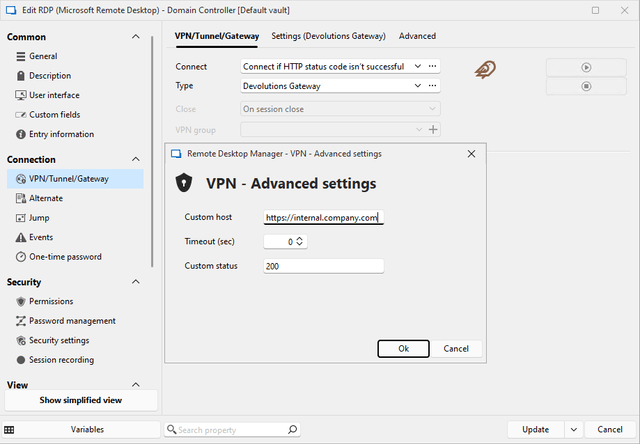
Devolutions Cloud and RDM support for VPN “Connect if HTTP status code isn’t successful” option
Before forcing a connection to your VPN, first attempt an HTTP connection. If the correct HTTP status code is returned, connect normally; if not, open the VPN connection.
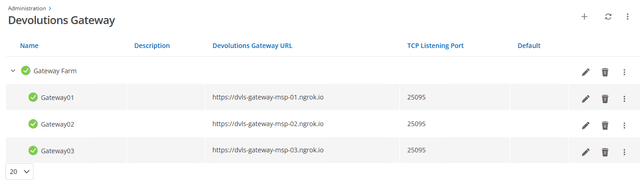
Load-balancing for multiple Devolutions Gateway instances with farms
Group multiple instances of Devolutions Gateway with newly introduced farm support. Assign relative weights to favor some Gateways over others while draining sessions when needed.
Custom PAM providers with Devolutions PAM support
This version supports Devolutions custom PAM providers.* With custom PAM providers, you can manage identities from nearly any source through PowerShell scripts that support account discovery, heartbeats, and password resets. Learn how Devolutions custom PAM provider works through our video walkthroughs.
To get started, follow these steps:
- In Devolutions Cloud, navigate to Administration > Application identities and create a new application identity to connect to Devolutions Cloud Services.
- Download and install Devolutions Cloud Services on your internal system, select PAM, and enter the previously created application identity.
- In Devolutions Cloud, navigate to Administration > Vaults and create a PAM vault to hold your entries.
- Go to the newly created PAM vault and modify the permissions to grant access to your previously created application identity.
- Create a custom Devolutions PAM provider.
- Run the custom Devolutions PAM provider discovery and import discovered accounts into your PAM vault.
*RDM 2025.1 is required (available on March 10th).
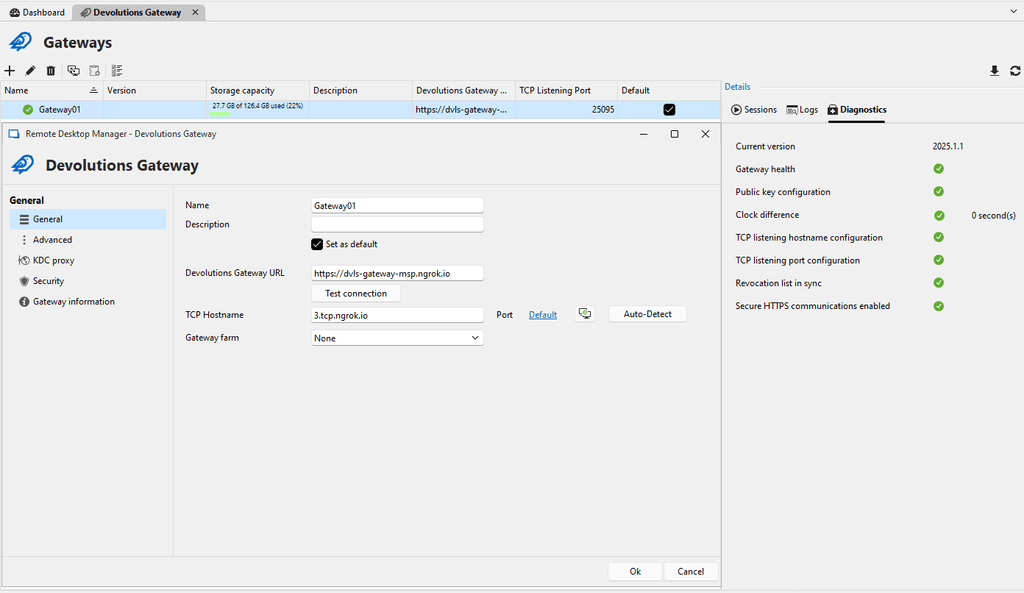
Configuration for managed Devolutions Cloud Gateway instances in RDM
Built directly into RDM, managed Devolutions Gateway instances can be configured for Devolutions Cloud data sources. View and manage current sessions, logs, and configurations as needed.
Tell us what you think
We’re constantly evolving Devolutions Cloud based on your ideas, so don’t hesitate to share your thoughts on these latest features and improvements. Drop us a comment below, join the conversation in our forum, or send your insights directly to our inbox. Together, we’re building something amazing!
About Devolutions Cloud
Devolutions Cloud is a secure, cloud-based password manager designed for IT teams and business users in small to medium-sized businesses (SMBs). Doubling as a cloud-based advanced data source for Remote Desktop Manager, this robust solution enables organizations to securely store and manage all their sensitive data — from passwords to building alarm codes — and consolidate remote connections, machine details, credentials, and more into a single, seamless experience.
Accessible via any browser through an intuitive web interface, as well as through the Devolutions Password Manager desktop app, mobile app, and browser extension, Cloud ensures ease of use without compromising on security.
Ready to get started? Create your Devolutions Cloud today.