











 Marc Beausejour
The endpoint your team supported in 2016 isn’t the endpoint you support today.
Windows desktops, Mac laptops, iPads on a factory floor, iPhones with field crews. Automation and scripting have grown alongside this complexity, but a long tail of work still demands a technician on the machine. And every time a technician opens a session on a critical system, that’s a moment of privileged access that needs governance.
When automation isn’t enough
Some problems don’t scale to scripts. A user reports something “feels off” with nothing in the logs. A legacy application needs a configuration change behind a GUI that has no CLI. A rendering issue exists only at the pixel level. A multi-factor authentication (MFA) prompt requires the user’s physical presence. The remote monitoring and management (RMM) agent itself stops responding. These aren’t exotic edge cases; they’re the daily reality of IT teams working in modern environments. They all require a human inside the system, often with elevated rights. Each one is a privileged session waiting to happen.
Where Remote Desktop Manager fits
This is where Devolutions Remote Desktop Manager (RDM) and Devolutions PAM earn their place.
RDM centralizes remote connections and credentials in a single interface, applying privileged access management (PAM) controls across every connection type. Credentials live in a vault and are brokered to sessions without ever being exposed to the technician. Role-based access controls decide who can reach which system. Session events are logged for audit and recorded, helping satisfy compliance requirements without depending on the underlying engine. For higher-risk targets, just-in-time access and dual-approval workflows ensure critical sessions never start unsupervised. The result is a governance envelope that wraps around every remote session, regardless of the protocol or tool driving it underneath.
These controls don’t stop at the session layer. Pair RDM with Devolutions PAM, and the privileged accounts behind those sessions get the same discipline. PAM discovers privileged accounts across the environment, brokers them through check-out and check-in workflows, and rotates passwords automatically after use. A technician can open a session on a critical system without ever seeing the password, and by the time the session ends, that password is already obsolete. Combined with just-in-time elevation and approvals, privileged access becomes something granted for a task, monitored while it’s used, and revoked when it’s done, not a standing door left open between incidents. That’s privileged access management sized for real IT teams: no dedicated PAM administrator required, no six-month deployment project.
How Supremo plugs in
Supremo is one of the remote access engines that integrates with RDM as a native connection type (we introduced the integration in a previous Spotlight article). Available on Windows, macOS, Android, and iOS, Supremo handles both attended sessions (the classic technician-supports-user scenario) and unattended access for systems that need to be reached without anyone at the other end. Within RDM, Supremo sessions inherit the same governance as RDP, SSH, or any other entry: vault-managed credentials, role-based access, and audited session logs.
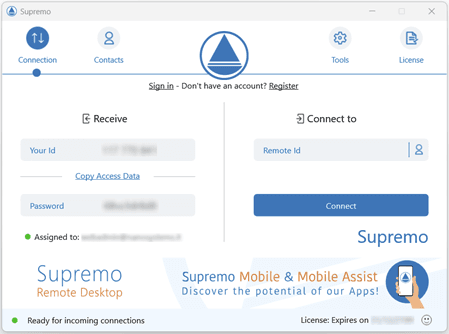
Supremo integration in Devolutions Remote Desktop Manager
Beyond standard remote access, Supremo adds extra functions like an RMM module and a Helpdesk toolkit, expanding the range of services technicians can offer their users from a single tool. Supremo also stands apart from other remote support tools with its flexible licensing model, which scales as your business grows.
A look ahead: Supremo 5 and the mobile gap
One gap most remote access tools haven’t closed is iOS. Field technicians on iPads, point-of-sale tablets, executives on iPhones: these are real endpoints, and remote support for them has historically meant screenshots and guesswork. The next release, Supremo 5, introduces remote control of iOS devices, extending RDM’s governance envelope to iOS endpoints that have lived outside it for too long.
Join the discussion and share your feedback in the comments section below or on our forum.
Learn more about the Supremo integration and see how it fits into governed remote access with RDM.