












 Steven Lafortune
Privileged accounts don’t get compromised at the login screen. They get compromised after login: when a session is hijacked, a device is left unlocked, or credentials get shared a little too casually. That’s the gap MFA at PAM checkout is built to close: instead of trusting whoever’s already inside the perimeter, Devolutions now verifies identity again, right at the moment someone requests access to a privileged account.
The problem MFA at checkout solves
Standard login MFA proves who authenticated at the start of the day. It doesn’t prove who’s sitting at the keyboard an hour later when a privileged checkout request comes in. For sensitive accounts — domain admins, service accounts, anything with elevated rights — that gap matters. Requiring a fresh MFA challenge at the exact moment of checkout closes it: verification now follows the access request itself, not just the initial sign-in.
Enabling MFA for checkout
In Devolutions Server:
- Make sure users have an MFA method configured, either per user (
Administration – Users – Multifactor) or enforced globally throughAdministration – Configuration – Server Settings – Security – Conditional Access Policies(set the MFA target to Required, Optional per user, or Skipped). - Open the PAM provider or entry’s properties and go to the Checkout policy tab.
- Enable the option to require MFA on checkout.
- Save. The requirement applies the next time that entry is checked out.
In Devolutions Cloud: the same logic applies through Administration – Configuration – Security – Authentication, where MFA verification can be enabled for launching sensitive entries. Supported methods include email and TOTP, with more identity providers covered through the platform’s broader MFA options (Yubikey, Duo, Radius, and others depending on your setup).
What happens when a user checks out an account
The checkout flow itself doesn’t change on the surface: a user picks the entry, selects a duration, and submits a reason or ticket number if that’s required. What’s new happens right there, before the request even goes anywhere. If MFA is required for that entry, the user has to verify — a TOTP code, an emailed code, or SMS — as part of submitting the request. Without a valid MFA, the request never reaches the approver in the first place: identity is confirmed at the source, not bolted on after the fact.
What the approver sees
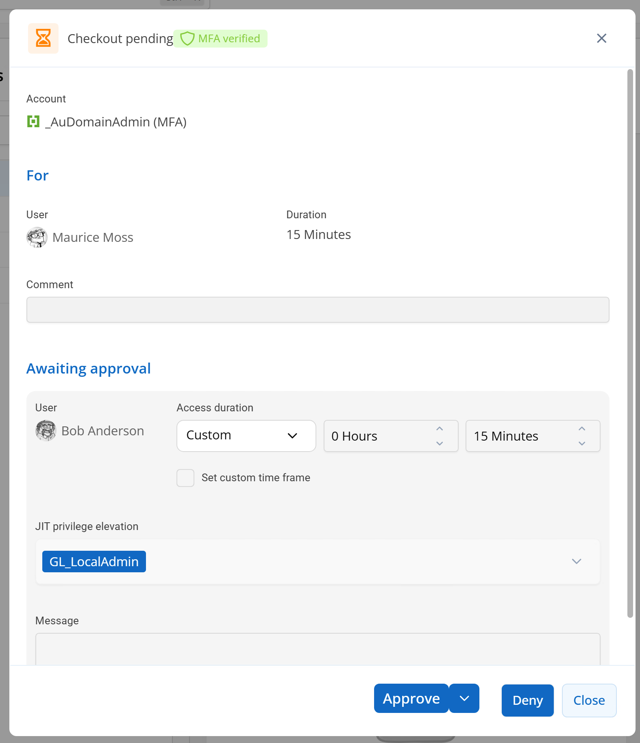
Approvers aren’t left guessing whether identity was confirmed. By the time a checkout request reaches them for review, MFA verification has already happened — the requester couldn’t have submitted the request otherwise. The approval screen reflects that, giving the approver one less unknown in the decision, and one more data point in the audit trail if that checkout is ever reviewed later.
Why this matters
MFA at checkout doesn’t replace approvals, session recording, or your existing checkout policies, it sits alongside them as one more checkpoint, placed exactly where the risk is highest: the moment someone gains access to a privileged account. For teams already using Devolutions PAM, it’s a policy toggle, not a new system to deploy.
If you’re running Devolutions PAM, this is worth turning on. Check the documentation below for the full setup, and let us know how it works for your team.
Resources: