
MAIN MENU
Devolutions PAM logo.

Easy to deploy, full-featured PAM built for SMBs

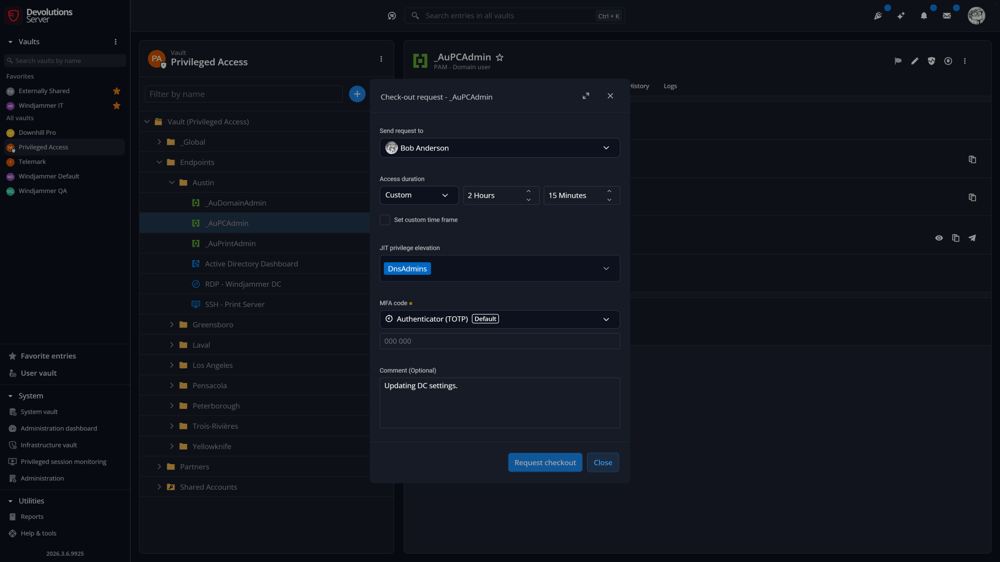
Remote Desktop Manager privileged account check-out request with custom access duration and approvers.

Kickstart your IT-led PAM journey

Devolutions PAM puts IT in the driver’s seat — deploy in hours, manage everything from one place, and prove compliance without adding complexity.

Clock icon symbolizing fast deployment of Devolutions PAM in hours, not weeks.

Ease of deployment in hours not weeks — Customize approval workflows to fit seamlessly into your existing processes with cloud or self-hosted options.

Automation gears icon representing the full feature set in Devolutions PAM.

All the must-have features at your fingertips — password vaulting, session management, approval workflows, session recordings, and JIT elevation.

Dollar sign icon highlighting the affordable pricing of Devolutions PAM for SMBs.

Most affordable — At $50/user, securing privileged accounts is a no-brainer. We even offer it at half the price for teams of 5 users or less.

See our solutions up close

Both are free and can be set up in minutes! No installation required.

Please enter a valid email address.

By subscribing, you agree to receive industry news, product updates, quick tips, special offers, and more from Devolutions. Learn how we handle your data in our Privacy policy.

Something went wrong. Please complete the security verification and try again.

Guided by an expert
Book a guided demo

Book a guided demo

Schedule a guided demo with one of our experts

Self-paced
Privileged Access Management

Launch a self-serve lab

Launch a self-serve lab simulating a real-world environment with our bestselling products.

See it in action!

Your data, stored exactly where you need it

Devolutions Password Manager connects to multiple workspaces. Our native options, Devolutions Cloud and Devolutions Server, are purpose-built for teams that need centralized governance, SSO, audit logs, and deep product integration right out of the box.

Devolutions Cloud logo.

Devolutions Cloud

The fully managed, cloud-hosted workspace. No servers or infrastructure to maintain — Devolutions handles everything so your team can stay focused on security and access.

  • Zero maintenance — no servers, updates, or backups to manage
  • SOC 2 Type II and ISO 27001 certified infrastructure
  • SSO and MFA with Microsoft Entra ID, Okta, and more
Devolutions Server logo.

Devolutions Server

A self-hosted workspace deployed on your own infrastructure. You retain full control over your data while benefiting from the same enterprise feature set as the cloud option.

  • Hosted on your servers — you own and control the data
  • Deep Active Directory and Microsoft Entra ID integration
  • On-premise or private cloud deployment

From core controls to ongoing optimization — Explore Devolutions PAM features

Database icon representing flexible cloud or self-hosted deployment options for Devolutions PAM.

Flexible deployment options

Deploy fast — on-premises or in the cloud — and start securing access in hours.

  • Flexible offerings that works for your own workflow
  • Minimal maintenance, instant ROI
  • No specialized PAM expertise required
Radar with shield icon representing privileged account discovery in Devolutions PAM.

Privileged account discovery

Automatically scan your environment to identify privileged accounts and risk points.

  • Supports Active Directory, Entra ID (Azure AD), SSH, SQL Server, and local Windows users
  • Quickly see where credentials live — and where potential gaps exist
  • Extend coverage with custom providers through PowerShell
Cartoon IT professional with large checkmark symbolizing check-out request approval.

Check-out request approval

Let teams request access the way they need to.

  • Choose from pre-defined time ranges or set custom durations
  • Route approvals to specific users or groups automatically
  • Approve on the go with Devolutions Password Manager for Android or iOS
Key with circular arrows representing automatic and scheduled password rotation.

Automatic and scheduled password rotation

Keep privileged credentials secure and fresh.

  • Rotate passwords automatically after each check-in
  • Define specific times or frequencies for rotations
  • Randomize imported passwords from day one
Microsoft Entra ID icon symbolizing just-in-time privilege elevation in Devolutions PAM.

Just-in-time privilege elevation and provisioning

Provide temporary, on-demand access — only when needed.

  • Grant privileges dynamically at check-out and revoke them on check-in
  • Use directory groups (AD, Entra ID) to manage who can elevate access
  • Gate elevation behind approval workflows — Keep everyone accountable
Scroll document icon representing password change propagation in Devolutions PAM.

Password change propagation

Ensure every password change reaches the right places.

  • Sync password updates across services, files, and databases
  • Use PowerShell scripts to automate propagation
  • Eliminate gaps between rotations and dependent systems
Computer screen with REC symbol representing privileged session recording and monitoring.

Session recording

Record and review every privileged session.

  • Capture activity through RDM, web, or terminal sessions
  • Store recordings locally or remotely via Devolutions Gateway
  • Jump directly to key events in playback for faster audits
Clipboard with magnifying glass icon symbolizing access reviews, audits, and compliance checks.

Administrative reports and auditing

Stay in control of every privileged action.

  • View requests, approvals, and password rotations in one place
  • Export detailed reports for compliance and security reviews
  • Filter by user, vault, or session type to spot patterns quickly

Ready to level up?

Learn how Devolutions PAM works together across the Devolutions ecosystem through our in-depth documentation.

Read more

Tailored proof of concept. Real results, fast.

For organizations over 100 users, we’ll set you up with a dedicated virtual lab and guided proof of concept so you can test everything hands-on.

Cartoon IT guide leading group on tour symbolizing the Devolutions PAM guided proof of concept.
Cartoon IT administrator holding Starter Pack sign promoting Devolutions privileged access solutions.

Complete PAM, compact price

Get all the essential PAM capabilities — from password vaulting and session management to just-in-time access — in one affordable package.

Ideal for IT pros and SMBs who need robust privileged access controls that are easy to deploy, manage, and scale. Available as cloud or self-hosted, ready to grow with your IAM maturity.

Resources

Learn more about our solutions by checking out our curated resources and see how privileged access management can help improve security within your organization!

Devolutions PAM

What makes privileged access management (PAM) a crucial defense for your organization?
PAM is your cybersecurity powerhouse — controlling and monitoring privileged access to critical systems and data. It's about safeguarding your "keys to the kingdom" to prevent catastrophic security breaches. Devolutions PAM offers a secure vault for credentials, enforces least-privilege principles, and provides detailed monitoring and reporting for enhanced security and compliance.

Why is Devolutions PAM superior to other solutions?
Devolutions' PAM boasts a superior feature set for maximum security, including versatile account management, customizable approval workflows, automated password rotation, and secured session launching. Our tight integration with Devolutions Remote Desktop Manager (RDM) leverages these capabilities directly within your IT operations, setting a new standard in privileged access management.

Why is Devolutions PAM the best solution for SMBs?
Our PAM solution is designed with SMBs in mind — easy to implement, user-friendly, and cost-effective. It grows with your business, scaling as your needs evolve, ensuring that you can protect sensitive information without breaking the bank.

How fast can I deploy Devolutions PAM?
Most teams are operational within a few days. Both cloud and self-hosted options offer simple setup with guided deployment tools and ready-to-use configurations.

How does Devolutions PAM serve as both a standalone product and an integrative add-on?
Devolutions PAM is an add-on module that integrates seamlessly with Devolutions Server and Devolutions Cloud to enhance PAM functionalities and create a unified security framework. Together with Devolutions Remote Desktop Manager and Gateway, it forms a comprehensive IT management and security package. Tailored for diverse business needs, it can also mesh with other platforms like CyberArk, BeyondTrust Password Safe, and Delinea Secret Server, enhancing your existing setup with robust, flexible security.

What's included in Devolutions PAM?
Devolutions PAM covers all the must-have capabilities: password vaulting, privileged account discovery, session monitoring, approval workflows, and just-in-time access — everything SMBs need to reduce privileged risk.

What role does just-in-time (JIT) elevation play in enhancing Devolutions PAM security?
Just-in-time (JIT) elevation in our PAM enhances security by granting temporary permissions for specific tasks, ensuring that elevated access is given only when necessary, and automatically revoking it once the task is complete. This keeps your operations lean and secure.

How does Devolutions PAM ensure remote access sessions are secured and sensitive credentials are protected?
When integrated with Remote Desktop Manager, Devolutions PAM secures remote sessions through credential injection and secure launching techniques. This means privileged credentials are never exposed, while ensuring seamless and secure remote access. Passwords are also automatically rotated, boosting security with each session.

How does RBAC within Devolutions PAM effectively enforce least privilege access?
Our RBAC (role-based access control) system is a cornerstone of security, ensuring users access only what they need for their roles. This minimizes risks and simplifies compliance, significantly reducing the attack surface and safeguarding against data breaches.