











 Adam Listek
Devolutions 2026.3 helps IT teams complete controlled work with fewer interruptions and fewer handoffs between tools. The release makes it easier to grant precisely scoped access, keep privileged work moving, reach systems on private networks, and turn successful fixes into repeatable workflows.
Work faster in clearer, more accessible interfaces
Version 2026.3 updates the user interface in Devolutions Remote Desktop Manager (RDM) and Devolutions Password Manager. RDM for Windows completes its Avalonia UI rebuild, starts faster, and comes in a smaller installer. The ribbon and main menu now share a more consistent design, and a simpler toolbar is the default.
For teams working with large vaults, sortable columns and status badges make long trees easier to scan, while selections remain intact when switching between vaults. Sessions render natively, and dashboard previews show notes, documents, and scripts without requiring users to open each entry. Better high-DPI scaling, high contrast, keyboard navigation, and screen reader support also make RDM easier to use across a wider range of workstations and accessibility needs.
Password Manager receives a cleaner, more modern interface, with refreshed screens, navigation, and controls that make everyday password management easier to navigate.
Control vault access and keep PAM work moving
Before a planned maintenance window, an IT administrator needs to confirm who can access the affected systems and gather the credentials the team will use. The work may involve several entries or run longer than expected. A just-in-time (JIT) account may also need to remain available after check-in because it owns a mailbox or license.
In 2026.3, more granular vault roles, consistent folder and multi-entry checkouts, checkout extensions, and reusable JIT accounts help teams keep temporary privileged access practical and controlled.
Assign granular administrator roles in Devolutions Server and Cloud
The administrator role in Devolutions Server and Devolutions Cloud is no longer all or nothing. Administration is now divided into separate roles, so people can receive access only to the parts of the job they perform instead of gaining access to everything at once.
For example, a Workspace Administrator can administer the workspace without gaining access to its vaults or their contents. Vault access must be granted explicitly, giving teams a clearer way to apply least privilege and review everyone’s access, including an administrator’s own.
Existing administrators do not lose access during the upgrade. Server assigns them the Workspace Owner role, while Cloud gives them the Vault Owner role on every vault. Teams can then remove access that is no longer needed without risking unexpected lockouts during the upgrade. A new Cloud administrator sees only the Administration menu until a vault role is assigned. In Server, the role view shows whether each role was assigned directly or through a group.
Keep connections and PAM credentials in one vault
Connections, standard entries, and PAM credentials can now live together in one shared vault. Administrators can start a session or retrieve a privileged account without moving between vaults, while the rest of the team has one place to find the resources related to its work.
Because privileged credentials require a high-security vault, offline access is not available. Only users with the appropriate permission can create PAM accounts, and the vault cannot return to standard security until those accounts are moved or deleted.
Extend active PAM checkouts
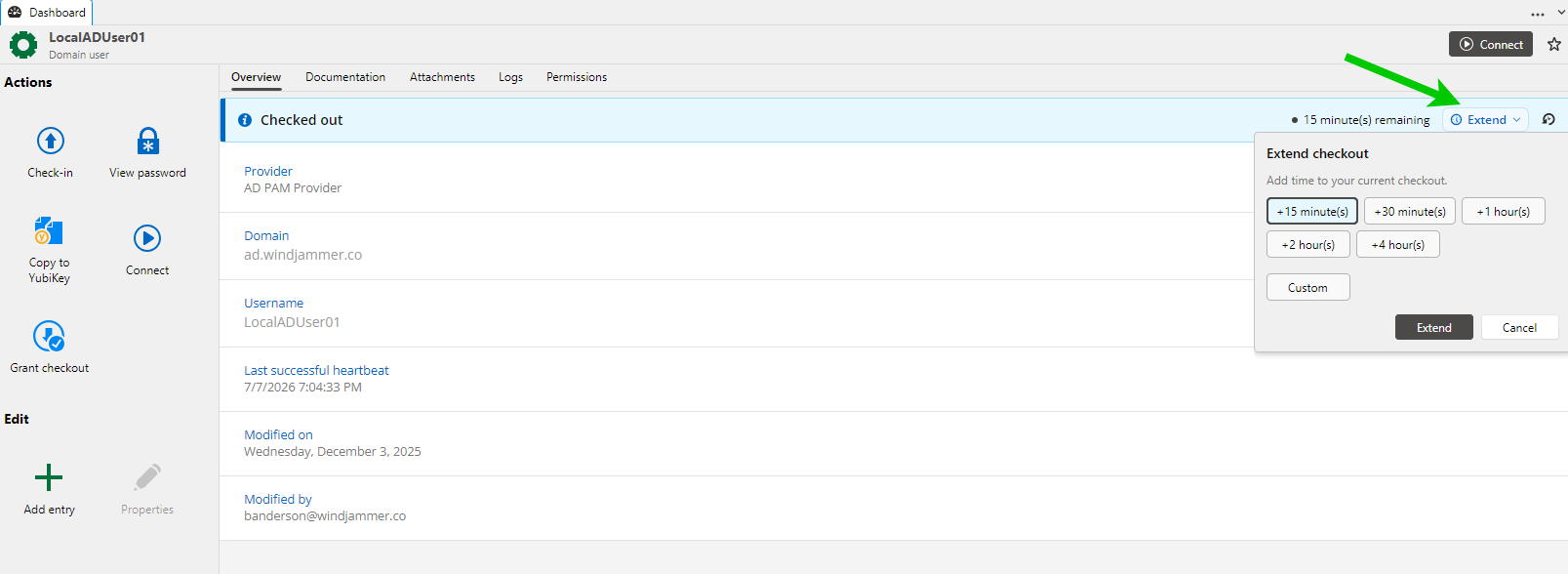
Active PAM checkouts can now be extended without checking in the credential and starting over. If a change runs past its original window, the user can continue working instead of interrupting the task halfway through.
Extensions are disabled by default. Organizations can require approval and limit the additional time granted, allowing work to finish without turning temporary access into open-ended access.
Reuse JIT accounts after check-in
Existing JIT accounts can now be enabled at checkout and disabled again at check-in instead of being created and deleted for every use. If an account owns a mailbox, license, or other resource, everything remains tied to the same identity after the work ends.
Across Devolutions Server and Devolutions Cloud, the account is ready for the next approved checkout without forcing the team to rebuild its access or history from scratch.
Manage users, policies, and contractor access more efficiently
Setting up a contractor can involve sending an invitation, reviewing license and group details, checking Cloud settings, applying password rules, and providing a direct path to the right sessions. Devolutions 2026.3 brings more of this administrative work into RDM, strengthens forbidden-password policies, and gives contractors a simpler session view in Devolutions Server.
Manage Devolutions Cloud users from RDM
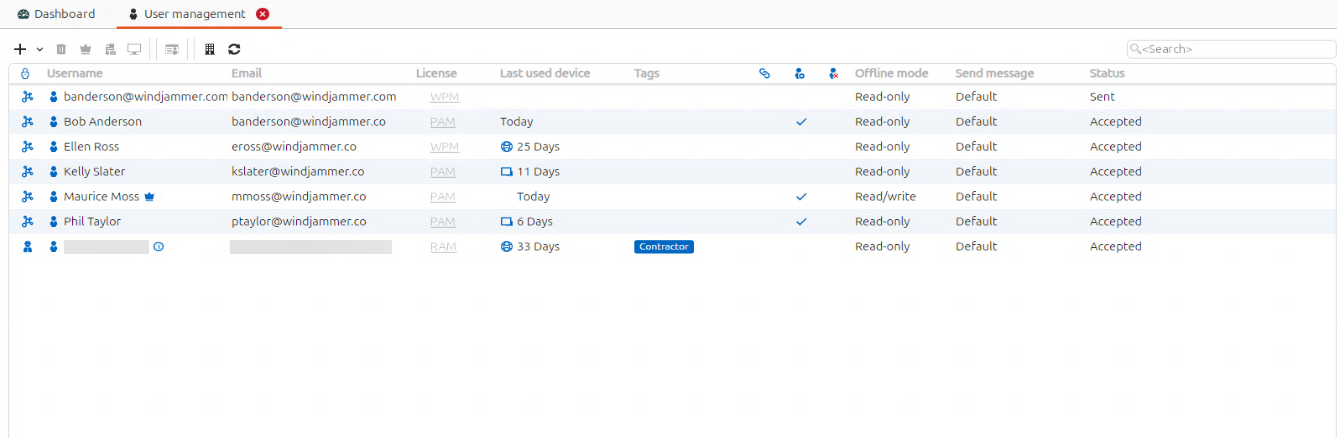
RDM on Windows, macOS, and Linux can now handle Devolutions Cloud user administration. Administrators can set up a contractor’s access, send the invitation, and review license, group, device, and activity details without switching to a browser.
Manage Devolutions Cloud system settings from RDM
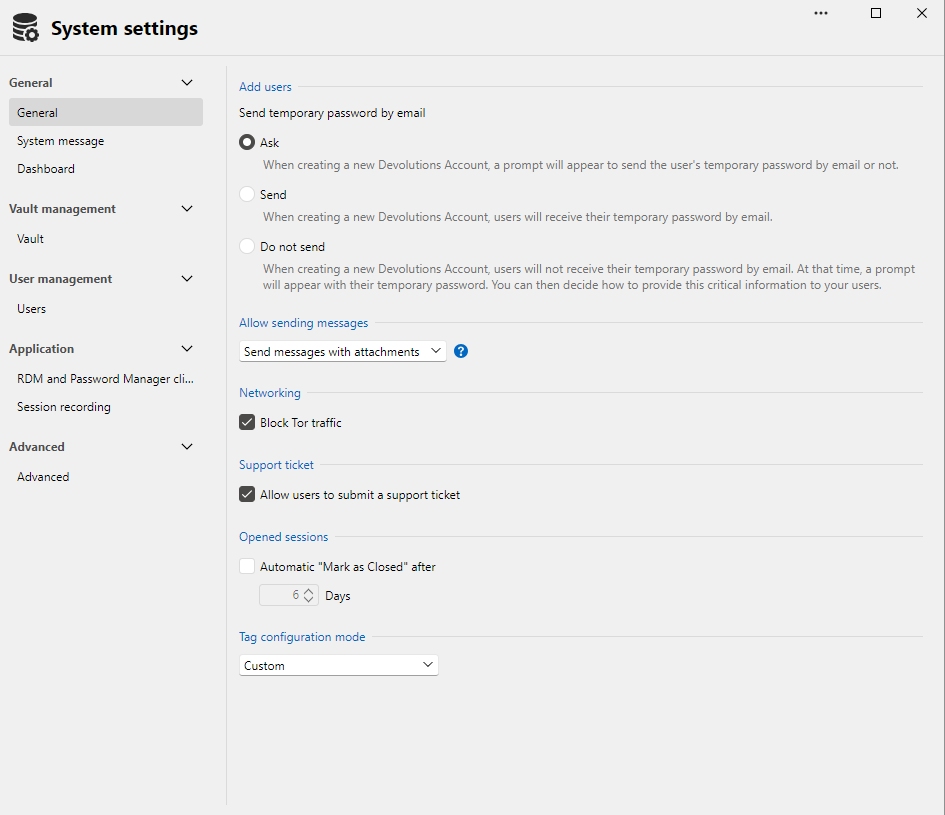
Supported Devolutions Cloud system settings can now be managed in RDM on Windows, macOS, and Linux. If onboarding or day-to-day administration reveals a setting that needs attention, the administrator can update it without leaving RDM for the web interface.
Use consistent folder and multi-entry checkouts
Folder and multi-entry checkout arrived in 2026.2. In 2026.3, the experience is consistent across supported platforms, workspaces, and clients. Administrators can check out a folder or several related entries in the same way and receive clear details if part of a request fails.
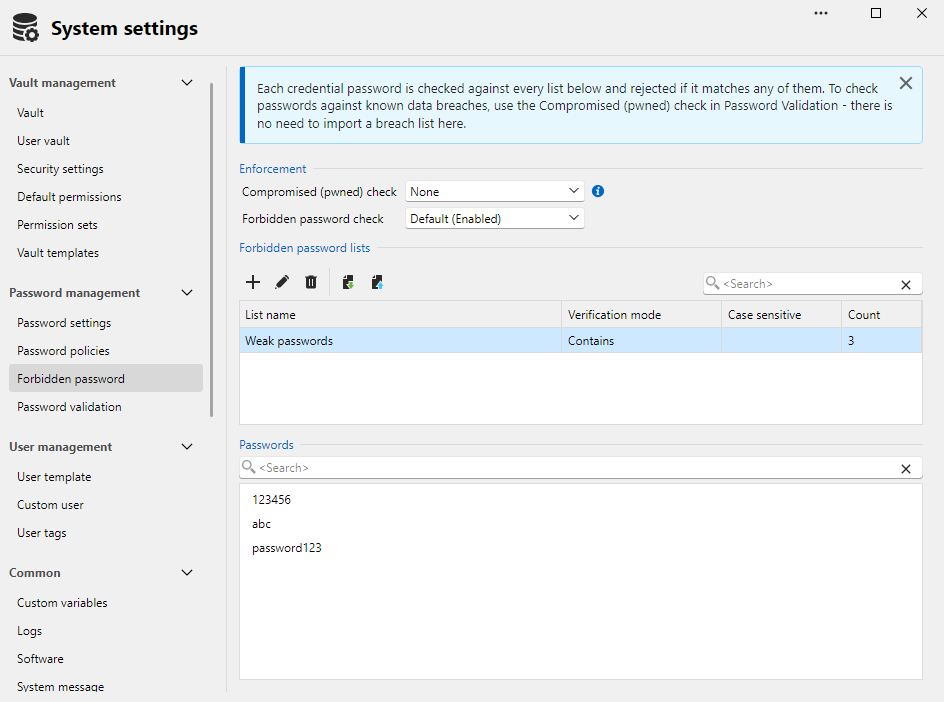
Create multiple forbidden-password lists
Administrators can now create several forbidden-password lists, each with its own matching criteria, such as an exact match or a partial match. For example, an organization can:
- Block its name anywhere in a password
- Reject a known weak or breached password when it matches exactly
- Block predictable patterns, such as a season followed by a year
A single policy can address several types of password risk at once instead of forcing administrators to fit them into one rule. The lists apply across the workspace and supported Password Manager clients, providing consistent enforcement without requiring teams to address users individually.
Give contractors a simplified Gateway session view
Compact mode for Gateway sessions was already available in Devolutions Cloud. It is now also available in the Devolutions Server web interface, where it shows only the sessions delivered through Devolutions Gateway.
A permalink can take a contractor directly to the appropriate sessions in a simple tile view, without displaying the full tree or surrounding navigation. The full view remains available when needed, and compact mode can be set as the default.
Deploy Server flexibly and reach private networks securely
Devolutions 2026.3 expands the deployment options for self-hosted Devolutions Server and gives IT teams an outbound route to systems that remain off the public network. Once connected, administrators can also run remote PowerShell scripts through Devolutions Gateway without exposing direct WinRM access.
Deploy Devolutions Server with PostgreSQL
PostgreSQL is now fully supported as an alternative to Microsoft SQL Server for self-hosted Devolutions Server deployments, including deployments on Linux and ARM64 hosts. Teams can use a database platform they already operate and avoid adding a separate SQL Server license solely for Devolutions Server.
Reach private networks through Devolutions Agent and Gateway
A Devolutions Agent inside a private network can now connect outbound to Devolutions Gateway and create a route to private targets. Administrators gain an approved route into the environment without exposing the targets publicly, opening an inbound firewall port, or configuring a site-to-site VPN.
Connected agents appear in the administration panel and can be revoked when the route is no longer needed. This capability provides a server-side tunnel to target hosts; it is not a client VPN.
Run remote PowerShell scripts through Gateway
RDM on Windows and the Devolutions Server web interface can now run scripts through Gateway from an interactive remote PowerShell terminal. The script runs on the target, while PAM credentials remain with the session. Administrators can investigate and resolve issues without opening direct WinRM access to the target.
The first version supports remote PowerShell terminal entries only. It does not run scripts unattended or from other entry types.
Standardize automation and elevated software updates
When a script solves a problem, turning it into a workflow helps the next person understand, maintain, and run it in the correct environment. Devolutions 2026.3 improves workflow authoring and PowerShell version control, while a new UniGetUI integration applies similar policy-based control to elevated software updates.
Make PowerShell Universal workflows easier to maintain
New workflow authoring improvements in Devolutions PowerShell Universal make it easier to turn a successful support task into a process another person can maintain. Authors can now add an activity from a button, reload workflow changes, prevent jobs waiting for feedback from timing out, and use input types beyond plain text.
Together, these improvements reduce friction during workflow creation and make workflows easier to understand, test, and update over time.
Run jobs with a required PowerShell version
A PowerShell Universal job can now require a specific PowerShell version, and several versions can coexist on the same host. This helps keep a workflow on the version it was designed and tested to use. The console shows which version ran, making version mismatches easier to identify.
Remote environments can use the specified version through Devolutions Agent, and the version is cached between jobs.
Install approved UniGetUI updates through Devolutions Agent
On Windows, UniGetUI can now pass an approved installation or upgrade to Devolutions Agent. The Agent checks the request against policy and runs it with elevation, allowing users to receive approved software without permanent local administrator rights or a User Account Control (UAC) prompt.
Administrators retain control over the packages, sources, operations, and versions that are allowed and can block risky options. The broker must be enabled in both UniGetUI and Devolutions Agent. If the Agent is unavailable, the update fails instead of falling back to a UAC prompt.
Download Devolutions 2026.3
Devolutions 2026.3 brings access control, remote operations, and automation closer together so IT teams can complete more work in the tools they already use while preserving security and oversight.
Download the latest release to explore the updated interfaces, granular administrative roles, PAM improvements, secure access to private networks, and more dependable automation across the Devolutions platform. Review the product-specific release notes for availability, requirements, and upgrade guidance.