











 Adam Listek
Version 2026.1 advances a remote access management package that:
- enables secure external and contractor access using focused workflows,
- increases operational control of the access plane with better Gateway lifecycle capabilities,
- and improves reliability and maintainability at scale with safer defaults and stronger diagnostics.
Enable secure contractor access through focused workflows
Better contractor support is now available. A full web interface is available, in both our cloud-hosted (Devolutions Cloud) and self-hosted (DVLS) data sources, and covers RDP, VNC, SSH, Telnet, PowerShell Remote, ARD, and Host sessions. Devolutions Gateway is required. Create a “Contractor” user type and select specific entries and sessions accessible to these users external to your organization. There’s also a focused, compact dashboard that displays three sessions at a time for quick access for Devolutions Cloud.
Improved session auditing with enhanced recording controls
Session recording can now use a different Devolutions Gateway than the one used for the connection. When recording is set to remote, you can pick a specific recording Gateway from a dropdown. If you choose a different recording Gateway, session termination and token logic will prevent the session from being killed when recordings are routed elsewhere.
Inject credentials securely with RDP proxy-based injection
Devolutions Gateway can now inject RDP credentials from the Gateway rather than sending them to the client, significantly reducing credential exposure by keeping secrets closer to the private network.
It also supports RDP reconnections by retaining the password only as long as needed, and is enabled by default for new Gateways (disabled for existing Gateways to avoid upgrade impact), and controlled via a ruleset toggle with logs indicating when it’s active.
Build better dashboards with customizable widgets
Dashboards will now allow users to create custom counter and list widgets and reorder widgets to match their priorities. Custom widgets can be based on filters like tags and entry status, support logic criteria, and counters are clickable to open the matching results. Widgets can be user-specific or shared at the data source level.
Scale organization with tag inheritance
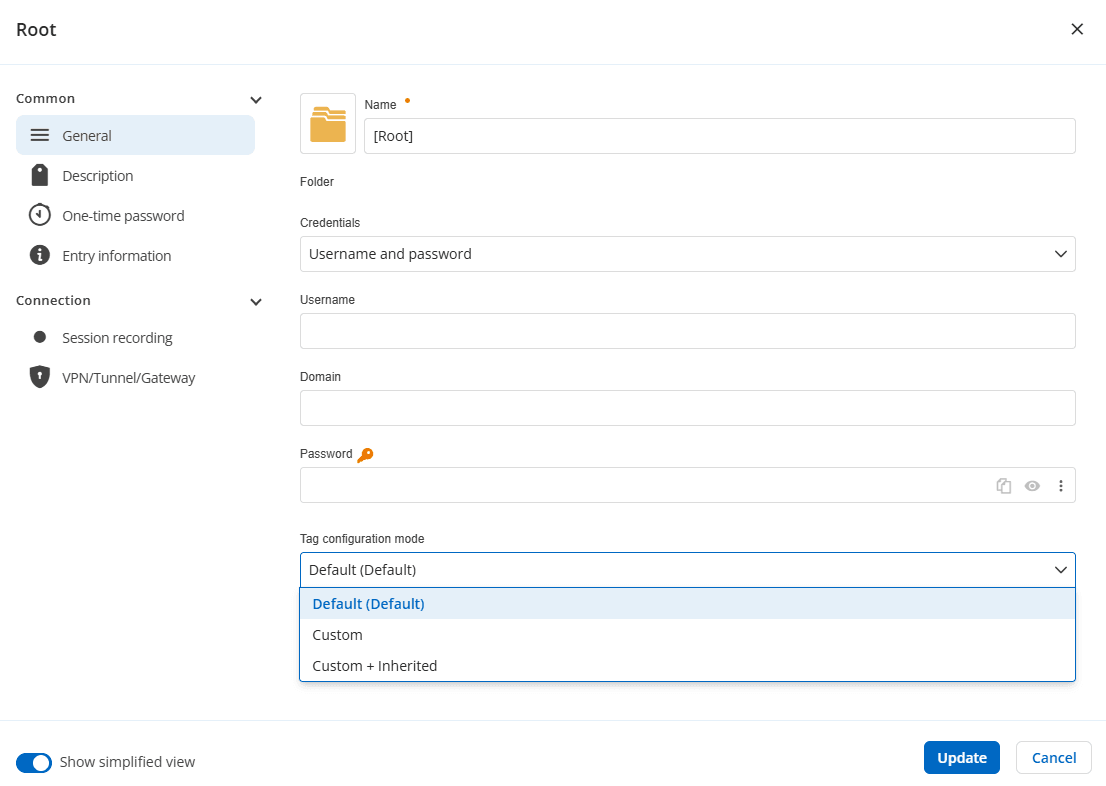
Tag inheritance can now be enabled by setting an inheritance mode in any folder, including the vault’s root folder. Once configured, entries will display both assigned and inherited tags, making it easy to validate in the RDM sidebar (or via a tags column) at a glance.
Tell us what you think
The 2026.1 release brings enhancements across all our solution packages. To explore the updates included in other packages, check out the other what’s new here:
- Workforce password management
- Remote desktop management & IT operations
- Privileged access management
We also invite you to visit our forum to share your feedback, ask questions, and discuss the changes with our team and the community.
As always, thank you for your continued support!
About remote access management
Tailored for external users, vendors, and IT consultants, remote access management provides just-in-time access to critical resources without compromising network security. It replaces traditional VPNs with a secure, efficient alternative, ensuring visibility into all external connections.
Ready to get started? Buy the remote access management package here.