


 Marc-André Moreau
On November 10, 2026, Microsoft announced the general availability (GA) of PowerShell 7.7 and removed the official Windows Installer (MSI) packages beginning with this release. That change affects scheduled tasks running as NT AUTHORITY\SYSTEM, PowerShell Remoting over Windows Remote Management (WinRM), and Windows Server Core.
Today, we are announcing Devolutions PowerShell: a free, open-source, cross-platform PowerShell distribution maintained by Devolutions, with PowerShell 7.6 long-term support (LTS) and PowerShell 7.7 standard term support (STS) release channels. It gives IT administrators and power users signed PowerShell installers, including traditional Windows MSI packages for PowerShell 7.7.
As Microsoft explained, the move to MSIX packaging reflects its investment in a declarative installation model, built-in servicing, and accessibility. Microsoft also acknowledged gaps in remoting and system-level execution. For a detailed look at the MSIX limitations for PowerShell, see this post from Michael Niehaus.
Why IT administrators still need an MSI
PowerShell is not just an interactive desktop app; it is core automation infrastructure, as I covered earlier this year in Everything Wrong with MSIX: No System Context and The Virtual Filesystem Trap. Microsoft is tracking the remaining limitations in its MSIX packaging gaps issue, with configuration improvements already underway. For administrators, the practical concerns include:
SYSTEMand background automation: Per-user package registration preventsNT AUTHORITY\SYSTEMand affected service identities from locating or invoking MSIX-packagedpwsh. This affects scheduled tasks running asSYSTEM, Windows services, and remote monitoring and management (RMM) and mobile device management (MDM) agents such as Intune and Configuration Manager.- WinRM remoting and Server Core: MSIX packaging introduces registration and access requirements that prevent PowerShell Remoting over WinRM from working, while Windows Server Core cannot register or activate the packages.
- Administrative cmdlets and machine-wide configuration: Deployment Image Servicing and Management (DISM) cmdlets such as
Get-WindowsOptionalFeature -Onlinefail under MSIX, and read-only package directories prevent writes to$PSHOMEused by machine-wide profiles, session configurations, and updatable help. Microsoft is working on a writable machine-wide data store to address configuration gaps. - Upgrade paths and patch management: Administrators have reported MSI-to-MSIX migration problems with WinGet. Store-managed updates also use a different servicing mechanism, so teams need to review how their patch policies apply. Windows provides policies to control automatic Store updates.
For environments that depend on these workflows, a signed, per-machine MSI remains a practical deployment option.
What the Windows, macOS, and Linux installers include
Devolutions PowerShell is built from upstream PowerShell source, code-signed by Devolutions, and designed to run existing PowerShell scripts and modules. It uses an alternative apphost executable, multi-pwsh, which adds features like PowerShell virtual environments and MCP tools that wrap PowerShell commands. The .NET runtime is included; no separate .NET runtime installation is required. As with any PowerShell upgrade, review the upstream release notes for changes that may affect your scripts.
This distribution provides the pwsh command-line executable.
- Windows
.msiinstallers (x64andarm64): Signed, per-machine installers for PowerShell 7.6 and 7.7, designed for workstations, Windows Server (including Server Core), Intune, Configuration Manager, and Group Policy Object (GPO) rollouts,SYSTEMtasks, and WinRM remoting.- Side-by-side installation: Installs under
C:\Program Files\Devolutions\PowerShell\7with distinct Devolutions blue icons, leaving the Microsoft PowerShell installation directory untouched. Adding Devolutions PowerShell to the systemPATHis optional. - Admin-friendly options: Supports silent installation with options such as
ADD_PATH=1,ENABLE_PSREMOTING=1, and File Explorer context menus. It also registers a Windows Terminal profile automatically.
- Side-by-side installation: Installs under
- macOS
.pkginstallers (Apple silicon and Intel): Signed and Apple-notarized packages that install under/usr/local/devolutions/powershell/7, with/Applications/Devolutions PowerShell.app, a/usr/local/bin/pwshlauncher, and man pages. Microsoft PowerShell’s installation directory remains separate, but whichever package is installed last owns the sharedpwshlauncher and man page. - Linux packages and portable archives (
x64andarm64): Native.deb(Debian/Ubuntu) and.rpmpackages (RHEL, Rocky, AlmaLinux, Fedora, and Azure Linux, includingarm64), plus standalone.tar.gzarchives for Windows, macOS, Linux, and Alpine Linux. The Linux packages conflict with Microsoft’spowershellpackage because both provide/usr/bin/pwsh; remove that package before switching, or use a portable archive for an isolated copy.
Prefer Microsoft’s build? Get the vanilla MSI
If you want an MSI without any Devolutions customizations, starting with v7.7.0.1, PowerShell 7.7 releases also include Microsoft-payload MSI packages, such as Microsoft.PowerShell-7.7.0.1-win-x64.msi and Microsoft.PowerShell-7.7.0.1-win-arm64.msi. They contain the original PowerShell binaries, code-signed by Microsoft, inside an MSI installer signed by Devolutions.
- Devolutions PowerShell is rebuilt from source with Devolutions customizations and installs side by side under
C:\Program Files\Devolutions\PowerShell\7. - The Microsoft-payload MSI contains Microsoft’s unmodified binaries, packaged and installer-signed by Devolutions. It installs to
C:\Program Files\PowerShell\7and upgrades an existing Microsoft MSI installation. It does not include the Devolutions remoting or Windows Terminal integrations, so configure remoting with the standard PowerShell tools if you need it.
Install the MSI and confirm you are running Devolutions PowerShell
Download the installers, whether you want PowerShell 7.7 STS or prefer PowerShell 7.6 LTS for servers, from GitHub Releases.
On Windows, run the .msi interactively or deploy it silently from an elevated prompt. For example, after downloading the 7.7.0.1 x64 MSI, run this command from the folder containing it. Substitute the matching filename if you download another version or the arm64 package:
# Silent machine-wide install with PATH and WinRM remoting enabled
msiexec.exe /i ".\Devolutions.PowerShell-7.7.0.1-win-x64.msi" /quiet /norestart ADD_PATH=1 ENABLE_PSREMOTING=1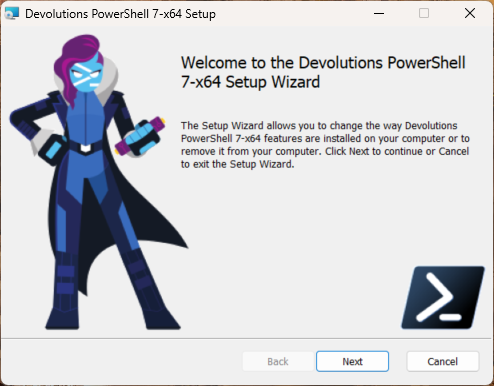
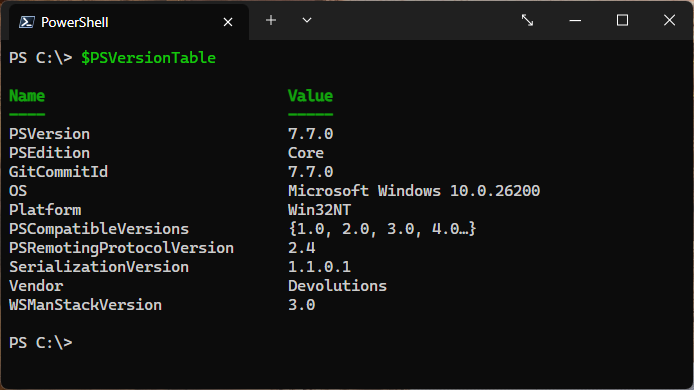
After installation completes, open Devolutions PowerShell explicitly and check its custom $PSVersionTable.Vendor field to confirm which distribution is running:
& "$env:ProgramFiles\Devolutions\PowerShell\7\pwsh.exe" -NoLogo -Command '$PSVersionTable.Vendor'The expected result is Devolutions. Within an open PowerShell session on any platform, you can also run $PSVersionTable.Vendor directly to identify the distribution.
For environments that still need a signed, per-machine Windows Installer, Devolutions PowerShell keeps that deployment path available for PowerShell 7.6 and 7.7.
Download the installer from GitHub Releases and install Devolutions PowerShell on a workstation or server. The project is open source in the Devolutions/pwsh-distro repository, where you can also report issues or share feature requests.