











 Adam Driscoll
PowerShell Universal has historically been a PowerShell-only platform. With the release of PowerShell Universal 4.2, we’ll be adding the ability to run Python scripts. This post walks through how to do so with a 4.2 nightly build.
This functionality will ship in November as part of PowerShell Universal 4.2.
Minimal environments
PowerShell Universal 4.2 introduces a new environment setting referred to as Minimal. Minimal environments do not attempt to load Universal assemblies or establish a gRPC connection between the child process and the parent process. That allows PowerShell Universal to run in environments that are not based on .NET. Minimal environments take advantage of STDOUT and STDERR to collect output from the process started in the environment. This can also be helpful for PowerShell scripts that load modules that conflict with Universal assemblies.
Python environment
To configure a Python environment, first create a new environment and set the path to python.exe. This requires that Python is installed on the machine. Next, set the command line to {scriptPath}. This value is expanded to the path of the script being executed and passed in at runtime.
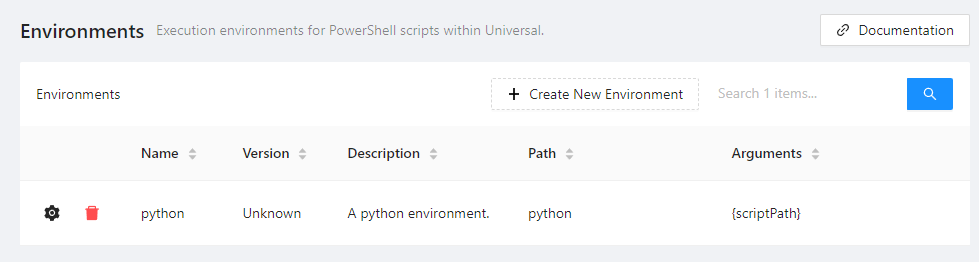
While it was technically possible to run Python scripts in previous versions of PowerShell Universal, this new environment type runs Python directly instead of starting an intermediate PowerShell process that then executes Python. That results in a much faster startup time for these jobs.
Running Python scripts
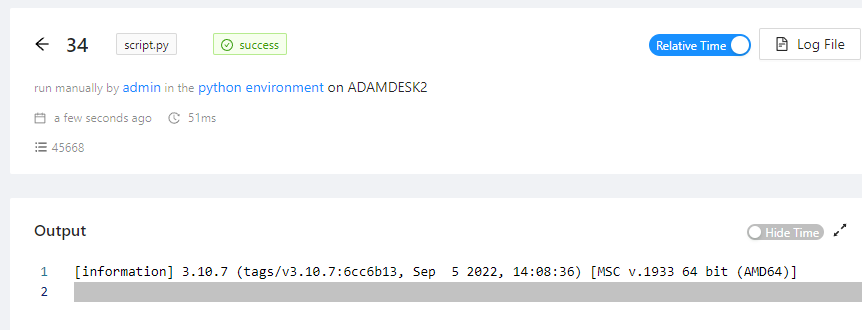
Next, create a script with a .py extension. We’ve updated the admin console to correctly identify Python scripts and syntax highlight them properly. Finally, click Run and select your Python environment.
What’s next for Minimal environments and Python integration?
Minimal environments let you run whatever process you’d like from the script execution engine and pass in the script path as an argument. Because we replace the {scriptPath} macro, you can include other arguments as well. This could be useful for other scripting languages, like bash on Linux. Minimal environments do not work with APIs, Apps, or Terminals. Those features require a gRPC implementation that is not available in these other languages and engines. We do hope to expose our gRPC proto files during the v5 release time frame. That would allow for the generation of clients that could run in any language where gRPC and protobuf are supported.
Ready to build? Download PowerShell Universal.