












 Adam Driscoll
In this post, we’ll create a PowerShell Universal dashboard that can perform basic CRUD operations in SQL.
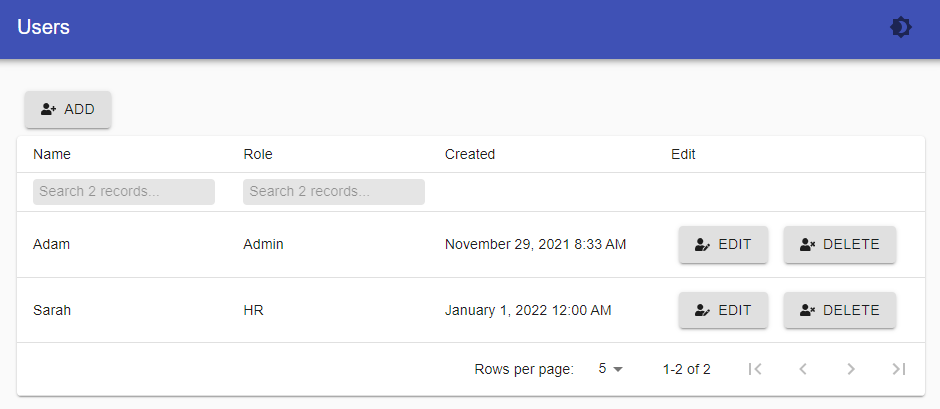
We’ll use a basic User table to add, update, read, and delete records with buttons, forms, and a UD table. By the end of this exercise, you’ll have a dashboard that looks like the one below.
Prerequisites
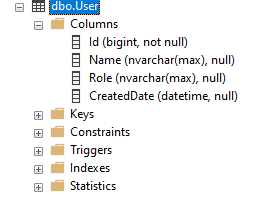
This post assumes that you have Microsoft SQL Server installed with a database called universal and a table called User. The User table has Id, Name, Role, and CreatedDate columns.
We’ll also take advantage of dbatools to query the database:
Install-Module dbatoolsCreating the dashboard
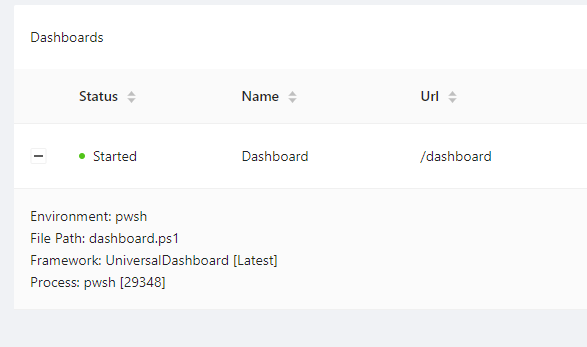
First, create a dashboard. This example uses PowerShell 7.2 and the default framework. In PowerShell Universal, click User Interfaces > Dashboards > Create New Dashboard. Enable Auto-Deploy so the dashboard reloads when you save changes.
Once the dashboard exists, open it with Details and start editing the code. Create two variables for the SQL instance and database name. This example uses integrated authentication; you can also pass credentials for your database.
New-UDDashboard -Title 'Users' -Content {
    $SqlInstance = '(localdb)\MSSQLLocalDB'
    $Database = 'universal'
}
View users in a table
New-UDTable supports server-side processing so sorting, filtering, and paging can happen in SQL instead of loading every row into the browser.
Start with a function that accepts a SQL instance and database name:
function New-UserTable {
    param($SqlInstance, $Database)
}
Next, define the columns. Name and Role display as-is and allow server-side filtering. CreatedDate renders with New-UDDateTime for a more readable date.
$TableColumns = @(
    New-UDTableColumn -Title 'Name' -Property 'Name' -Filter
    New-UDTableColumn -Title 'Role' -Property 'Role' -Filter
    New-UDTableColumn -Title 'Created' -Property 'CreatedDate' -Render {
        New-UDDateTime $EventData.CreatedDate
    }
)
Wrap New-UDTable in New-UDDynamic so you can reload the table after edits. Pass in the columns, enable sorting, filtering, and paging, and use the dense format to reduce whitespace. -LoadData calls SQL to load rows for the current table state.
Inside -LoadData, use Invoke-DbaQuery to count records, apply sort and filter, page the results, and return data with Out-UDTableData:
function New-UserTable {
    param($SqlInstance, $Database)

    $TableColumns = @(
        New-UDTableColumn -Title 'Name' -Property 'Name' -Filter
        New-UDTableColumn -Title 'Role' -Property 'Role' -Filter
        New-UDTableColumn -Title 'Created' -Property 'CreatedDate' -Render {
            New-UDDateTime $EventData.CreatedDate
        }
    )

    New-UDDynamic -Id 'UserTable' -Content {
        New-UDTable -LoadData {
            $TableData = ConvertFrom-Json $Body

            $OrderBy = $TableData.orderBy.field
            if ($OrderBy -eq $null) {
                $OrderBy = 'Name'
            }

            $OrderDirection = $TableData.OrderDirection
            if ($OrderDirection -eq $null) {
                $OrderDirection = 'asc'
            }

            $Where = ' '

            $SqlParameters = $null
            $CountSqlParameters = $null

            if ($TableData.Filters) {
                $SqlParameters = @()
                $CountSqlParameters = @()
                $Where = 'WHERE '
                foreach ($filter in $TableData.Filters) {
                    $SqlParameters += New-DbaSqlParameter -Name $filter.Id -Value "%$($filter.Value)%"
                    $CountSqlParameters += New-DbaSqlParameter -Name $filter.Id -Value "%$($filter.Value)%"
                    $Where += $filter.id + " LIKE @$($filter.Id) AND "
                }
                $Where += ' 1 = 1'
            }

            $PageSize = $TableData.PageSize
            $Offset = $TableData.Page * $PageSize

            $Parameters = @{
                SqlInstance = $SqlInstance
                Database    = $Database
                Query       = "SELECT COUNT(*) AS count FROM [User] $Where"
                SqlParameter = $CountSqlParameters
            }

            $Count = Invoke-DbaQuery @Parameters

            $Parameters = @{
                SqlInstance = $SqlInstance
                Database    = $Database
                Query       = "SELECT * FROM [User] $Where ORDER BY $OrderBy $OrderDirection OFFSET $Offset ROWS FETCH NEXT $PageSize ROWS ONLY"
                SqlParameter = $SqlParameters
            }

            $Data = Invoke-DbaQuery @Parameters
            $Data | Out-UDTableData -Page $TableData.page -TotalCount $Count.Count -Properties $TableData.properties
        } -Columns $TableColumns -Sort -Filter -Paging -Dense
    }
}
Add the table function to the dashboard:
New-UDDashboard -Title 'Users' -Content {
    $SqlInstance = '(localdb)\MSSQLLocalDB'
    $Database = 'universal'

    New-UserTable -SqlInstance $SqlInstance -Database $Database
}
Adding users to the database
With users visible in the table, add a button to create new ones.
Create a function that accepts $SqlInstance and $Database:
function New-AddUserButton {
    param($SqlInstance, $Database)
}
Then create a New-UDButton with an icon, text, and an OnClick handler that opens a modal:
New-UDButton -Icon (New-UDIcon -Icon 'UserPlus') -Text 'Add' -OnClick {
    Show-UDModal -Content {
    }
}
Inside the modal, define a New-UDForm with a Name textbox and a Role select:
New-UDForm -Content {
    New-UDTextbox -Id 'Name'
    New-UDSelect -Id 'Role' -Option {
        New-UDSelectOption -Name 'Administrator' -Value 'Admin'
        New-UDSelectOption -Name 'Human Resources' -Value 'HR'
        New-UDSelectOption -Name 'Development' -Value 'Dev'
    }
} -OnSubmit {
}
In the OnSubmit handler, call Invoke-DbaQuery with parameters from $EventData, hide the modal, and refresh the table with Sync-UDElement:
function New-AddUserButton {
    param($SqlInstance, $Database)

    New-UDButton -Icon (New-UDIcon -Icon 'UserPlus') -Text 'Add' -OnClick {
        Show-UDModal -Content {
            New-UDForm -Content {
                New-UDTextbox -Id 'Name'
                New-UDSelect -Id 'Role' -Option {
                    New-UDSelectOption -Name 'Administrator' -Value 'Admin'
                    New-UDSelectOption -Name 'Human Resources' -Value 'HR'
                    New-UDSelectOption -Name 'Development' -Value 'Dev'
                }
            } -OnSubmit {
                $Name = New-DbaSqlParameter -Name 'name' -Value $EventData.Name
                $Role = New-DbaSqlParameter -Name 'role' -Value $EventData.Role

                $Parameters = @{
                    SqlInstance  = $SqlInstance
                    Database     = $Database
                    Query        = 'INSERT INTO [User] (Name, Role, CreatedDate) VALUES (@name, @role, GetDate())'
                    SqlParameter = @($Name, $Role)
                }

                Invoke-DbaQuery @Parameters | Out-Null
                Hide-UDModal
                Sync-UDElement -Id 'UserTable'
            }
        }
    }
}
Wire the button into the dashboard above the table:
New-UDDashboard -Title 'Users' -Content {
    $SqlInstance = '(localdb)\MSSQLLocalDB'
    $Database = 'universal'

    New-AddUserButton -SqlInstance $SqlInstance -Database $Database
    New-UserTable -SqlInstance $SqlInstance -Database $Database
}
Editing users in the database
Editing follows the same modal pattern. Pass the selected row into the edit button, prefill the form with -Value and -DefaultValue, then run an UPDATE on submit.
function New-UserEditButton {
    param($EventData, $SqlInstance, $Database)

    New-UDButton -Icon (New-UDIcon -Icon 'UserEdit') -Text 'Edit' -OnClick {
        $RecordId = $EventData.Id
        Show-UDModal -Content {
            New-UDForm -Content {
                New-UDTextbox -Value $EventData.Name -Id 'Name'
                New-UDSelect -DefaultValue $EventData.Role -Id 'Role' -Option {
                    New-UDSelectOption -Name 'Administrator' -Value 'Admin'
                    New-UDSelectOption -Name 'Human Resources' -Value 'HR'
                    New-UDSelectOption -Name 'Development' -Value 'Dev'
                }
            } -OnSubmit {
                $Name = New-DbaSqlParameter -Name 'name' -Value $EventData.Name
                $Role = New-DbaSqlParameter -Name 'role' -Value $EventData.Role

                $Parameters = @{
                    SqlInstance  = $SqlInstance
                    Database     = $Database
                    Query        = "UPDATE [User] SET name = @name, role = @role WHERE Id = $RecordId"
                    SqlParameter = @($Name, $Role)
                }

                Invoke-DbaQuery @Parameters | Out-Null
                Hide-UDModal
                Sync-UDElement -Id 'UserTable'
            }
        }
    }
}
Add an Edit column that passes the current row into the button:
$TableColumns = @(
    New-UDTableColumn -Title 'Name' -Property 'Name' -Filter
    New-UDTableColumn -Title 'Role' -Property 'Role' -Filter
    New-UDTableColumn -Title 'Created' -Property 'CreatedDate' -Render {
        New-UDDateTime $EventData.CreatedDate
    }
    New-UDTableColumn -Title 'Edit' -Property 'Edit' -Render {
        New-UserEditButton -EventData $EventData -SqlInstance $SqlInstance -Database $Database
    }
)
Delete users from SQL
The delete button skips the modal. It issues a DELETE, then refreshes the table:
function New-UserDeleteButton {
    param($EventData, $SqlInstance, $Database)

    New-UDButton -Icon (New-UDIcon -Icon 'UserTimes') -Text 'Delete' -OnClick {
        $RecordId = $EventData.Id

        $Parameters = @{
            SqlInstance = $SqlInstance
            Database    = $Database
            Query       = "DELETE FROM [User] WHERE Id = $RecordId"
        }

        Invoke-DbaQuery @Parameters | Out-Null
        Sync-UDElement -Id 'UserTable'
    }
}
Put both Edit and Delete in the same column:
$TableColumns = @(
    New-UDTableColumn -Title 'Name' -Property 'Name' -Filter
    New-UDTableColumn -Title 'Role' -Property 'Role' -Filter
    New-UDTableColumn -Title 'Created' -Property 'CreatedDate' -Render {
        New-UDDateTime $EventData.CreatedDate
    }
    New-UDTableColumn -Title 'Edit' -Property 'Edit' -Render {
        New-UserEditButton -EventData $EventData -SqlInstance $SqlInstance -Database $Database
        New-UserDeleteButton -EventData $EventData -SqlInstance $SqlInstance -Database $Database
    }
)
Conclusion
You now have a dashboard that talks directly to SQL for create, read, update, and delete. From here you could validate inputs, use steppers for more complex forms, or warn before deleting a user. The full source for the dashboard is below. This post was written against PowerShell Universal 2.5.5.
function New-AddUserButton {
    param($SqlInstance, $Database)

    New-UDButton -Icon (New-UDIcon -Icon 'UserPlus') -Text 'Add' -OnClick {
        Show-UDModal -Content {
            New-UDForm -Content {
                New-UDTextbox -Id 'Name'
                New-UDSelect -Id 'Role' -Option {
                    New-UDSelectOption -Name 'Administrator' -Value 'Admin'
                    New-UDSelectOption -Name 'Human Resources' -Value 'HR'
                    New-UDSelectOption -Name 'Development' -Value 'Dev'
                }
            } -OnSubmit {
                $Name = New-DbaSqlParameter -Name 'name' -Value $EventData.Name
                $Role = New-DbaSqlParameter -Name 'role' -Value $EventData.Role

                $Parameters = @{
                    SqlInstance  = $SqlInstance
                    Database     = $Database
                    Query        = 'INSERT INTO [User] (Name, Role, CreatedDate) VALUES (@name, @role, GetDate())'
                    SqlParameter = @($Name, $Role)
                }

                Invoke-DbaQuery @Parameters | Out-Null
                Hide-UDModal
                Sync-UDElement -Id 'UserTable'
            }
        }
    }
}

function New-UserEditButton {
    param($EventData, $SqlInstance, $Database)

    New-UDButton -Icon (New-UDIcon -Icon 'UserEdit') -Text 'Edit' -OnClick {
        $RecordId = $EventData.Id
        Show-UDModal -Content {
            New-UDForm -Content {
                New-UDTextbox -Value $EventData.Name -Id 'Name'
                New-UDSelect -DefaultValue $EventData.Role -Id 'Role' -Option {
                    New-UDSelectOption -Name 'Administrator' -Value 'Admin'
                    New-UDSelectOption -Name 'Human Resources' -Value 'HR'
                    New-UDSelectOption -Name 'Development' -Value 'Dev'
                }
            } -OnSubmit {
                $Name = New-DbaSqlParameter -Name 'name' -Value $EventData.Name
                $Role = New-DbaSqlParameter -Name 'role' -Value $EventData.Role

                $Parameters = @{
                    SqlInstance  = $SqlInstance
                    Database     = $Database
                    Query        = "UPDATE [User] SET name = @name, role = @role WHERE Id = $RecordId"
                    SqlParameter = @($Name, $Role)
                }

                Invoke-DbaQuery @Parameters | Out-Null
                Hide-UDModal
                Sync-UDElement -Id 'UserTable'
            }
        }
    }
}

function New-UserDeleteButton {
    param($EventData, $SqlInstance, $Database)

    New-UDButton -Icon (New-UDIcon -Icon 'UserTimes') -Text 'Delete' -OnClick {
        $RecordId = $EventData.Id

        $Parameters = @{
            SqlInstance = $SqlInstance
            Database    = $Database
            Query       = "DELETE FROM [User] WHERE Id = $RecordId"
        }

        Invoke-DbaQuery @Parameters | Out-Null
        Sync-UDElement -Id 'UserTable'
    }
}

function New-UserTable {
    param($SqlInstance, $Database)

    $TableColumns = @(
        New-UDTableColumn -Title 'Name' -Property 'Name' -Filter
        New-UDTableColumn -Title 'Role' -Property 'Role' -Filter
        New-UDTableColumn -Title 'Created' -Property 'CreatedDate' -Render {
            New-UDDateTime $EventData.CreatedDate
        }
        New-UDTableColumn -Title 'Edit' -Property 'Edit' -Render {
            New-UserEditButton -EventData $EventData -SqlInstance $SqlInstance -Database $Database
            New-UserDeleteButton -EventData $EventData -SqlInstance $SqlInstance -Database $Database
        }
    )

    New-UDDynamic -Id 'UserTable' -Content {
        New-UDTable -LoadData {
            $TableData = ConvertFrom-Json $Body

            $OrderBy = $TableData.orderBy.field
            if ($OrderBy -eq $null) {
                $OrderBy = 'Name'
            }

            $OrderDirection = $TableData.OrderDirection
            if ($OrderDirection -eq $null) {
                $OrderDirection = 'asc'
            }

            $Where = ' '

            $SqlParameters = $null
            $CountSqlParameters = $null

            if ($TableData.Filters) {
                $SqlParameters = @()
                $CountSqlParameters = @()
                $Where = 'WHERE '
                foreach ($filter in $TableData.Filters) {
                    $SqlParameters += New-DbaSqlParameter -Name $filter.Id -Value "%$($filter.Value)%"
                    $CountSqlParameters += New-DbaSqlParameter -Name $filter.Id -Value "%$($filter.Value)%"
                    $Where += $filter.id + " LIKE @$($filter.Id) AND "
                }
                $Where += ' 1 = 1'
            }

            $PageSize = $TableData.PageSize
            $Offset = $TableData.Page * $PageSize

            $Parameters = @{
                SqlInstance  = $SqlInstance
                Database     = $Database
                Query        = "SELECT COUNT(*) AS count FROM [User] $Where"
                SqlParameter = $CountSqlParameters
            }

            $Count = Invoke-DbaQuery @Parameters

            $Parameters = @{
                SqlInstance  = $SqlInstance
                Database     = $Database
                Query        = "SELECT * FROM [User] $Where ORDER BY $OrderBy $OrderDirection OFFSET $Offset ROWS FETCH NEXT $PageSize ROWS ONLY"
                SqlParameter = $SqlParameters
            }

            $Data = Invoke-DbaQuery @Parameters
            $Data | Out-UDTableData -Page $TableData.page -TotalCount $Count.Count -Properties $TableData.properties
        } -Columns $TableColumns -Sort -Filter -Paging -Dense
    }
}

New-UDDashboard -Title 'Users' -Content {
    $SqlInstance = '(localdb)\MSSQLLocalDB'
    $Database = 'universal'

    New-AddUserButton -SqlInstance $SqlInstance -Database $Database
    New-UserTable -SqlInstance $SqlInstance -Database $Database
}
Want to try this yourself? Grab PowerShell Universal from the download center.