 Jenny Knafo
Updated August 31, 2016: We have added FreeOTP, Authenticator Plus and SoundLogin!
Please look below for the added Password Managers review and also take a look at our updated comparison table.
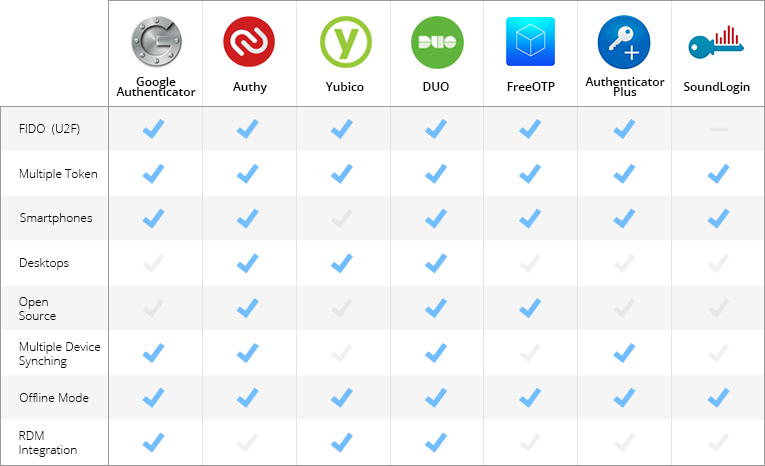
Google Authenticator vs Authy vs Yubico vs Duo vs FreeOTP vs Authenticator Plus vs SoundLogin
Do you, by any chance, use the same password for more than one website? Do you download software straight from the Internet? Or click on sketchy links in email messages? By doing any of these typical actions, you risk having your password stolen or being hacked. 2FA will prevent this from happening by adding an extra layer of security to your account.
There are 3 well-known factors used for authentication: something you know (a password or passphrase), something you have (your mobile phone or a token), and something you are (your fingerprint). 2FA means the system is using two of these options to authenticate you.
2FA can offer important benefits to enterprises as well as individual users, although the technology can seem complicated and the tools themselves vary. Choosing the right software to fit your needs is a hefty task, so we did some digging around for you and took a closer look at the most popular ones: Google Authenticator, Authy, Yubico, Duo, FreeOTP, Authenticator Plus and SoundLogin.
Some of the features that we look for in a great 2FA application are mobile support, multiple token support, reporting, complexity workflow and FIDO support.
Google Authenticator

Google Authenticator is a 2FA mobile application that uses the Time-based One-time Password Algorithm (TOTP) and HMAC-based One-time Password Algorithm (HOTP), for authenticating users.
Where it needs improvement
User Interface
Google Authenticator would benefit from a smoother interface. The new version adds a lot of white space and wasted space, including a lot of scrolling to get where you want to be.
Too few accounts on the screen
If you only have 4 accounts, then it will work well, but if you have 14 accounts, only 4 of them will occupy the entire screen, making it impossible to view all of your accounts in a glance.
What we love
TOTP algorithm
Google Authenticator uses the TOTP algorithm to provide new code every 60 seconds, making it a secure option to generate codes for 2FA.
Works without Internet access
One of the most appealing features of Google Authenticator is that it doesn’t require any sort of internet or cellular connectivity. Since Google Authenticator uses TOTP, the same code will be generated on your mobile device and on the Google side without internet. The matching code gives you access to your account.
Holds multiple accounts in one place
Most websites allow you to have more than one account, but won’t allow you to use the same mobile number with multiple accounts. To receive your 2FA code, you then have to give different mobile numbers for each. The Google Authenticator application allows you to have codes for all your accounts in one place.
Easy to use
Google Authenticator is easy to use and has a simple interface. The application also works in airplane mode and will work on older version of Android. It is less than 2MB in size, so it works easily on all devices, even those with less RAM and storage.
Who it’s for
Google Authenticator is mostly for single users, but it could also serve industry standards. It is best suited for users who need an easy app to protect their password on some of the most popular websites.
Price
The application is completely free.
Authy

Authy makes it easy for anyone to use their iPhone, Android or desktop for 2FA with all their online accounts. Choose between 3 different combinations of authentication options: Authy SoftToken, Authy OneCode and Authy OneTouch.
Where it needs improvement
Master password not mandatory
Authy hasn’t made it mandatory to enter a master password to protect its desktop edition; without protection, this could be a safety concern. Entering a master password upon installation should be mandatory.
Initial investment of time
Getting Authy up and running takes some time, as you have to set up each of your accounts individually, authorizing the Authy application to generate 2FA tokens for each one.
What we love
Mobile and desktop application
If you want to install 2FA on your desktop, Authy is the way to go. The application is supported whether you’re using iOS, Android, BlackBerry, Linux, Mac OS or Windows — you could even install the application on your Apple Watch.
Security token directly on your desktop
Most people use their smartphone as their second factor, which means that you have to copy the security code onto your computer when prompted. Authy makes it easier by inserting the security token directly on your desktop.
Sync and backup in the Cloud
Authy allows you to sync and backup your accounts on the Cloud. This saves time, since you no longer have to manually add your accounts to each device and browser.
Remove other authorized devices
If your phone is stolen or lost, you will be able to remove the lost phone from the devices’ list on your desktop application, thereby preventing it from syncing with Authy’s servers. Keep in mind, however, that if your phone has been stolen, the thief could still use Authy to generate tokens for any accounts you’ve already added to it.
Who it’s for
Authy has made it quite easy and manageable to have 2FA for single users, developers and businesses.
Price
Authy has different pricing depending on which plan - Authentication, Phone verification or Phone intelligence — you choose. They have a free plan for less than 100 authentications per month or a pay-per-use plan. You will have to contact them for an Enterprise license price, which will vary depending on volume.
Yubico

Yubico offers YubiKey, which is a small hardware device that features 2FA with the simple touch of a button.
Where it needs improvement
Some sites are not really supported by YubiKey
Yubico lists WordPress as being supported but the plugin for WordPress is not developed by Yubico. The plugin was coded by an individual and hasn’t been updated in over two years, so it comes up with a security warning in the WordPress Plugin Directory. Yubico also lists Dashlane as being supported, but you will need a Premium or Business account for it to work. If you only have a free Dashlane account, YubiKey will not be supported.
Easy to lose
The YubiKey is pretty small and some people find it hard not to lose one of these tiny gadgets.
What we love
Works independently
Hardware keys like YubiKey have the great advantage of not relying on phone or network coverage, or anything else; no matter what, they just do their job.
One key to secure unlimited applications
There is no limit to the number of applications you can access from a single YubiKey. Just buy it once and use it as much as you want!
Excellent support for users
Yubico offers support via email or online support tickets. They also offer plenty of online support documents, which are available to download, as well as some open source software for developers.
Ease of use
YubiKey is incredibly easy to use. With a simple touch, it protects access to your computers, networks and online services. It’s robust, small and never needs a battery.
Who it’s for
The YubiKey really is for anyone and everyone. It’s built strong enough for large companies, while remaining simple enough for single users. Any organization considering 2FA should take a very close look at Yubico. It would even be the perfect solution for developers since Yubico offers open source software, documentation and tools.
Price
The standard YubiKey USB authentication key starts at $40. Yubico also offers a FIDO U2F Security Key for $18.
Duo

Duo enables users to secure their logins and transactions by self-enrolling and authenticating through their smartphones, the Duo mobile app, a landline, or even offline.
Where it needs improvement
Countdown clock
Duo could improve by integrating a countdown into their application. This would prevent users from being in the middle of typing the number in, only for it to suddenly change.
Configuration sync between devices
At the moment, there is no way to synchronize your configuration between devices. You have to configure each device separately if working with more than one.
What we love
iCloud backup of all your information
When enabling iCloud Backup, your Duo Mobile account information will be automatically backed up on your phone and can then be restored on the same device.
Duo Push
With Duo Push, you won’t even have to copy numbers anymore. It is an out-of-band authentication method that prevents remote attackers from stealing your password. The app or website sends an authorization request directly to the application on your smartphone, which displays two buttons: Approve and Deny. From there, you simply tap “Approve” on the push notification sent to your phone.
Integrates with almost everything
Duo 2FA can be integrated into websites, VPNs and Cloud Services. It can work with iPhones, Androids, Windows phones, Blackberries and personal computers.
Endpoint security
For organization, the Duo Platform Edition gives you advanced analytics to help you look into your users’ devices and security health. This edition will even flag any out-of-date device software for you, giving you rapid insight into possible security risks.
Who it’s for
Duo’s customers can easily range from single users to small businesses to large corporations. It is easy to use for the single user but still meets organizational security requirements and has a wide range of options (like Endpoint Security and group management) for larger organizations.
Price
The Personal license (2FA for up to 10 users) is completely free; the Business license is $1/user/month; the Enterprise license is $3/user/month; and the Platform license will cost you $6/user/month.
FreeOTP
FreeOTP is a free and open source two-factor authentication application. It adds a second layer of security for your online accounts.
Where it needs improvement
User Interface
The application definitely has some work to do to catch up with some other 2FA solutions. They would greatly benefit from a smoother interface, as at the moment it is underdeveloped and quite rustic.
Offers no backup
They offer no backup and restore functionality, making you feel like all your eggs are in the same basket with nothing to keep them safe if something happens.
What we love
Easy to use
Easily add tokens by simply scanning a QR-code or by entering the token configuration manually. No need to be tech-savvy to use this application.
FreeOTP implements open standards
FreeOTP implements the open standards, meaning there are no necessary proprietary server-side components. FreeOTP offers HOTP and TOTP integration.
Lightweight
Compared to some other 2FA applications that can be up to 6MB, FreeOTP actually takes up less than 500KB.
Works on multiple online services
FreeOTP works great with multiple online services like Facebook, Evernote, Google, and GitHub (to name only a few).
Who it’s for
FreeOTP is often used to replace Google Authenticator. It is mostly for single users and is best suited for users in need of a quick and easy app that’s also a lightweight install.
Price
The application is completely free.
AuthenticatorPlus

Authenticator Plus offers a highly secure 2FA solution with seamless synchronization across devices.
Where it needs improvement
Barcode scanner
Many users have mentioned compatibility issues when using the Authenticator Plus barcode scanner with either the Amazon Fire phone or the Kindle Fire. Authenticator will simply not recognize the barcode scanner.
Support
Authenticator Plus could highly benefit from more documentation and support.
What we love
High level of security
The account data is encrypted with 256-bit AES encryption and also a PIN lock for an extra layer of security. The data is encrypted and decrypted locally before any syncing is made - your password never has to leave your device and stays accessible only to you.
Syncs Across Devices
Authenticator Plus offers smooth synchronization across multiple devices. The application is available for Android phones, tablets, iPhone, iPad, Android Wear and Apple Watch.
Organize
Easily position your frequently used accounts on top for quick access, group your different accounts by category and display account logos to find them with a glimpse of an eye.
Automatic backup / restore
Allows for automatic backup of your data to a cloud solution like Dropbox or Google Drive, which can then be easily restored.
Who it’s for
Authenticator Plus is for everyone in need of an extra layer of security on their smartphones and tablets. It is quick and easy to use for everyone.
Price
They offer a free version but you could choose to pay a one-time fee of 3,99$ to access all the Authenticator Plus’s Pro features.
SoundLogin

SoundLogin is a two-factor authentication that relies on sound to generate one-time codes.
Where it needs improvement
Still a work-in-progress
SoundLogin is still pretty rough around the edges. With small glitches and occasional inaccurate code, at the moment it’s not ideal to have it as your only 2FA solution.
Support
They offer no real documentation or support for the application. All they have is a contact form that you have to fill in to get more information about the SoundLogin solution.
What we love
Easy-to-use
SoundLogin simplifies the 2FA process by relying on an audio frequency. Simply click on the one-time code button on the mobile application which will play a short notification sound containing an encoded OTP. The browser then captures the sound, decodes it and automatically fills in the form on the website. No more manual entering of one-time passwords.
Secure solution
Since the OTP is carried out locally by the sound wave, no account data is transferred over the Internet, making it safe from remote attack since no one can intercept your one-time password.
Extract OTP
The application provides the option to extract one-time passwords from SMS messages and then send them to the browser via sound notification automatically or after user confirmation.
Innovative technology
The SoundLogin mobile application by itself acts as a Google Authenticator or FreeOTP application, and is fully compatible with these applications. It is a new technology that is still a little glitch, but it’s worth looking at for the novelty of alone.
Who it’s for
SoundLogin is for everyone who is intrigued by new technology. Any single user who loves to try out new gadgets will want to give this a try.
Price
SoundLogin is completely free and can be downloaded through Google Play, Amazon or the App Store.
Conclusion
2FA can render hacker attacks much less threatening since accessing passwords is not enough anymore to access your information; and it is pretty unlikely that the attacker would also have the physical device associated with the user account. More layers of authentication makes a system more secure.
Any of these four apps would do a great job in providing that extra layer of protection. All of them support mobile tokens, have different levels of flexible authentication methods, and some will even provide you with advanced analytics. They differ, however, when it comes to pricing, packaging offers, and ability to comprehend and act on the diverse product reports. Surely, these four should be in the starting lineup for any individual or enterprise in the market for a great 2FA.
We concentrated this blog more towards user oriented 2FA, however there are other beasts out there that are more enterprise driven like AuthAnvil or SafeNet only to mention a few. Devolutions Server actually incorporates those solutions such as: AuthAnvil, SafeNet, Azure MFA and Radius. Maybe one day will do a comparison with those ones…maybe…
Let’s not forget that 2FA comes in all sizes and flavors and you need to know as much about multifactor authentication as possible before choosing the right one for you.
Here is a table for a quick overview of some advanced options supported by the different 2 Factor Authentication applications.