
 Patrick Pilotte
What is TRIM?
TRIM is an ATA-interface command. Whenever you use your reader or modify data, the SSD must ensure that any invalid information is deleted, and that space is available for new information to be entered. Essentially, TRIM tells the SSD what data can be erased.
Why is this necessary? Because due to the manner that SSDs read and write information, data isn’t actually deleted at a user’s request (even though it seemingly disappears from their document or device). Rather, the section of the SSD that contains the unwanted data is marked as no longer in use. The TRIM command is needed to confirm that the data can be removed. Once this confirmation is made, final deletion is handled by Active Garbage Collection the next time the computer is inactive.
Verification Process
At Devolutions, we have implemented a streamlined and logical verification workflow that involves our IT Team and our Security Team:
- Our IT Team handles erasing disks and partitions, and then reinstalling Windows. The disks are then handed over to our Security Team.
- Our Security Team follows-up with an analysis of the work, and verifies that there is no recoverable data. The disks are then returned to the IT team for a reset.
This workflow minimizes the number of tasks and each team’s workload. This is a great example of how security can optimize the performance of a process, without compromising efficiency and productivity.
Validation Process
To ensure that TRIM is active and that the process is working properly, we have created a PowerShell script that is deployed using our MDM. This script creates a recurring validation task from TRIM. After this, we access the logs obtained by our SIEM for analysis.
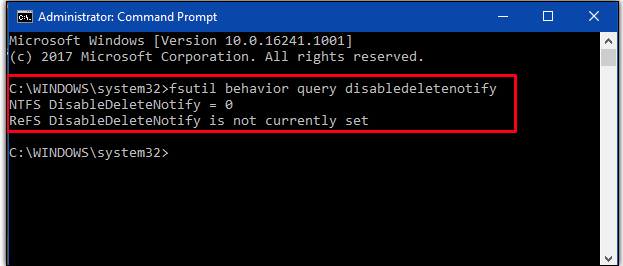
The results of this command can be read as follows:
| Description | |
|---|---|
| NTFS DisableDeleteNotify = 0 | This specifies that SSDs with NTFS has TRIM already enabled. |
| NTFS DisableDeleteNotify = 1 | If the status displays the Value as 1, it states that SSDs with NTFS has TRIM disabled. |
| NTFS DisableDeleteNotify is not currently set | This status illustrates that TRIM support will automatically get enabled when an SSD with NTFS is connected. |
| ReFS DisableDeleteNotify = 0 | The 0 with ReFS denotes that TRIM support is enabled for SSDs with ReFS. |
| ReFS DisableDeleteNotify = 1 | Here the Value 1 with ReFS signifies that TRIM is disabled for SSDs with ReFs. |
| ReFS DisableDeleteNotify is not currently set | This specific result interprets that TRIM support will itself be enabled when an SSD with ReFS is connected. |
PowerShell Script
Here is the PowerShell Script that we created, and which we invite you to use in your company:
# Trim Validation

$scriptblock = {
    param (
        )

        function Write-Log {
            [CmdletBinding()]
            param (
                [Parameter(Mandatory)]
                [String]
                $Message,
                [Parameter(Mandatory)]
                [int32]
                $EventID,
                [Parameter(Mandatory)]
                [String]
                $Type
            )
            Write-EventLog -LogName "Windows PowerShell" -Source "TrimPS1" -EventId $EventID -Message $Message -EntryType $Type
        }
        function Get-TrimConfigurationntfs{
           $trimntfs = fsutil behavior query disabledeletenotify ntfs
           $trimntfsvalue = $trimntfs.substring(27,1)

           if ($trimntfsvalue -ne "0"){
            $message = "Trim NTFS is inactive"
            Write-Log -EventId 2 -Message $message -Type "Warning"
        }

        else{
            $message = "Trim NTFS is active"
            Write-Log -EventId 0 -Message $message -Type "Information"
        }

        }
        function Get-TrimConfigurationrefs{
            $trimrefs = fsutil behavior query disabledeletenotify refs
            $trimrefsvalue = $trimrefs.substring(27,1)
            if ($trimrefsvalue -ne "0"){
                $message = "Trim REFS is inactive"
                Write-Log -EventId 2 -Message $message -Type "Warning"
            }

            else{
                $message = "Trim REFS is active"
                Write-Log -EventId 0 -Message $message -Type "Information"
            }
         }

        Get-TrimConfigurationntfs
        Get-TrimConfigurationrefs

}

##### Section opérationnelle du script #####
function Write-Log {
    [CmdletBinding()]
    param (
        [Parameter(Mandatory)]
        [String]
        $Message,
        [Parameter(Mandatory)]
        [int32]
        $EventID,
        [Parameter(Mandatory)]
        [String]
        $Type
    )
    Write-EventLog -LogName "Windows PowerShell" -Source "TrimPS1" -EventId $EventID -Message $Message -EntryType $Type
}

$jobname = "Trim-Verification";
$accountId = "SYSTEM";
$task = Get-ScheduledJob -Name $jobname  -ErrorAction SilentlyContinue
New-EventLog -LogName 'Windows PowerShell' -Source 'TrimPS1' -ErrorAction Ignore
if ($null -ne $task){
    Unregister-ScheduledJob $task  -Confirm:$false;
}

try {
    $trigger = New-JobTrigger -Weekly -DaysOfWeek Monday, Tuesday, Wednesday, Thursday, Friday -At "11:00" -WeeksInterval 1 # Vérification du Lundi au Vendredi à 11h
    $options = New-ScheduledJobOption -ContinueIfGoingOnBattery -StartIfOnBattery -RequireNetwork -RunElevated;

    Register-ScheduledJob -Name $jobname -ScriptBlock $scriptblock -ScheduledJobOption $options -Trigger $trigger;

    $principal = New-ScheduledTaskPrincipal -UserID $accountId -LogonType ServiceAccount -RunLevel Highest;
    $psJobsPathInScheduler = "\Microsoft\Windows\PowerShell\ScheduledJobs";
    $someResult = Set-ScheduledTask -TaskPath $psJobsPathInScheduler -TaskName $jobname  -Principal $principal;

    $message = "Scheduled job ok"
    Write-Log -EventId 65000 -Message $message -type "Information"
}
catch {
    $message = "Unable to setup scheduled job. This is an error"

    Write-Log -EventId 65001 -Message $message -type "Warning"

    $task = Get-ScheduledJob -Name $jobname  -ErrorAction SilentlyContinue
    if ($null -ne $task){
        Unregister-ScheduledJob $task  -Confirm:$false;
    }
    exit 1
}
If you use this PowerShell script, then here are the EventIDs to watch for:
- EventID 0 if the TRIM is active
- Type information
- Message TRIM (NTFS/REFS) in active
- EventID 2 if the TRIM is inactive
- Type warning
- Message TRIM (NTFS/REFS) in inactive
Final Thoughts
In our experience, TRIM is an efficient and reliable solution for reducing the number of steps involved in handling hardware for redistribution or sale. Credible third parties also endorse this process. For example:
- In a YouTube video, data recovery company Data Rescue Labs has stated companies claiming to sell special software for recovering data from SSD that has undergone TRIM are “lying,” and that such claims are “laughable.”
- R-studio Data Recovery, whose software is well known and specialized in restoring data, has stated: “Data recovery from SSD devices when the TRIM command is used is extremely difficult, and in most cases impossible.’’
Lastly, although we use and endorse TRIM, we nevertheless recommend that you conduct your own research to confirm that this process suits your requirements and goals.


 Vincent Lambert