











 Adam Listek
With the release of Devolutions Server (DVLS) 2024.3, managing custom PAM provider scripts has reached a new level of flexibility and control. Custom PAM providers, which act as a bridge between Devolutions PAM and diverse identity systems, leverage PowerShell scripts to centralize privileged account management. Before the 2024.3 update, custom PAM provider scripts could only be executed on systems directly accessible to DVLS. However, many scenarios require running a custom PAM provider PowerShell scripts on external network segments (such as MSP client networks or remote offices), using a set PowerShell version, or meeting specific compliance standards.
These necessities led us to develop two exciting features:
- A unique cross-platform WinRM stack, which is the technology used by PowerShell to run scripts remotely;
- Support for Devolutions Gateway.
By combining these two new features, you can now run a custom PAM provider script on a remote system through a Devolutions Gateway tunnel. Just imagine: you can securely manage PAM accounts —from anywhere in the world — tunneled through Devolutions Gateway with Devolutions Server and Remote Desktop Manager.
Running a custom PAM provider over Devolutions Gateway
Thanks to PowerShell scripts, custom PAM providers now offer flexible Run as options, allowing you to run the custom PAM provider code nearly anywhere that it’s needed.
- Use the new WinRM stack as the default, or use the original “Legacy API” (potentially needed if running scripts locally on DVLS).
- Specify a PowerShell configuration. The default is
Microsoft.PowerShell, which runs in the older Windows PowerShell 5.1 environment. You can also specify a configuration likePowerShell.7, which runs in the recommended PowerShell 7 environment. - Choose to run the provider over a specific Devolutions Gateway instance.
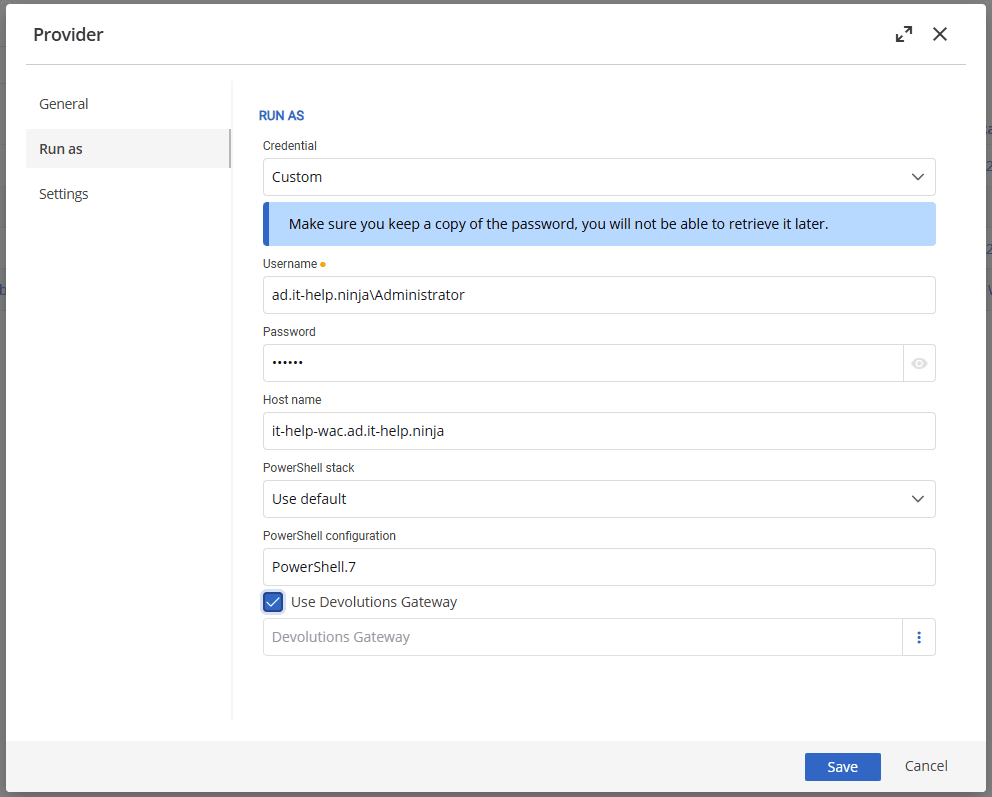
Note: PowerShell 7 is not natively installed on most servers, and PowerShell remoting is not configured by default. We recommend installing PowerShell 7 and enabling remoting.
Devolutions Server for Linux (Beta)
You may have noticed that we recently introduced a beta version of Devolutions Server for Linux (Beta). With the previously mentioned options for custom PAM providers, you can run those scripts on a remote system without worrying about the Linux environment. Though PowerShell works on Linux, not all features and functionalities are available. With the option to run a custom PAM provider in a remote environment through a Devolutions Gateway, you can run DVLS wherever you need it.
Run a custom PAM provider anywhere
Ultimately, the flexibility afforded by the newest features introduced in Devolutions Server gives you what you need to run a custom PAM provider anywhere. Whether you’re running DVLS on Linux (Beta) or Windows, you can manage your privileged accounts across your entire environment. Discover how these enhancements in Devolutions PAM help you take positive control of your privileged access environment today!

 Marc Beausejour

 Steven Lafortune

 France Lymburner