











 Jenny Knafo
The start of a new year means that it’s time to make New Year’s Resolutions — or, if you’re like me, make the same resolutions that you’ve made many times in the past (“eat healthier” has been on my list for about a decade).
Well, here at Devolutions, we’re all about KEEPING the promises we make, including the commitment to constantly make our products better and more useful for you. And that’s what we’ve done by integrating Bitwarden with Remote Desktop Manager Enterprise Edition!
About Bitwarden
Bitwarden is a free and open-source password management software that stores sensitive information, such as usernames and passwords, in an encrypted vault. The Bitwarden platform offers a variety of client applications, including a web interface, desktop applications, browser extensions, mobile apps, and a CLI.
Adding Your Bitwarden Account
Integrating your Bitwarden account into Remote Desktop Manager is fast and easy. Here is what to do:
- Start by adding a new credential entry, and then select Bitwarden.
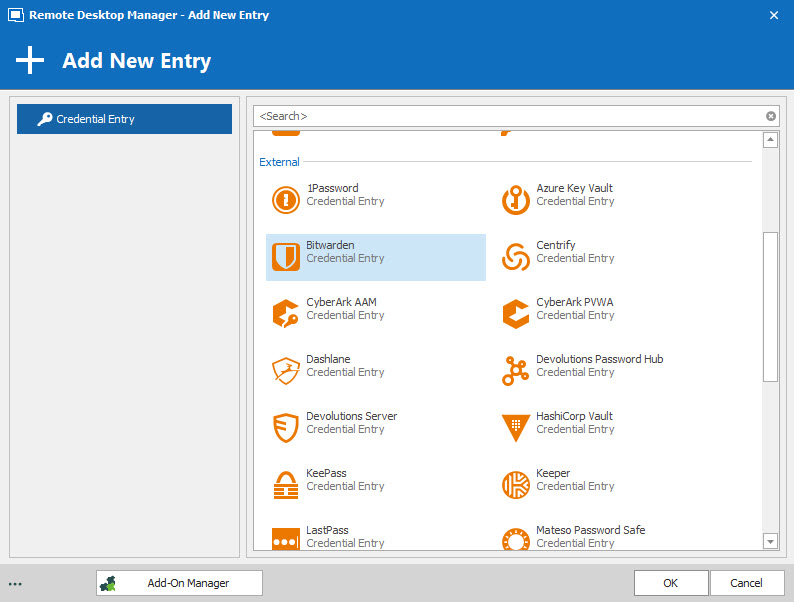
Next, enter your Bitwarden account email address and password to connect.
Now, you have two options: Static Credential Linking or Dynamic Credential Linking.
- Static Credential Linking links your entry to a specific credential that is stored in your Bitwarden account.
- Dynamic Credential Linking grants you direct access to your Bitwarden credential list every time you connect. This creates a bridge between Remote Desktop Manager and Bitwarden, which makes it even easier for you to create just one credential entry for use with multiple sessions.
And that’s it! You’re ready to start enjoying all the benefits of Bitwarden and Remote Desktop Manager working together hand-in-hand!
As always, please let us know your thoughts by commenting below. You can also visit our forum to get help and submit feature requests.

 Coralie Lemasson


 Laurence Cadieux