












 Joey Dupont
For years, Remote Desktop Manager has supported Windows PowerShell through the RDM CmdLet snap-in. And while this was a functional solution, we have made things even **easier with the new RDM PowerShell Module that will be available with the release of RDM 12. **
The RDM PowerShell Module is called RemoteDesktopManager.PowerShellModule.dll, and it is located in the same folder as RDM binaries (RemoteDesktopManager.exe).
If you installed RDM in the default location, here is how to** import the module**:
Import-Module "${env:ProgramFiles(x86)}\Devolutions\Remote Desktop Manager\RemoteDesktopManager.PowerShellModule.dll"
Alternatively, if you launch PowerShell through RDM (Tools->PowerShell Console), or from a PowerShell session, the new RDM PowerShell Module will load automatically.
And there’s even more good news: in addition to putting all of the existing cmdlets in the new module, we’ve added new ones and enhanced the overall functionality based on feedback from our community of IT pros. Here’s a quick rundown of the new features and improvements:
More interactive and dynamic
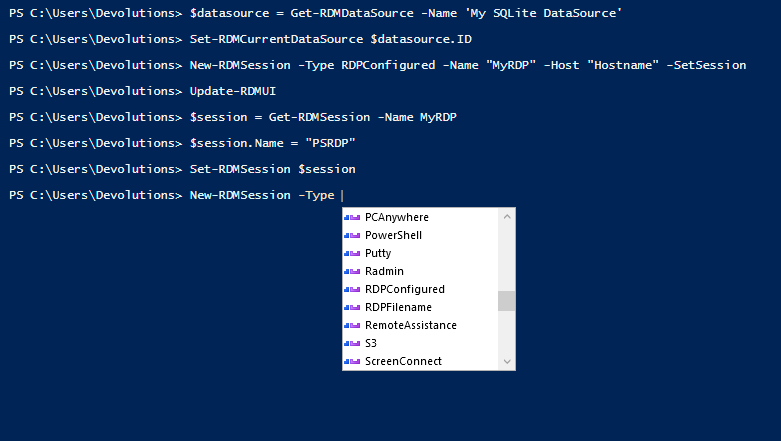
When using PowerShell interactively, the cmdlets now dynamically create parameters and validation sets. For example, when you use the cmdlet Get-RDMSession, the parameter “Name” works as a filter and gives you the available connections by name in your current data source according to the parameter Group.
Access the Private Vault
- Get-RDMPrivateSession to get sessions from the user Private Vault.
- Set-RDMPrivateSession to save sessions into the user Private Vault.
Manipulate User Specific Settings
- Get-RDMUserSpecificSettings to get user-specific settings from a session, or local and shared templates.
- Set-RDMUserSpecificSettings to save user-specific settings into a session.
Manipulate documents sessions
- These cmdlets are useful for moving document sessions from one data source to another they keep the embedded data document in the document session.
- Get-RDMSessionDocument to get document sessions stored in the data source.
- Set-RDMSessionDocument to save the document in the data source.
Local and shared Playlist management
- New-RDMPlaylistLocal to create a new local playlist.
- Get-RDMPlaylistLocal to get a local playlist.
- Set-RDMPlaylistLocal to save a local playlist.
- New-RDMPlaylistShared to create a new shared playlist.
- Get-RDMPlaylistShared to get a shared playlist.
- Set-RDMPlaylistShared to save a shared playlist.
Added cmdlets to simplify session configuration
- Get-RDMSessionCredentials to retrieve the credentials ID or credentials mode.
- Set-RDMSessionCredentials to set a credentials mode without having to know the credentials ID.
- Rename-RDMGroup is now the best way to change the group of a session.
- Get-RDMOpenedSession to get the embedded opened sessions in the Remote Desktop Manager application.
New parameters added to cmdlets
- Set-RDMCurrentDataSource accepts username and password to avoid a UI prompt (SQL Server, DVLS, MySQL and MariaDB are supported).
- Copy-RDMSession workflow is now similar to the copy from the UI, and returns the new copied session in the pipeline.
- There are now set parameters in the cmdlets of type New, which enable you to save the object created without having to use the Set cmdlet related to it. For example, when creating a new session with New-RDMSession, using the parameter SetSession will save the session in the data source just like Set-RDMSession does.
- Open-RDMSession now allows for the opening of a session externally or silently, which is useful for syncing sessions.
We hope that you find the new RDM PowerShell Module useful and easy to use. As always, please send us your feedback by commenting below, posting in our forum, or sending me an email.
 Coralie Lemasson


 Laurence Cadieux