











 Jenny Knafo
Hello RDMers,
So let say that you are the administrator of an enterprise that manages multiple users and you would like to restrict some of the actions allowed to them, like creating a new data source or changing program options. Using our policies will allow you to do just that!
At the heart of the functionality are registry keys that our applications use to enforce the restrictions. You can set these registry keys manually and protect them using permissions, but the best way to deploy them is surely using a Group Policy at the domain level.
Administrative Templates will facilitate the management of registry-based policy settings that are applied on both the computer and the user configuration.
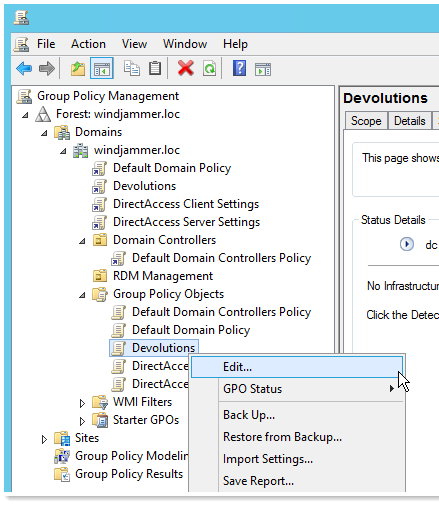
This hierarchy is created when the Group Policy Editor reads XML-based Administrative Template files (.admx), the ADM file is a text file with a specific syntax which describes both the interface and the registry values which will be changed if the policy is enabled or disabled. Since they contain the registry keys that are used, you could actually consult the ADM files to get the list of registry keys that you must use if you intend on doing this manually.
Here are the templates that have been predefined for Remote Desktop Manager:
General
- Disable the application automatic update check
- Disable the x64 edition of the application
- Disable the x86 of the application
Security
- Force the user to always be prompted for the passphrase while connecting to data source.
- Force the user to always be prompted for his credentials while connecting to data source.
Sessions
- Disable the add-on creation and the Add-on Manager.
- Disable the custom image edition in the session configuration.
- Disable the reveal password for this machine.
User Interface
- Disable all the local application tools like the Event Viewer or IIS
- Disable the Devolutions Cloud usage
- Disable the menu File - Data Sources on the machine
- Disable the menu File - Options on the machine
This allows for a much simpler way to manage and controls all your machines with one easy template!
You can find the Devolutions.admx file in the Policies folder where you’ve installed our application. For specific instructions on how to manage the policies, please consult Microsoft’s Technet.As always, please let us know your thoughts by using the comment feature of the blog. You can also visit our forums to get help and submit feature requests, you can find them here. Adding new policies is really easy, please do submit requests if you think of an area of the application that you’d like to protect.
 Coralie Lemasson

 Laurence Cadieux