











 Marc Beausejour
The new CyberArk Secure Infrastructure Access (SIA) session within Remote Desktop Manager (RDM), introduced in version 2025.1, offers several key benefits:
- Centralized access: Connect to endpoints securely and efficiently directly within RDM, without needing to navigate through multiple CyberArk platforms like Password Vault Web Access (PVWA).
- Reduced authentication steps: Authenticate once with multi-factor authentication (MFA); RDM maintains the session in the background, minimizing repeated prompts.
To better understand how this integration works, let’s take a closer look at CyberArk SIA itself.
Request a trial of our CyberArk integration here.
Understanding CyberArk Secure Infrastructure Access (SIA)
CyberArk SIA, formerly known as Dynamic Privileged Access (DPA), is an agentless software as a service (SaaS) solution designed to secure privileged access across diverse hybrid and cloud environments. It enables organizations to operate with zero standing privileges (ZSP) or use vaulted credentials, significantly reducing the risks associated with standing privileged access. SIA includes features like session isolation and monitoring to enhance security.
Creating the CyberArk SIA entry in RDM and establishing a session
Below is a summary for using CyberArk SIA in RDM. For full details, see our documentation. Additionally, the CyberArk SIA Launcher is integrated into the CyberArk dashboard entry.
- Open RDM.
- In the navigation pane, open the context menu (right click) and select
New entry. - Search for “CyberArk” and choose
CyberArk SIA. - Fill in the
Subdomaininformation and, if applicable, optional SSH credentials. - In your RDP or SSH session settings, under the
VPN/Tunnel/Gatewaysettings, select your CyberArk SIA entry. - Select an access mode: either
Zero standing privilegesorVaulted credentials. The address, as well as the user and domain (for vaulted credentials), will be extracted from the RDP/SSH session. - Select
Update. - Select and open your RDP or SSH session entry from the navigation pane. The connection will go through CyberArk SIA.
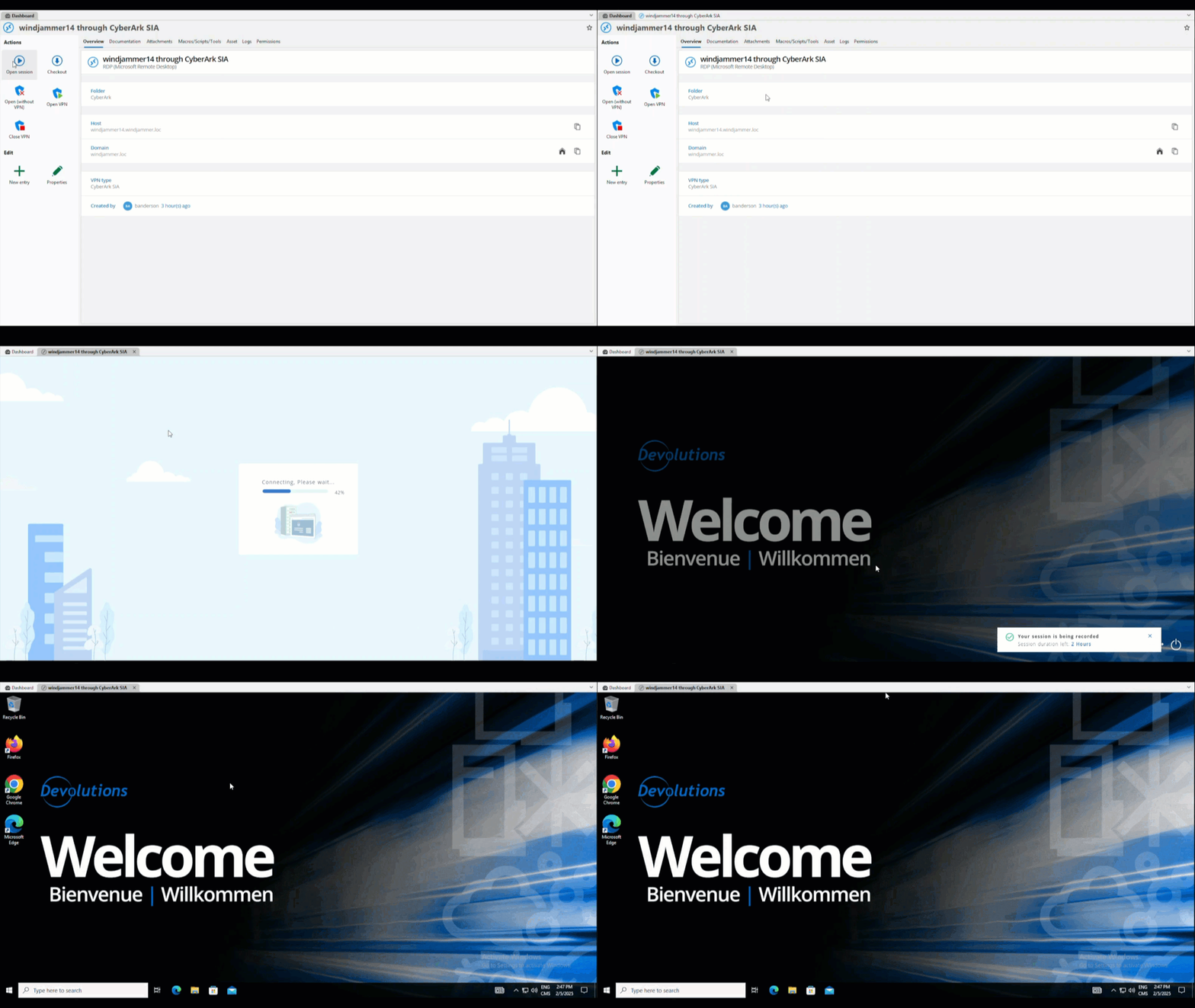
Simplifying management with the CyberArk SIA integration
By integrating CyberArk SIA with Devolutions RDM, organizations can enhance their security posture while simplifying the management of privileged access. This seamless integration ensures that users can securely connect to critical assets with minimal friction, adhering to the principle of least privilege and reducing the attack surface associated with standing credentials.
Already using the CyberArk module? Try the new SIA integration and tell us how it works for you—or what we can improve or contact us to get the CyberArk integration module.
Join the discussion and share your feedback in the comments section below or on our forum!


 Steven Lafortune
 France Lymburner