











 Marc Beausejour
What is the Okta SSO/SCIM integration?
The Okta SSO/SCIM integration in Devolutions Hub Business combines secure single sign-on (SSO) authentication and automated user provisioning through System for Cross-domain Identity Management (SCIM), streamlining identity management for organizations. With Okta’s secure platform, users can authenticate in compliance with industry standards, while SCIM ensures real-time updates to user accounts and groups in Devolutions Hub Business. This integration significantly reduces manual intervention by dynamically provisioning and deprovisioning user access and allows administrators to customize roles and group memberships directly from Okta.
Looking for Okta in Devolutions Server? Consult our detailed guide on how to configure the integration.
How to use the Okta SSO/SCIM integration
Setting up SSO and SCIM with Okta in Devolutions Hub Business is straightforward. Here’s a breakdown of the process:
- Configure SSO:
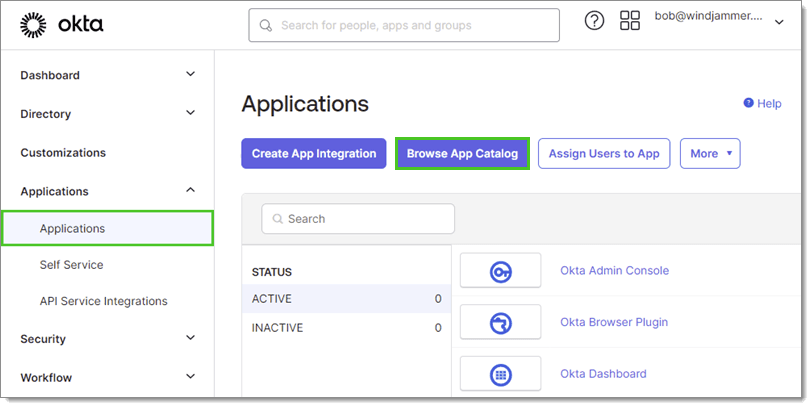
Sign in with your Okta account and navigate to the Okta Admin Console. In
Applications, selectBrowse App Catalog.
- Add the integration:
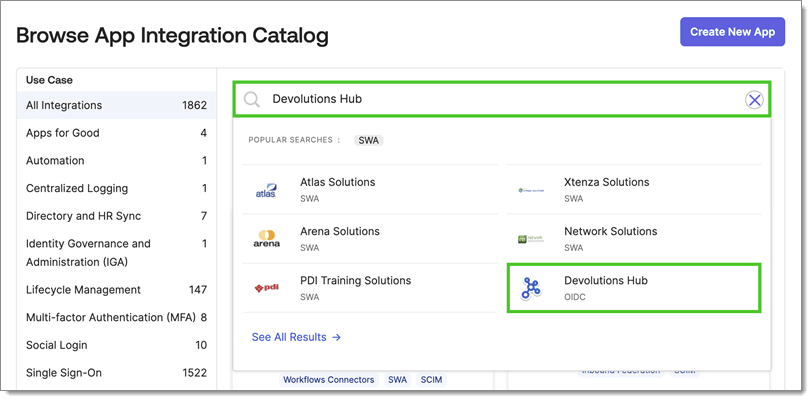
Use the search bar to locate and select
Devolutions Hubfrom the search results and selectAdd Integrationat the top.
Configure the integration: Configure the settings with the values provided in the Devolutions Hub Business SSO configuration wizard.
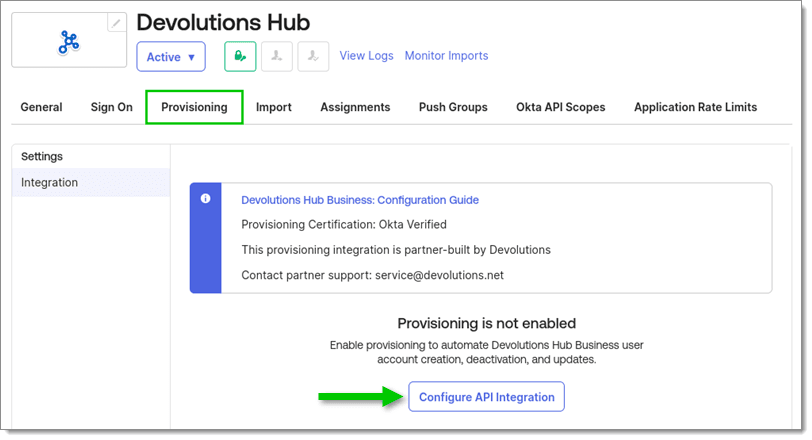
Enable provisioning in Okta: In Okta, go to the Devolutions Hub application. Under the
Provisioningtab, selectConfigure API Integration.
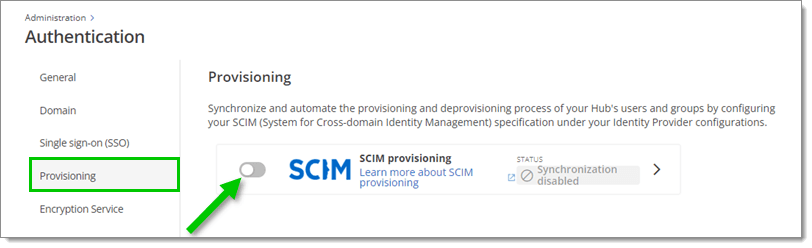
- Enable provisioning in Hub:
In Devolutions Hub, go to
Administration > Authentication > Provisioningto enable provisioning and provide the SCIM API credentials.
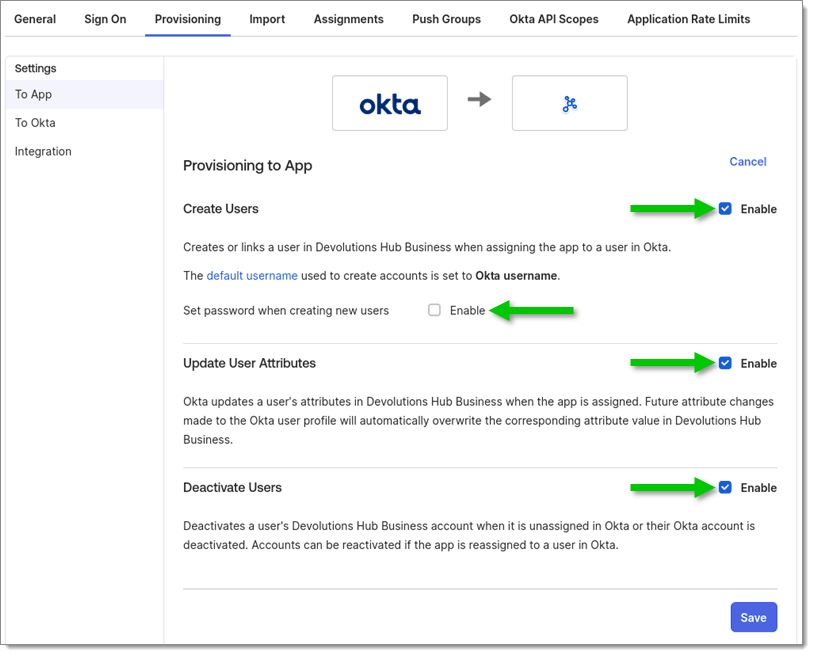
- Configure provisioning actions: In Okta, enable or disable actions such as creating, updating, and deactivating user accounts automatically.
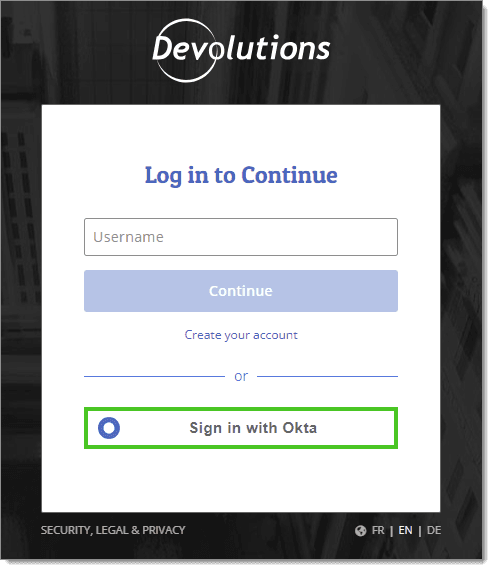
- Test the Integration: Verify SSO by signing into Devolutions Hub Business using your Okta credentials. Confirm that user accounts and roles are correctly synchronized via SCIM, and you’re all set!
Advantages of integrating Okta with Devolutions Hub Business
Simplified authentication with SSO:
- Allows users to sign into Devolutions Hub Business using their Okta credentials, reducing the need to manage multiple usernames and passwords.
- Enhances productivity by enabling quicker access to resources.
- Strengthens security by leveraging Okta’s advanced authentication policies.
Automated user management with SCIM:
- Enables automatic synchronization of user accounts between Okta and Devolutions Hub Business.
- Simplifies onboarding by automatically creating and assigning user groups when new employees join.
- Ensures security by deactivating user access when accounts are removed from Okta.
Centralized access control:
- Allows management of permissions, roles, and group memberships directly within Okta and reflects changes in real-time in Devolutions Hub Business.
- Streamlines processes, reduces administrative overhead, and ensures consistent compliance.
Best practices for deploying SSO/SCIM
Enforce multi-factor authentication (MFA): Combine Okta’s MFA policies with SSO for an added layer of security.
Regularly audit access logs: Use Devolutions Hub Business reporting features to monitor user activity and ensure compliance.
Maintain updated roles and groups: Periodically review and adjust roles in Okta to align with organizational changes.
Simplify user management with the Okta integration
Integrating Okta with Devolutions Hub Business eliminates the complexity of manual account management while bolstering security measures. Whether you’re onboarding new employees or managing access during offboarding, the combined capabilities of Okta and Devolutions Hub Business ensure that sensitive information is accessible only to authorized users.
For a detailed guide on setting up and optimizing this integration, explore our official documentation.
Take control of your access management strategy today with Okta and Devolutions Hub Business!

 Steven Lafortune

 France Lymburner