












 Jenny Knafo
It’s time to get back to basics! After taking a look back at upgrading databases and how to manage credentials, I thought it was time to explore a Remote Desktop Manager feature that I personally really enjoy: the Play List.
No, I’m not talking about a way to import and play your favorite Spotify tracks. But trust me, this feature will make your life better — just like listening to awesome music!
The Play List feature lets you create a list of specific tasks that can be executed with just one click. For example, if you need to connect to 10 servers every day, then instead of doing this manually, you can create a Play List to do it for you.
How to Create a Play List
Creating a play list is simple:
In the Navigation Pane, select all of the entries you wish to add to your Play List.
In the Home menu, click on the Play List drop-down menu, and then click New.
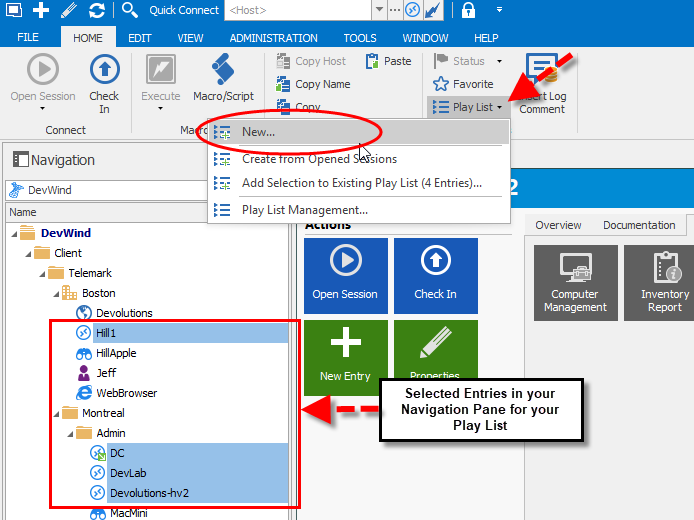
- Choose where you want to save your Play List. You have three options:
- Locally will save your Play List on your computer and will not be available to other users of the same data source.
- Shared will save your Play List in the database and will be available to all other users.
- Private Vault will save your Play List inside your Private Vault and will only be available to you.
- Click on Selected Entries in Navigation Pane, then provide a name and a short description for your Play List.
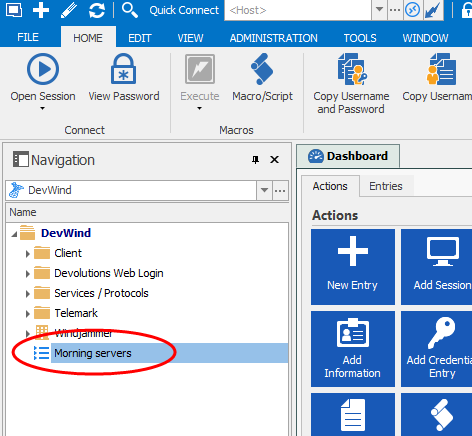
- To launch any saved Play List, simply double click it.
And there you go folks! The Play List is one more way that Remote Desktop Manager can help you in your day-to-day routine. We’re far from being magicians, but helping you save time like this gives us a little Harry Potter feeling.
As always, please let us know your thoughts by using the comment feature of the blog. You can also visit our forums to get help and submit feature requests, you can find them here.
 Coralie Lemasson

 Laurence Cadieux