











 Max Trottier
When you close your RDP sessions, you may inadvertently (or willfully) leave your session running on the remote host. Depending on the programs you have left running, this can consume excessive resources and can be even interpreted as a security risk. Windows allows you to control how Remote Desktop Services handle sessions through Group Policies. This can be administered on the host computer itself, or be pushed at the domain level for multiple hosts. What follows is the procedure to perform on a single host computer.
Procedure
1. Launch “Edit group policy”. (Press the windows key, and type “edit group policy”, for Windows 8 it is in the Settings category)
2. Browse to:
- Computer Configuration
- Administrative Templates
- Windows Components
- Remote Desktop Services
- Session Time limits
The settings are described as follows (when you alter the setting using the Group Policy Editor, you will see a detailed description)
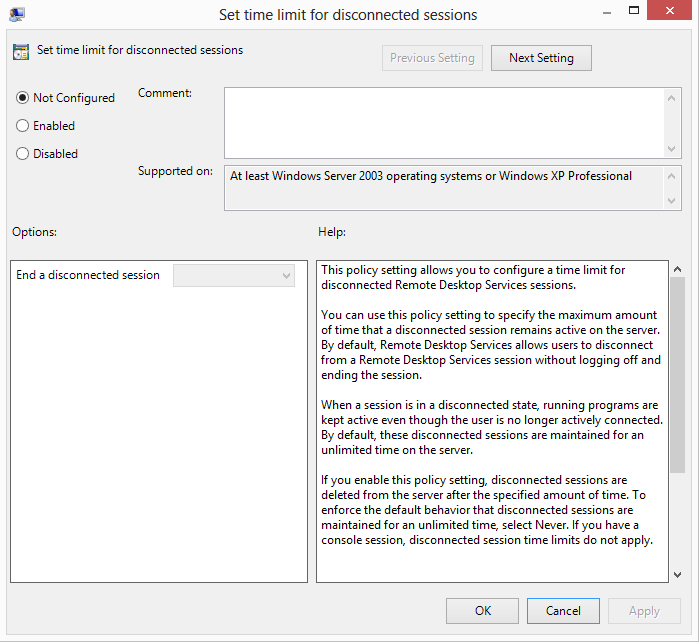
- Set time limit for disconnected sessions **: **This policy setting allows you to configure a time limit for disconnected Remote Desktop Services sessions. By default, Remote Desktop Services allows users to disconnect from a Remote Desktop Services session without logging off and ending the session.
- Set time limit for active but idle Remote Desktop Services sessions : This policy setting allows you to specify the maximum amount of time that an active Remote Desktop Services session can be idle (without user input) before it is automatically disconnected.
- Set time limit for active Remote Desktop Services sessions : This policy setting allows you to specify the maximum amount of time that a Remote Desktop Services session can be active before it is automatically disconnected.
- End session when time limits are reached : This policy setting specifies whether to end a Remote Desktop Services session that has timed out instead of disconnecting it
3. Double click on the setting (or right-click -> Edit), an edition form will appear
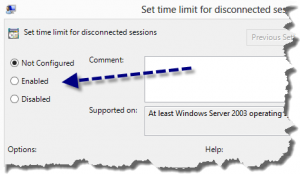
4. Select Enabled, this will enable the control in the lower section
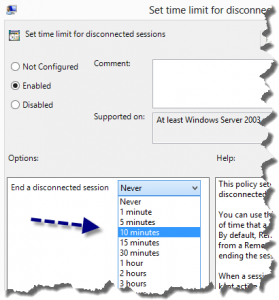
5. Choose your desired value from the list
6. Press Apply
7. Repeat for other settings as desired.
Note that for true/false settings there is no control in the Options area. Just enabling the policy will activate the setting. From then on, all future sessions established on that host will follow these policy settings. You may want to explore all the policies below Remote Desktop Services, you may find hidden gems that would help your organization.

 Coralie Lemasson


 Laurence Cadieux