











 Laurence Cadieux
In order to provide users with flexibility and versatility, Remote Desktop Manager supports multiple data source types.
In this article, we’ll take a closer look at two data source options — Devolutions Online Drive and Devolutions Hub Personal — and share why we recommend the latter. Let’s start by summarizing each data source type.
What is Devolutions Online Drive?
Devolutions Online Drive is a free, fast, and reliable cloud file storage service with no limitations regarding the number of sessions. It enables users to store and synchronize credential data online, and access sessions from anywhere.
However, it is important to keep in mind that Devolutions Online Drive is designed for single users vs. teams, because files cannot be shared. In addition, there is no security management. Therefore we strongly recommend that users encrypt their data by applying a Master Key. Individuals without the master key will be unable to read the file. Also, even though Devolutions Online Drive is a cloud service, we do not maintain multiple versions of the content. Users are required to use our free online backup service to keep an archive of their data.
What is Devolutions Hub Personal?
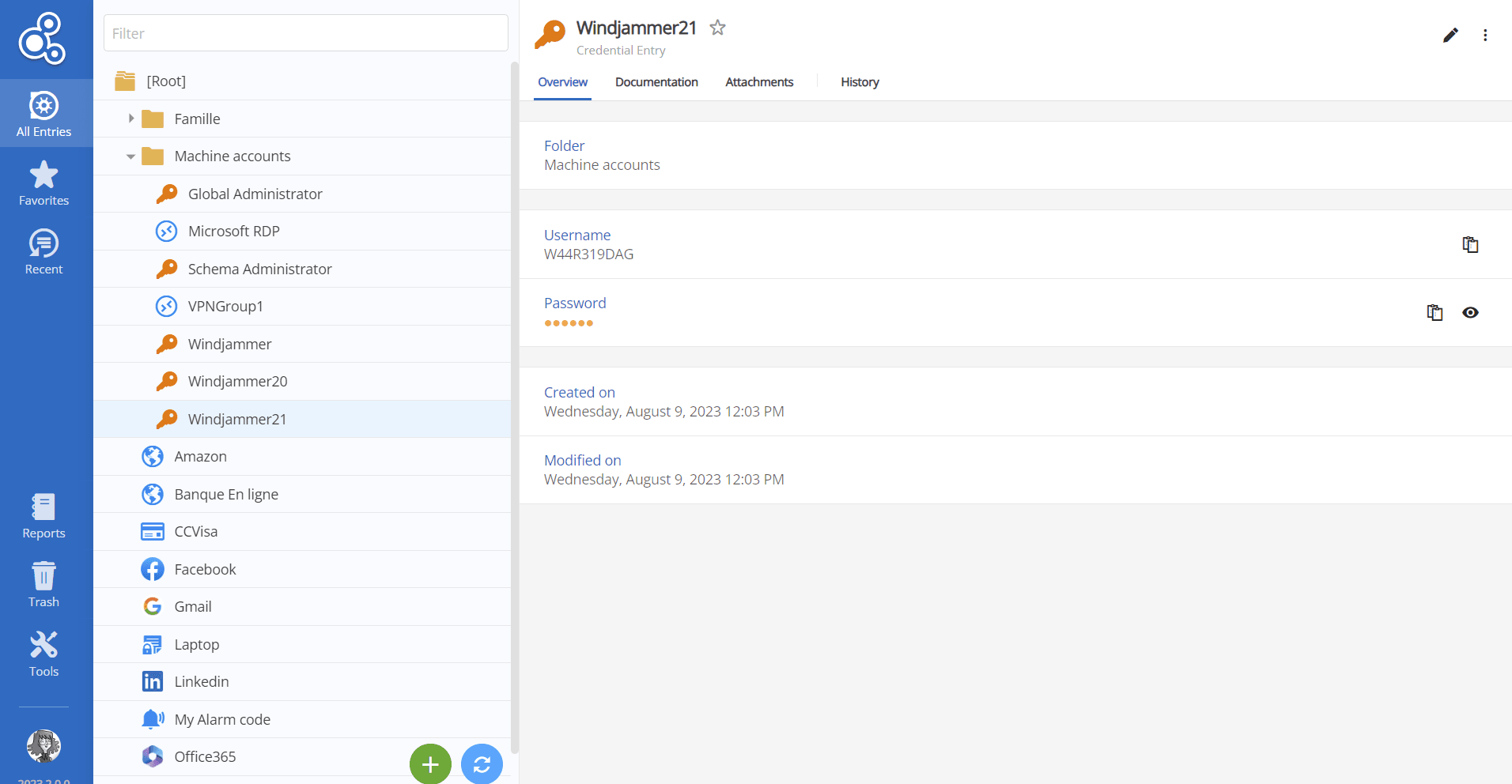
Devolutions Hub Personal provides a secure vault for individual users to safeguard and manage their personal passwords. It also serves as a data source for RDM. Thanks to a user-friendly interface and superior security features, Devolutions Hub Personal is an excellent platform for storing confidential information, such as credit card details and home security system alarm codes. By choosing Devolutions Hub Personal, users can thwart all risks associated with storing sensitive data in unprotected spreadsheets, documents, or similar sources.
Compared to Devolutions Online Database, Hub Personal provides a higher level of security. With the inclusion of two-factor authentication, coupled with prestigious SOC2 and SOC 3 certifications, Hub Personal effortlessly combines productivity and security.
Why We Recommend Devolutions Hub Personal as a Data Source in RDM
When choosing between Devolutions Online Drive and Devolutions Hub Personal, we encourage you to prioritize the latter for optimal benefits. Not only does Devolutions Hub Personal offer reliability and a cost-free experience, but it boasts a range of advantages, such as:
Seamless Integration with Remote Desktop Manager: Devolutions Hub Personal seamlessly integrates with Remote Desktop Manager, providing users with convenient access to all necessary tools and settings required to initiate remote sessions directly from within the platform.
Enhanced Security Measures: Devolutions Hub Personal has been meticulously developed within a highly secure cloud environment, ensuring secure access and privacy by design. It incorporates the principle of Zero Knowledge and strictly adheres to SOC 2 and SOC 3 certifications, with readily available reports. By choosing Devolutions Hub Personal, your business gains a heightened level of security assurance.
Secure Access with Unique Private Key: Users can log in to Devolutions Hub Personal using their Devolutions Account, thereby guaranteeing secure access through a unique private key. This additional layer of security ensures that only authorized individuals can access the platform.
Easy-to-Use Web Interface: Devolutions Hub Personal features an intuitive, user-friendly web interface designed for accessibility and effortless navigation within any web browser. When integrated with RDM, Hub’s web interface also supports seamless synchronization of essential resources, enhancing both productivity and convenience for users.
Integration with Devolutions Web Login: By pairing Devolutions Hub Personal with Devolutions Web Login, users can quickly access their credentials and other data across any web browser without skipping a beat.
Mobile access via Workspace and RDM mobile: Devolutions Hub Personal is accessible on mobile through the Workspace app, allowing users to access their personal Hub on the go. Also, integrating Devolutions Hub Personal with RDM enables users to access their personal Hub through the RDM mobile app as well.
Wide range of useful features: Devolutions Hub Personal offers a range of features including:
- attachment links on entries.
- documentation links on entries.
- the ability to view entry history and deleted entries.
By leveraging the numerous advantages offered by Devolutions Hub Personal, you can optimize your remote session management, enhance security protocols, and enjoy the convenience of secure access anytime, anywhere.
How to Add Devolutions Personal Hub as a Data Source
By now, you may be convinced that using Devolutions Personal Hub as a data source in Remote Desktop Manager is the best option — and we agree with you!
Next, you may be wondering how to add it as a data source or how to migrate from your DOD data source to Hub Personal.
Migration for RDM v.2023.1 users: If you are currently using RDM version 2023.1 or newer, we recommend migrating to Hub Personal. To initiate the migration process, you need to create your own Hub Personal account. Instructions on creating an account can be found here. Once your Hub Personal account is set up, the migration to Hub Personal will automatically occur within RDM.
Migration for users on older versions of RDM: If you are using an RDM version older than 2023.1, you must first update to the latest version of RDM. Once updated, you need to create your Hub Personal account and proceed with migrating your Devolutions Online Drive (DOD) data source to Hub Personal. The migration process is then automatically executed within RDM.
Manual migration of DOD data source to Hub Personal: Alternatively, users have the option to manually migrate their DOD data source to Hub Personal. To do this, you need to create your Hub Personal account within your Devolutions Portal. Next, add Hub Personal as a data source in Remote Desktop Manager. Finally, copy and paste your DOD data source information into Hub Personal. This manual migration process ensures a smooth transition of your data source.
Final Thoughts
We know that some of you are fans of using Devolutions Online Drive as a data source in Remote Desktop Manager. Rest assured that this option will remain available to you.
However, we strongly recommend switching to (or choosing, if you are new) Devolutions Hub, for all the reasons noted above. It is simply a better option that will help you get more value, security, and performance from your Devolutions products.
If you have any questions or need assistance, then please contact our Support Team.
 Marc Beausejour
 Steven Lafortune
 France Lymburner